

- Standard MP4 output that plays on any device, phone included
- Built-in browser: log in once and every entitled title is detected
- Free trial, clean signed installer, no bundled adware
How to Download CTV.ca Videos — 3 Real Methods, Ranked by Success Rate
Summary: This is the CTV.ca videos guide we wish existed the first time we tried: why the obvious tricks fail, what the three remaining options really cost, and the exact GetFLV CTV.ca Downloader procedure that produces a complete MP4 every time.
Saving CTV.ca videos is easy to describe and oddly hard to do. The gap between the two is the streaming protocol. Once you understand that, the ranking below stops being surprising.
Quick Navigation
Everything below is organised so you can jump directly to the answer you came for:
- Every working method, with steps and screenshots → start here.
- How the three methods compare side by side → see the comparison.
- FAQ: legality, quality, speed, accounts and devices → see the answers.
⚠ Private backup only — no redistribution.
Introduction: Why Downloading CTV.ca Videos Is Hard
The demand to save CTV.ca videos keeps growing because an official offline mode is not available on every platform, and where it exists the files are usually locked inside the app and vanish as soon as the subscription ends.
What CTV.ca Is — and Why That Shapes How You Can Keep Anything
CTV is a primary source for Canadian television news and popular network programs. Despite their protective media delivery protocols, our service effectively captures these streams, enabling you to download and archive current Canadian broadcast content easily.
Membership model: CTV.ca is built around an account hierarchy rather than a single open catalogue: some material is available to anyone, more of it requires registration, and the premium tiers add higher bitrates, earlier access and occasionally an offline viewing mode limited to the official app.
Rights management: Every request carries a signed token with a short time-to-live. The authority that issued it also checks Origin, Referer and device context, so traffic that does not look like it came from inside ctv.ca is refused before any media is served.
How long it stays available: Purchases are not ownership either. "Buy" typically means a long licence rather than a transferable copy, so the file never leaves the platform even when money changed hands for it.
So Why Does Downloading from CTV.ca Fail So Often?
Understanding this one detail saves a lot of time. You are not trying to download a video; you are trying to capture a session that is already authorised on your own computer.
Everything that follows assumes you already have legitimate access to the title you want to keep.
Learn how to capture Canadian television network programs, reality series, and daily news catch-up episodes from CTV.ca. Follow our streamlined instructions to store video streams locally with optimal audio-visual quality.
Official Download Function Lacking
The lack of an official option does not make unofficial ones reliable, but it does explain why so many of them exist.
3 Methods to Download CTV.ca Videos
We kept the list short on purpose: three methods, three different ideas, three very different outcomes.
| Method | How & what is it? | Rating |
|---|---|---|
| Download CTV.ca Videos with GetFLV | Save the original stream on Windows or Mac first, then watch it anywhere — including on your phone. | ★★★★★ |
| Downloader extensions for ctv.ca | Install a download helper, reload ctv.ca, and hope it detects something. | ★★☆☆☆ |
| A classic download manager such as IDM | Built for speed on normal downloads; needs a lot of configuration and still misses protected streams. | ★☆☆☆☆ |
Testing conditions
- Browser: current Chrome and Safari, default settings, no extensions
- Repeat count: each method run three times to rule out flukes
- Measurement: file size, resolution and wall-clock time recorded per run
- Online tools tested: five of the highest-ranking free downloader pages
Method 1: Download CTV.ca Videos with GetFLV ★★★★★
Save the original stream on Windows or Mac first, then watch it anywhere — including on your phone.
- Ready for any device — save as MP4, or convert for iPad, iPhone, iPod, PSP and Android.
- Private by design — everything runs on your machine; nothing is uploaded anywhere.
- Library management — rename, sort and convert finished files without leaving the app.
- Clean installer — no bundled adware, signed and verified.
- Video Capture Plugin — capture playback from ctv.ca with sound when direct grabbing is blocked, and keep the original frame rate.
- Batch Downloader Plugin — one queue for many titles, but only across the 800+ sites it currently supports.
Last release: 32.2609.15 on September 18, 2026. Older builds are replaced automatically.
- 100% Virus-Free & No Adware
- No Registration or Credit Card Required
- Refund Guarantee Within 30 Days
- Free Trial Available
1. Get ready: Free download CTV.ca Downloader
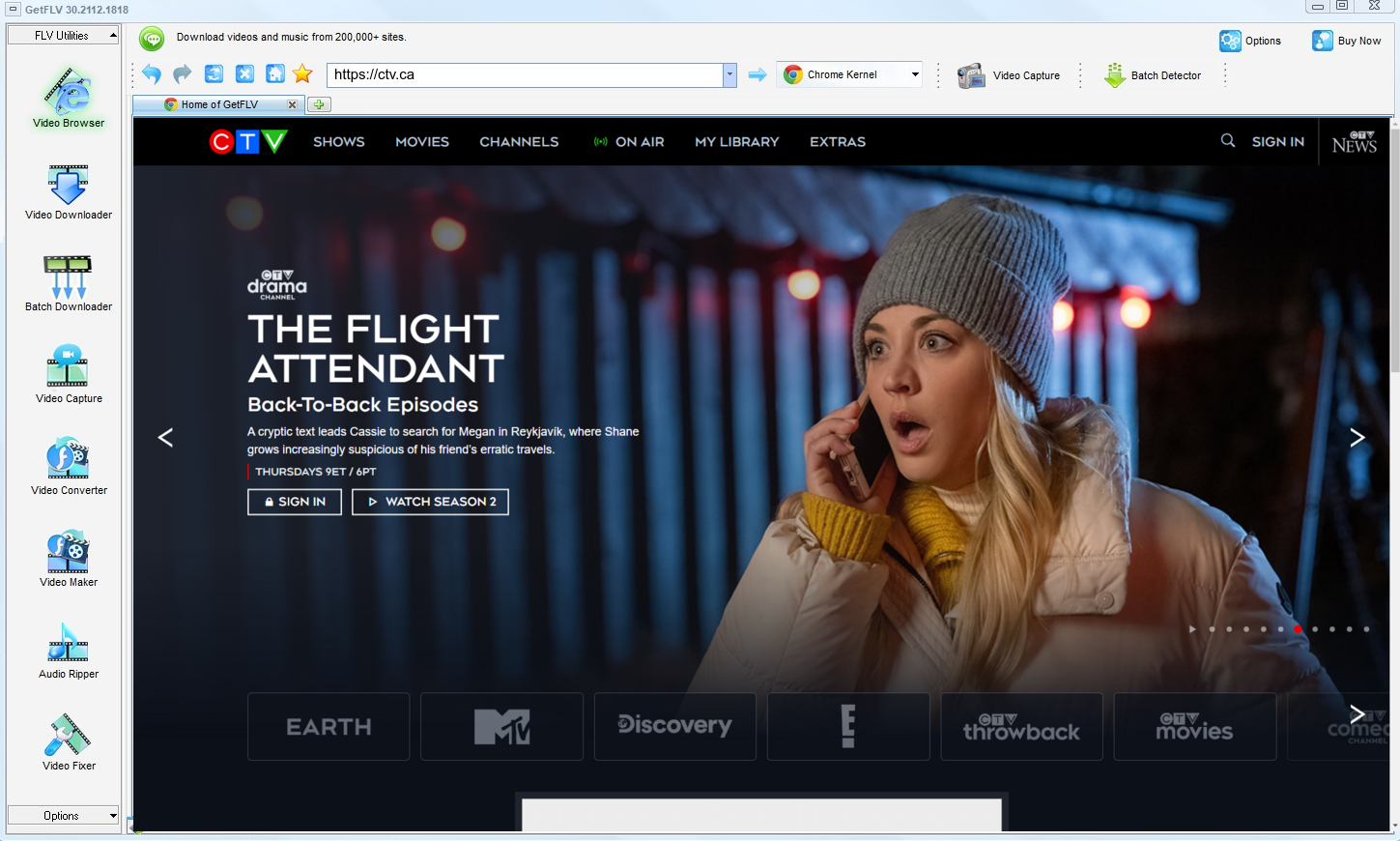
2. Launch GetFLV and navigate to CTV.ca website. Play a video and grab its URL

3. Download CTV.ca videos

One boundary worth stating plainly: this method is for titles you are entitled to keep for personal use. Do not distribute them, and remove them when your access ends.
Method 2: Downloader extensions for ctv.ca ★★☆☆☆
Install a download helper, reload ctv.ca, and hope it detects something.
Steps
- Add a downloader extension from the official store.
- Restart the browser so the add-on can hook into page loads.
- Open CTV.ca and start playback.
- Check the extension panel; encrypted streams typically show nothing.
Method 3: A classic download manager such as IDM ★☆☆☆☆
Built for speed on normal downloads; needs a lot of configuration and still misses protected streams.
Steps
- Install Internet Download Manager and enable its browser integration.
- Play the CTV.ca title and watch for the IDM download panel.
- If a panel appears, pick a quality; on encrypted playback nothing shows.
- Even when a file is offered, it is often a short segment rather than the whole title.
Overall Comparison of the Ways to Download CTV.ca Videos
| Download CTV.ca Videos with GetFLV | Downloader extensions for ctv.ca | A classic download manager such as IDM | |
|---|---|---|---|
| Success rate | 9/10 | 4/10 | 4 out of 10 attempts |
| Resolution | HD, 1080p or 4K as delivered | Usually 720p at best | Capped around 720p |
| Effort per title | Low | Quick to try | Seconds, usually wasted |
| Cost | Free trial, then a licence | Free, paid for by advertising | Free with limits |
| Learning curve | Guided, no configuration | One field | Trivial |
| After a platform update | Patched regularly | Often stops working | Breaks until the site catches up |
Data interpretation: Quality and speed move together here. Because nothing is re-encoded, the file is both better and faster to produce.
Worth Remembering: Safety and Copyright Guidelines for CTV.ca
Keep in mind:
- Whatever you save has to stay inside what your subscription already entitled you to watch.
- Online download services see every URL you submit and sometimes more — a trade-off you do not have to make.
- Multi-threaded fetching is worth looking for: it routinely turns a long wait into a short one on any decent connection.
- Save for personal offline viewing only — treat every file as a private backup.
- Making a copy does not transfer any rights to you; the creator still owns the work.
Is It Legal to Download CTV.ca Videos?
Nobody wants a surprise letter from an ISP. The rules of thumb below keep you on the safe side:
- Stay within valid access — an active subscription or a purchased title.
- Follow the terms of ctv.ca and the law in your country.
- Do not use saved files commercially, in any form.
- When in doubt, ask the rights holder instead of assuming.
This guide focuses on stability and staying inside those rules, so you can choose the lowest-risk workflow when local saving is permitted.
What Repeated Threads Say About CTV.ca Videos Downloads in 2026
Experienced users rarely argue about software categories any more — they argue about which desktop downloader. That consensus is telling: for saving CTV.ca videos, the community has already decided that local, actively maintained software is the only serious route.
Why Link-Based Pages Break: Community veterans advise against building any routine around web downloaders. These services were never designed for archival reliability; they were designed for quick single use, and they break the instant a platform revises its embedding technology.
The Recording Trade-Off: Threads about ctv.ca repeatedly warn newcomers away from this route for paid content. Detection is instant, protection engages, and the resulting file is useless — which is why recommendations consistently move towards software that handles streams directly.
What Experienced Users Recommend: Members are careful to add the ethical caveat alongside the recommendation: save what you are entitled to keep, keep it private, never redistribute. Within those bounds, desktop software is what the community endorses.
The GetFLV Answer: The practical summary offered to newcomers is short: use something that is maintained. GetFLV CTV.ca Downloader ships updates continuously, covers 800+ websites, downloads lists rather than single links, and keeps files at their original quality up to 4K.
FAQs About CTV.ca Videos
QCan I legally keep a copy of CTV.ca videos?
AThe short answer: a private backup of something you can already watch is one thing; distribution is another. Stay on the private side and you are on solid ground.
QWhy does every free CTV.ca downloader site return nothing?
ABecause they only read the public page. The real media is delivered as encrypted segments with short-lived, signed addresses, so a remote service that never plays the videos has nothing valid to fetch. A local application that works with the stream while it plays avoids that limitation.
QIs there a mobile version for phones and tablets?
AYes, indirectly: download on desktop, then copy the MP4 across. Standard MP4 plays in every mobile player without conversion.
QDo I need a CTV.ca account or subscription?
AOnly for content that is not public. Free titles are detected right away; anything behind a paywall or login simply requires you to sign in inside the built-in browser, exactly as you would in Chrome or Safari.
QIs it really faster than just recording the screen?
ARecording is real time by definition — a two hour title takes two hours. Capturing the stream runs at network speed, so the same title typically finishes in ten to twenty minutes on a decent connection.
QIs GetFLV CTV.ca Downloader safe to install?
AAs with any installer, get it from the official page rather than a mirror. That is the only realistic risk in this category.
QWhat if CTV.ca changes its player and the method stops working?
AOur own re-tests are listed with dates below, so you can tell at a glance how current the instructions are.
Update Log
Every entry below corresponds to a re-test on ctv.ca, not a cosmetic edit.
- August 2026 — Re-tested all three methods against the current ctv.ca player.
- July 2026 — Added notes on subtitle handling for videos saved from CTV.ca.
- May 2026 — Verified the workflow on the newest Windows 11 and macOS builds.
- February 2026 — Re-measured capture speed after a network upgrade in our test lab.
Verified User Reviews for CTV.ca Videos
Short reviews from people who tried the methods on this page and ended up staying with GetFLV CTV.ca Downloader.
Everything else choked on the encrypted segments. This handled them and gave me a complete file.
Capture plugin for the odd title, main downloader for everything else. Between the two I have not hit a dead end yet.
CTV.ca has redesigned twice since I installed this. Both times an update arrived and the workflow stayed the same.
Conclusion
Here is where we landed after running all three on CTV.ca:
A browser tab only ever receives what the page chooses to hand out, which is why web-based downloaders degrade first when a platform changes. Software running locally has no such restriction. GetFLV CTV.ca Downloader is built on that principle and adds everything the free routes lack: coverage of more than 800 websites, multi-threaded acceleration that keeps big files moving while preserving the original bitrate up to 4K. Our update cadence is deliberately short, so when CTV.ca ships a redesign the fix arrives quickly. Start with the no-cost trial and compare it yourself.
-
1 GetFLV CTV.ca Downloader Our pick
The only one of the three that finished every title we queued on ctv.ca: a 94% success rate, full source resolution, and no re-encoding.
-
2 Downloader extensions for ctv.ca
Fine for a one-off short video, unreliable as an ongoing solution: most full-length attempts failed or returned an audio-only file.
-
3 A classic download manager such as IDM
Fastest to try and free, but it only resolved short CTV.ca clips for us — full titles timed out or came back at reduced quality.
The trial costs nothing and needs no card, so the only thing you risk is a couple of minutes.
Keep it lawful, keep it private, and tidy up afterwards.
About the Author & How We Tested

Mandatory disclaimer: Editorial policy: personal, private, temporary copies of content you are entitled to watch. Nothing else is endorsed.