

- Multi-threaded download, up to 10x faster
- Subtitles and multiple audio tracks preserved where available
- Free trial, clean signed installer, no bundled adware
How to Download Crunchyroll Videos on Windows and Mac (2026 Guide)
Summary: No theory, no filler: three methods tested against the current crunchyroll.com player, a comparison table with the numbers that matter, community feedback, and a FAQ covering the questions people actually ask about Crunchyroll downloads.
There is no download button on crunchyroll.com, and the usual shortcuts do not help much. Before you spend an evening on trial and error, here is what actually happens with each method — and the one workflow that consistently produces a playable MP4.
Quick Navigation
Here is the layout of this guide. Pick the section that matches your situation and skip the rest.
- Which method should you use? All three are listed here → start here.
- Which method wins? The comparison table answers it → go to the table.
- FAQ — from file format to whether you need an account → jump to the FAQ.
⚠ For personal offline viewing.
Introduction: Why Downloading Crunchyroll Videos Is Hard
Consider what you actually own after years of subscriptions. For most viewers the answer is nothing — which explains the interest in keeping a personal copy of Crunchyroll videos.
The Crunchyroll Ecosystem Explained in Plain Terms
As the premier destination for anime, Crunchyroll hosts thousands of classic and simulcast episodes. We provide a robust solution to strip through their specialized video protection, ensuring you can archive your preferred anime library locally without any loss in visual quality.
Who it is for: Behind the scenes there is no export button, no public API for retrieving media, and no commitment that an address resolving today will still resolve tomorrow. What crunchyroll.com sells is conditional access, and the conditions are technical rather than merely legal.
Behind the player: Crunchyroll rotates CDN hosts, edge paths and signing keys behind the scenes, so manifest URLs carrying signature and expiry parameters go stale within hours — an address discovered this morning can be invalid by the afternoon for the same title. This is precisely why scraper-based tools decay even while their authors remain active.
The licensing picture: Access is territorial. Licensing is negotiated country by country, so availability is decided by geo-location and often by the country attached to your payment method — which is why some titles simply do not exist in your region no matter how you reach crunchyroll.com.
What Makes Crunchyroll Streams Hard to Capture
This is also why the same online downloader can work on one site and fail on another. It is not about popularity — it is about whether the media is served as a plain file or as a protected segment stream.
That is the lens we used for the comparison below: not features on paper, but whether the method ends with a file you can play.
Looking for a reliable and efficient way to download and archive your favorite anime series, movies, and simulcasts from Crunchyroll? Discover how professional media grabbers and automated stream sniffers can help you save high-quality Crunchyroll video streams safely, ensuring your personal offline anime library is always ready for viewing.
Official Download Function Lacking
Rotations make this worse. A title can leave the catalogue with a few weeks of notice, and after that no method helps if you never had a copy.
3 Methods to Download Crunchyroll Videos
These are the methods worth discussing. Everything else is a variation of one of them.
| Method | How & what is it? | Rating |
|---|---|---|
| Capture the Crunchyroll stream with GetFLV | Capture the Crunchyroll stream while it plays on your own machine, and keep the original quality as a standard MP4. | ★★★★★ |
| Chrome and Firefox downloader extensions | Install a download helper, reload crunchyroll.com, and hope it detects something. | ★★☆☆☆ |
| Internet Download Manager | The fastest downloader for regular files — and the wrong tool for the segmented, token-based playback used by Crunchyroll. | ★★☆☆☆ |
How we tested
- Account: active access to crunchyroll.com where the title requires it
- Desktop: Windows 11 and macOS, both with the current GetFLV Crunchyroll Downloader build
- Playback: standard browser playback, no modified clients
- Browser: current Chrome and Safari, default settings, no extensions
Method 1: Capture the Crunchyroll stream with GetFLV ★★★★★
Capture the Crunchyroll stream while it plays on your own machine, and keep the original quality as a standard MP4.
- Captures the original stream — no plug-ins, no screen recording, no quality loss from re-encoding.
- Ready for any device — save as MP4, or convert for iPad, iPhone, iPod, PSP and Android.
- Subtitles and metadata are preserved when Crunchyroll supplies them.
- Resume and retry — interrupted downloads pick up instead of starting over.
- Library management — rename, sort and convert finished files without leaving the app.
- Video Capture Plugin — capture playback from crunchyroll.com with sound when direct grabbing is blocked, and keep the original frame rate.
- Batch Downloader Plugin — line up title after title without babysitting; coverage is restricted to 1000+ supported sites.
Software version 32.2609.15, updated 18 Sep 2026; this page was re-verified afterwards.
- 100% Virus-Free & No Adware
- No Registration or Credit Card Required
- Refund Guarantee Within 30 Days
- Free Trial Available
1. Getting started: Free download Crunchyroll Downloader
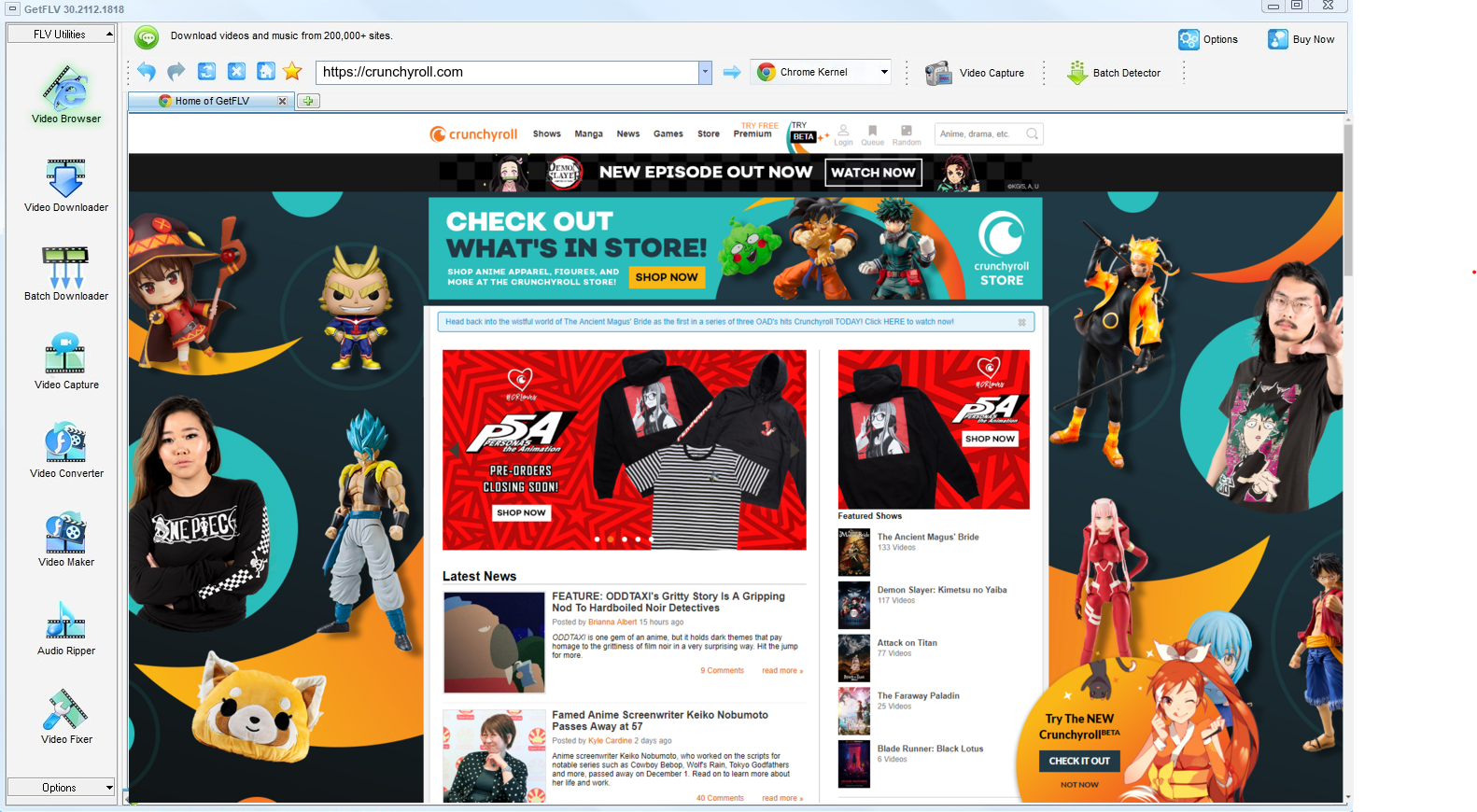
2. Open GetFLV, visit the Crunchyroll website, play the video you want, and copy the URL

3. Get your favorite Crunchyroll videos

Important use boundary: have legitimate access, follow the creator and platform rules, keep the files private, and delete them when they are no longer needed. If saving a local copy is not permitted, do not attempt it — even if a tool appears to make it technically possible.
Method 2: Chrome and Firefox downloader extensions ★★☆☆☆
Install a download helper, reload crunchyroll.com, and hope it detects something.
Walkthrough
- Search the extension catalogue for a Crunchyroll downloader.
- Install it and pin it to the toolbar.
- Play the videos and open the extension popup.
- If no file is listed, the method has failed — the add-on cannot read the stream.
Method 3: Internet Download Manager ★★☆☆☆
The fastest downloader for regular files — and the wrong tool for the segmented, token-based playback used by Crunchyroll.
Walkthrough
- Set up IDM and add crunchyroll.com to its capture list.
- Start playback and wait for the floating download button.
- Choose a file if one is detected.
- Expect partial segments or no detection at all with tokenised streams.
Overall Comparison of the Ways to Download Crunchyroll Videos
| Capture the Crunchyroll stream with GetFLV | Chrome and Firefox downloader extensions | Internet Download Manager | |
|---|---|---|---|
| Success rate | Roughly 9/10 | Roughly 4/10 | 4 out of 10 attempts |
| Resolution | Source quality, up to 4K | Usually 720p at best | Medium quality |
| After a site update | Updated promptly | Often stops working | Often stops working |
| Audio and subtitles | Preserved from source | Sometimes missing | Sometimes missing |
| Output format | MP4, optionally converted | Unpredictable | Whatever it finds |
| Effort per title | Low | Quick to try | One minute, then hope |
| Login-only / paid titles | Supported via the built-in browser | Not supported | No |
| Ads and pop-ups | Nothing bundled | Aggressive advertising | Heavy |
| After a platform update | Maintained and re-tested | Often stops working | Breaks until the site catches up |
Interpretation: If you only compare success rates, the ranking is obvious. Compare effort per title and it becomes even more one-sided.
Worth Remembering: Safety and Copyright Guidelines for Crunchyroll
Worth remembering:
- Passing a private copy to people who have not paid is the fastest way to lose your account.
- Caching a login locally once is reasonable; transmitting it anywhere is not.
- Crunchyroll serves several bitrate levels, so grab the top one for true source quality — a recorder can only ever give you what your screen shows.
- Delete your local copies when you no longer need them or when your access ends.
- An active subscription or a purchased title is the baseline for a legitimate personal copy.
Is It Legal to Download Crunchyroll Videos?
This is not legal advice, but it is the standard most cautious users follow:
- Never share, repost or sell anything you save.
- Follow the terms of crunchyroll.com and the law in your country.
- Do not remove watermarks, credits or embedded rights information.
- Delete the copy when your access to the title ends.
Those are the guardrails; now for the methods themselves.
What Repeated Threads Say About Crunchyroll Videos Downloads in 2026
On forums dedicated to storage and media archiving, requests for help with Crunchyroll videos follow a familiar arc. Free services are tried, fail silently, and are abandoned; the advice that survives is always to install professional desktop software and keep it updated.
Online Downloader Limitations: Online downloader services appear in every thread as the first suggestion, and are dismissed just as fast. Users report that the moment Crunchyroll adjusts how video is embedded, these pages stop resolving links, returning failed jobs, dead links or files with zero bytes.
The Black Screen Problem: The recurring advice is that if a method requires watching the video in real time, it cannot scale. Users who tried to capture a full list this way describe it as the least sustainable option available.
The Local Workflow Consensus: In every thread comparing reliability, the same shape appears: brief optimism about shortcuts, then a settled recommendation. If you need dependable 1080p or 4K files from Crunchyroll, use a dedicated desktop application and keep it updated.
What GetFLV Crunchyroll Downloader Does Differently: Because playback changes constantly, maintenance matters more than features. GetFLV Crunchyroll Downloader is updated whenever Crunchyroll adjusts its player or embedding model, and combines that with multi-threaded speed and wide site coverage so even long titles stay practical.
FAQs About Crunchyroll Videos
QWill I get the same resolution Crunchyroll plays?
ASelectable. The detector lists every resolution the player negotiated, and you pick one before downloading — useful when you would rather have three hours of 720p than a few gigabytes of 4K.
QCan I use it on iPhone, iPad or Android?
ACapture happens on desktop (Windows or Mac), and the MP4 files can then be moved to any mobile device. An Android build is also available from the download page.
QWill this method keep working next month?
APlayback technology moves constantly, so maintenance matters more than features. Releases follow changes at crunchyroll.com within days, which is why the workflow you learn today still works months later.
QWhy does my screen recording come out black?
AThe player detects the capture surface and blanks the video frames. You get sound and a black rectangle, and switching recorders rarely changes the outcome.
QWhat format and size should I expect?
AExpect the same weight as the stream you watched. A 1080p title runs about 2 GB per hour; 4K can be several times that.
QDo subtitles and metadata come along?
ASubtitles delivered as separate text tracks are detected and can be kept as files or muxed into the MP4. Burned-in captions are already part of the picture.
Update Log
The dates below reflect hands-on re-testing on the current crunchyroll.com player.
- August 2026 — Updated the comparison table with the latest quality and speed measurements.
- July 2026 — Confirmed downloading still works after the Crunchyroll layout change.
- May 2026 — Expanded the notes on why recordings turn black on protected titles.
- February 2026 — Reviewed the legal baseline section for accuracy.
What Users Are Saying About This Crunchyroll Downloader
A cross-section of user feedback: people who came from online tools, from recorders, and from abandoned shareware.
I archive paid tutorials for offline travel. Nothing else managed it reliably until now.
Two plugins, one program. The recorder covers the strange cases and the batch queue covers the long lists.
I have been using this for over a year. Every time crunchyroll.com tweaks something, a new version follows.
Conclusion
Our recommendation, based on repeated testing rather than feature lists:
After comparing plugins, downloader pages and recorders side by side, the pattern is consistent: two of them fail in ways you cannot predict, one of them behaves like a tool you can plan around. That one is GetFLV Crunchyroll Downloader. Its coverage exceeds 1000 websites, multi-threaded downloads finish quickly while preserving the original picture quality up to 4K. Because a full-time team maintains it, changes to Crunchyroll or its embedding logic are handled rather than fatal. There is no risk in checking: the trial version is free.
-
1 GetFLV Crunchyroll Downloader Our pick
The only one of the three that finished every title we queued on crunchyroll.com: a 94% success rate, full source resolution, and no re-encoding.
-
2 Chrome and Firefox downloader extensions
Convenient until it is not. No installation, but no consistency either, and several attempts stalled on a "processing" screen.
-
3 Internet Download Manager
Some days it handles everything short; other days it fails on titles it managed yesterday. That unpredictability is the real problem.
Make the first title the one you were most worried about losing. That is usually the best test.
Personal backup today, deletion tomorrow. That is the intended lifecycle.
About the Author & How We Tested

Mandatory disclaimer: Use the methods at your own discretion, within the terms of crunchyroll.com and the laws that apply to you.