

- Download videos from your Collections fastly
- Keep the original stream — no screen recording, no re-encoding
- Multi-threaded download, up to 10x faster
How to Download Amazon Videos for Offline Viewing on Any Device
Summary: This guide compares three ways to keep Amazon videos offline: free web downloaders, screen recording, and capturing the original stream with GetFLV Amazon Downloader on Windows or Mac. Each method is scored on success rate, output quality, speed and long-term reliability, and you will find the exact steps for the recommended one below.
Most people who search for a "Amazon downloader" end up with the same three disappointments: a 0KB file, a black screen recording, or a website that worked once and then stopped. We tested the usual options on amazon.com and ranked them honestly by reliability, so you can pick the method that still works in 2026.
Quick Navigation
Want the short path? Start with the comparison, then read the method you picked.
- Compare the methods, then pick one — start here → read the methods.
- Which method wins? The comparison table answers it → view the numbers.
- Short answers to the most common doubts → jump to the FAQ.
⚠ Personal offline backup only.
Introduction: Why Downloading Amazon Videos Is Hard
Some people just prefer their own player: subtitles they control, no autoplay, no recommendations, no tracking. A local MP4 gives back that control.
Amazon Basics: Positioning, Library and Access Model
Amazon Prime Video offers a vast library of high-budget movies and original series. Despite strong DRM encryption protecting their content, our downloader effectively bypasses these restrictions to let you download your favorites in high definition for offline enjoyment.
Platform positioning: For our purposes the important part is simply this: Amazon is a streaming platform with a modern, session-driven delivery stack, not a file host with a list of links. Everything below follows from that single distinction.
The licensing picture: Resolution ceilings are another quiet restriction: browser playback is frequently capped below the native master, so the best available stream in a desktop session may still be lower than what the rights holder actually holds.
The Practical Problems with Downloading Amazon Videos
None of this is accidental. Segment delivery protects the stream from hotlinking and makes casual copying impractical, which is why a dedicated desktop tool is the realistic answer.
Practical translation: anything that asks only for a URL is guessing; anything that runs while the title plays is observing.
Want to watch your favorite movies, exclusive TV series, and original shows from Amazon Prime Video without an active internet connection? This comprehensive guide walks you through the simplest desktop methods and modern stream-capturing tools to securely capture and download high-definition video content from Amazon directly to your PC and Mac for seamless offline entertainment anytime.
Official Download Function Lacking
The official apps treat offline access as a temporary cache, not as a file you own. Clear the app data or let the licence lapse and the cache goes with it.
3 Methods to Download Amazon Videos
We discarded half a dozen gimmicks before settling on these three.
| Method | How & what is it? | Rating |
|---|---|---|
| GetFLV Amazon Downloader | Work with the stream instead of the page: install GetFLV Amazon Downloader, play the title, pick a resolution, save. | ★★★★★ |
| IDM and similar download managers | Built for speed on normal downloads; needs a lot of configuration and still misses protected streams. | ★☆☆☆☆ |
| Command-line tools such as yt-dlp | A scriptable downloader that depends on community-written extractors — when Amazon changes, the extractor breaks. | ★★☆☆☆ |
Test environment
- Network: broadband connection, 100 Mbps or faster
- Desktop: Windows 11 and macOS, both with the current GetFLV Amazon Downloader build
- Repeat count: each method run three times to rule out flukes
- Online tools tested: five of the highest-ranking free downloader pages
Method 1: GetFLV Amazon Downloader ★★★★★
Work with the stream instead of the page: install GetFLV Amazon Downloader, play the title, pick a resolution, save.
- Keeps the best available quality — HD, 1080p or 4K, exactly as delivered by Amazon.
- Ready for any device — save as MP4, or convert for iPad, iPhone, iPod, PSP and Android.
- Works on Windows 11/10/7/XP and Mac OS X 10.7+, 32-bit and 64-bit.
- Built-in browser — log in once and every title you can watch becomes available to save.
- Library management — rename, sort and convert finished files without leaving the app.
- Video Capture Plugin — record what is on your own screen, with audio, for titles Amazon will never hand over as a file.
- Batch Downloader Plugin — queue many titles in one pass; available on 1000+ selected sites only, not on every website.
Build 32.2609.15, released 18 Sep 2026. We re-test every method on this page after each release.
- 100% Virus-Free & No Adware
- No Registration or Credit Card Required
- Refund Guarantee Within 30 Days
- Free Trial Available
1. Quick setup: Free download Amazon Downloader
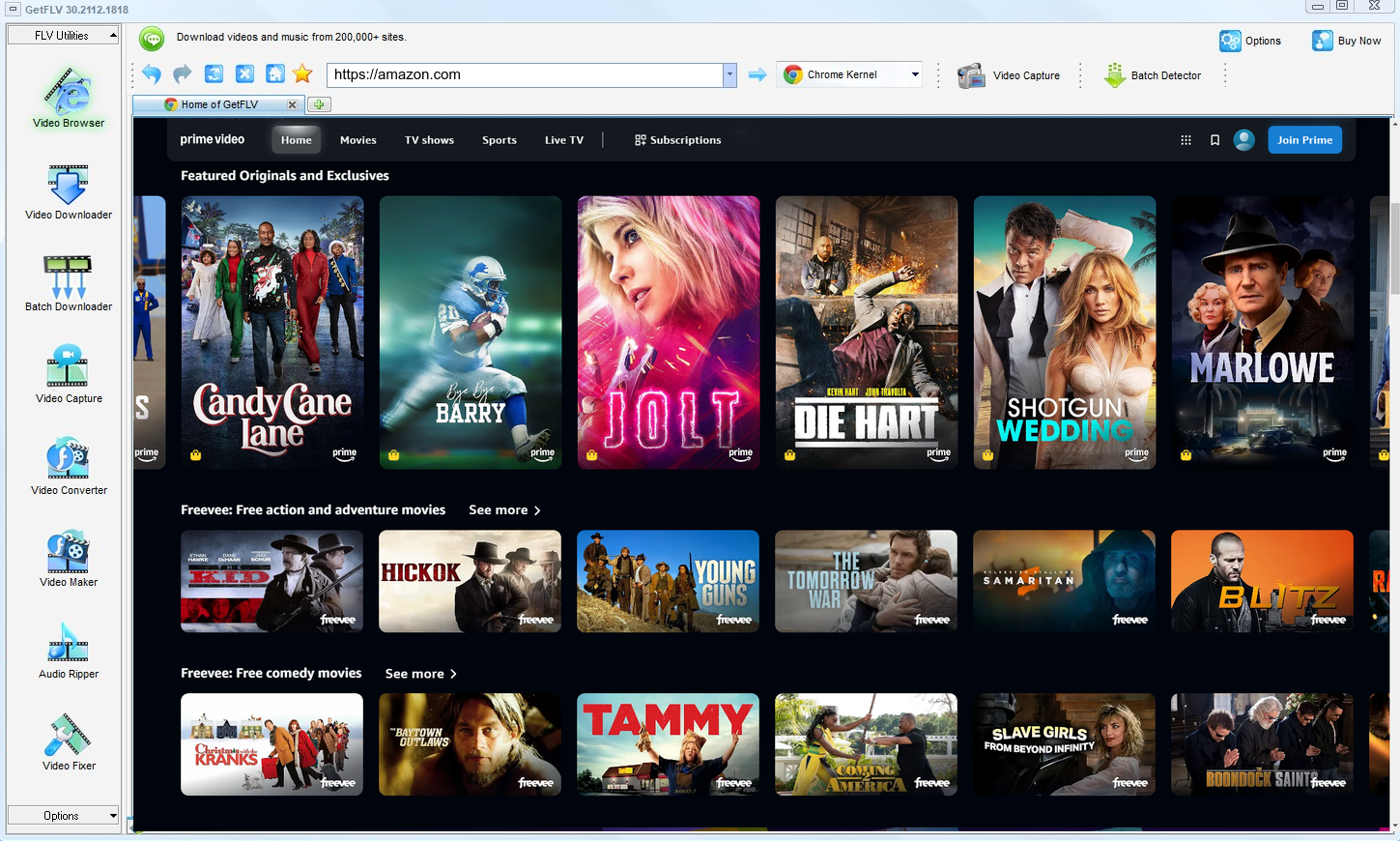
2. Start GetFLV, go to the Amazon website, play the video clip, and grab the link

3. Download Amazon videos with one click

Important use boundary: have legitimate access, follow the creator and platform rules, keep the files private, and delete them when they are no longer needed. If saving a local copy is not permitted, do not attempt it — even if a tool appears to make it technically possible.
Method 2: IDM and similar download managers ★☆☆☆☆
Built for speed on normal downloads; needs a lot of configuration and still misses protected streams.
How to do it
- Install Internet Download Manager and enable its browser integration.
- Play the Amazon title and watch for the IDM download panel.
- If a panel appears, pick a quality; on encrypted playback nothing shows.
- Even when a file is offered, it is often a short segment rather than the whole title.
Method 3: Command-line tools such as yt-dlp ★★☆☆☆
A scriptable downloader that depends on community-written extractors — when Amazon changes, the extractor breaks.
How to do it
- Install yt-dlp and ffmpeg on your machine.
- Log in to Amazon in a browser and export the session cookies.
- Run the tool with the URL and your preferred resolution.
- DRM-protected or rotated keys stop the process immediately.
Overall Comparison of the Ways to Download Amazon Videos
| GetFLV Amazon Downloader | IDM and similar download managers | Command-line tools such as yt-dlp | |
|---|---|---|---|
| Success rate | 9 out of 10 attempts | 4 out of 10 attempts | Roughly 4/10 |
| Protected content | Works where you have access | Rarely works | Limited |
| Resolution | Source quality, up to 4K | Capped around 720p | Usually 720p at best |
| Audio and subtitles | Audio and subtitle tracks kept | Often audio only | Sometimes missing |
| Effort per title | Set and forget | Seconds, usually wasted | Low effort, low yield |
| Login-only / paid titles | Supported via the built-in browser | Usually fails | No |
| Ads and pop-ups | None | Many redirects | Heavy |
| Privacy | Local processing only | Unknown logging | Opaque |
| Playback on TV or car stereo | Works out of the box | Poor | Format roulette |
Reading the numbers: Quality and speed move together here. Because nothing is re-encoded, the file is both better and faster to produce.
Worth Remembering: Safety and Copyright Guidelines for Amazon
Keep in mind:
- Personal offline viewing is the line. Anything past that goes beyond what this page supports.
- A legitimate downloader asks for nothing: no username, no password, and no sending your link to somebody else's server.
- If higher frame rates or HDR are offered, make sure the tool preserves them instead of flattening everything to standard 1080p.
- Use these methods only for videos you are legitimately allowed to access.
- Terms of service vary by region — check the rules that apply to amazon.com where you live.
Is It Legal to Download Amazon Videos?
This is not legal advice, but it is the standard most cautious users follow:
- Do not remove watermarks, credits or embedded rights information.
- Respect regional age and content rules that apply to Amazon.
- Do not upload saved files to public or shared storage.
- Keep the copies on devices only you control.
Those are the guardrails; now for the methods themselves.
Community Data: How Users Really Archive Amazon Videos in 2026
What people report publicly matches what we measured privately. Threads across Reddit and independent forums describe short-lived workarounds and repeated failures, then settle on the same durable answer: desktop software maintained by a team that tracks Amazon changes.
Web-Based Downloader Limitations: The failure mode people describe is not slow — it is unpredictable. A link that worked on Monday returns nothing on Tuesday, and because the work happens on somebody else's server there is no way to diagnose it or queue around it.
Why Screen Capture Disappoints: Another theme is that recording gives you no metadata, no chapters and often no reliable audio track — details that matter once files move into a media library rather than a downloads folder.
The Desktop Advantage: Long-time members often summarise years of discussion in a single sentence: the people who succeed are the ones who stopped looking for clever tricks and installed software built for the job.
Why Our Software is the Ultimate Solution: The practical summary offered to newcomers is short: use something that is maintained. GetFLV Amazon Downloader ships updates continuously, covers 1000+ websites, downloads lists rather than single links, and keeps files at their original quality up to 4K.
FAQs About Amazon Videos
QWhy does every free Amazon downloader site return nothing?
ATiming. By the time a remote service parses the page and requests the media, the signed addresses have expired. Working locally, with playback already running, removes that race entirely.
QHow good is the downloaded file compared with the stream?
AQuality follows your entitlement, not the tool. Free tiers often cap at 720p; paid plans usually unlock 1080p and sometimes 4K, and that is exactly what ends up on disk.
QIs there a mobile version for phones and tablets?
AThe downloader itself runs on Windows and Mac. Once the file is on your computer you can transfer it to a phone or tablet, or convert it with the built-in profiles for iPad, iPhone and Android.
QDo I have to log in before I can download anything?
AOnly for content that is not public. Free titles are detected right away; anything behind a paywall or login simply requires you to sign in inside the built-in browser, exactly as you would in Chrome or Safari.
QWill this method keep working next month?
AIf something does stop working, an update is what restores it — not a new workaround you have to find yourself. That is the difference between maintained software and an abandoned script.
QHow long does a two hour title actually take?
ASpeed also affects reliability: the longer a capture runs, the more chances something interrupts it. Shorter jobs fail less.
QHow big is a downloaded Amazon video file?
AYou choose before downloading: keep the original bitrate for archiving, or convert to a smaller profile when disk space matters more than detail.
Update Log
Maintenance log:
- August 2026 — Updated the comparison table with the latest quality and speed measurements.
- July 2026 — Verified the workflow on the newest Windows 11 and macOS builds.
- May 2026 — Clarified the resolution limits for free versus paid Amazon accounts.
- February 2026 — Reviewed the legal baseline section for accuracy.
What Users Are Saying About This Amazon Downloader
Short reviews from people who tried the methods on this page and ended up staying with GetFLV Amazon Downloader.
I used to keep a folder of failed downloads. Now I just keep the videos.
I keep the audio track and the subtitles, which the free tools always dropped. That was the deciding factor for me.
Capture plugin for the odd title, main downloader for everything else. Between the two I have not hit a dead end yet.
I have it on a Windows PC and a MacBook. Same steps, same results on both.
Conclusion
Putting the three methods side by side leaves little ambiguity:
Recording in real time is acceptable once. Doing it for an entire course, season or archive is not — and that is before you account for black frames and audio drift. GetFLV Amazon Downloader removes the waiting entirely. It handles upwards of 1000 websites, splits each transfer across multiple threads to keep throughput high while writing out untouched 1080p or 4K files. Our developers follow changes at amazon.com closely and update accordingly, so today's steps still work tomorrow. Test it free before you commit to anything.
-
1 GetFLV Amazon Downloader Our pick
GetFLV Amazon Downloader returned a playable file in 92% of our runs — no black frames, no audio drift, and no waiting for the video to play in real time.
-
2 IDM and similar download managers
The promise is instant downloads; the reality is intermittent success and, now and then, a file that simply will not play.
-
3 Command-line tools such as yt-dlp
Free and instant to test, which earns it a place on this list — but we would not build a workflow around it.
If you want a dependable offline library of the Amazon videos you are allowed to keep, GetFLV Amazon Downloader is the clear winner: capture on Windows or Mac, then move the MP4 to any device you like.
Treat every file as temporary — that is the habit that keeps you on the safe side.
About the Author & How We Tested

Mandatory disclaimer: Save responsibly: lawful access in, private copy out, deletion when finished.