

- Multi-threaded download, up to 10x faster
- Free trial, clean signed installer, no bundled adware
- Automatic retry and resume on unstable connections
How to Download Crunchyroll Videos at the Original Bitrate (2026)
Summary: This guide compares three ways to keep Crunchyroll videos offline: free web downloaders, screen recording, and capturing the original stream with GetFLV Crunchyroll Downloader on Windows or Mac. Each method is scored on success rate, output quality, speed and long-term reliability, and you will find the exact steps for the recommended one below.
Streaming is convenient until you need the file itself: a long flight, a flaky hotel connection, or a title that is about to leave the catalogue. Below are the three methods people try, with the honest results we measured on crunchyroll.com in 2026.
Quick Navigation
Each heading answers one question about saving Crunchyroll videos. Here they are:
- All methods explained, from least to most reliable → go to the methods.
- How the three methods compare side by side → go to the table.
- The FAQ section, including the legal baseline → read the questions.
⚠ For personal offline viewing.
Introduction: Why Downloading Crunchyroll Videos Is Hard
The demand to save Crunchyroll videos keeps growing because an official offline mode is not available on every platform, and where it exists the files are usually locked inside the app and vanish as soon as the subscription ends.
Crunchyroll 101: Understanding the Platform First
As the premier destination for anime, Crunchyroll hosts thousands of classic and simulcast episodes. We provide a robust solution to strip through their specialized video protection, ensuring you can archive your preferred anime library locally without any loss in visual quality.
Platform positioning: Behind the scenes there is no export button, no public API for retrieving media, and no commitment that an address resolving today will still resolve tomorrow. What crunchyroll.com sells is conditional access, and the conditions are technical rather than merely legal.
Delivery internals: Put plainly, Crunchyroll is engineered so that watching is effortless and extracting is not. The technique that works is the one that reads the authorised stream the way the player does, rather than trying to reconstruct it afterwards.
Access limits and timing: Put simply, Crunchyroll grants conditional access that can be narrowed by geography, altered by contract or withdrawn entirely — and none of those changes requires your consent or comes with a warning.
The Hard Part: Turning Crunchyroll Playback into Local Files
The player does not fetch a video file; it fetches a playlist of fragments and asks for each one with a token that expires in minutes. Anything that copies the page URL instead of participating in that session gets nothing useful.
That is the lens we used for the comparison below: not features on paper, but whether the method ends with a file you can play.
Looking for a reliable and efficient way to download and archive your favorite anime series, movies, and simulcasts from Crunchyroll? Discover how professional media grabbers and automated stream sniffers can help you save high-quality Crunchyroll video streams safely, ensuring your personal offline anime library is always ready for viewing.
Official Download Function Lacking
Practically speaking, if you need a file rather than a temporary cache, you need a method that captures the stream while it plays.
3 Methods to Download Crunchyroll Videos
We discarded half a dozen gimmicks before settling on these three.
| Method | How & what is it? | Rating |
|---|---|---|
| GetFLV Crunchyroll Downloader for Windows and Mac | Everything runs locally, so nothing depends on a remote service guessing your link. | ★★★★★ |
| Online Crunchyroll downloader pages | Paste the Crunchyroll link into a free web-based downloader and hope it can see the stream. | ★★☆☆☆ |
| Internet Download Manager | Built for speed on normal downloads; needs a lot of configuration and still misses protected streams. | ★☆☆☆☆ |
Our benchmark setup
- Network: broadband connection, 100 Mbps or faster
- Desktop: Windows 11 and macOS, both with the current GetFLV Crunchyroll Downloader build
- Playback: standard browser playback, no modified clients
- Test title: a full-length Crunchyroll videos title with a login requirement
Method 1: GetFLV Crunchyroll Downloader for Windows and Mac ★★★★★
Everything runs locally, so nothing depends on a remote service guessing your link.
- Works on Windows 11/10/7/XP and Mac OS X 10.7+, 32-bit and 64-bit.
- Built-in browser — log in once and every title you can watch becomes available to save.
- Private by design — everything runs on your machine; nothing is uploaded anywhere.
- Clean installer — no bundled adware, signed and verified.
- Video Capture Plugin — a fallback for anything Crunchyroll protects: record it while it plays, picture and audio together.
- Batch Downloader Plugin — one queue for many titles, but only across the 600+ sites it currently supports.
Current release 32.2609.15 — 18 Sep 2026, maintained for Windows 11 and the newest macOS.
- 100% Virus-Free & No Adware
- No Registration or Credit Card Required
- Refund Guarantee Within 30 Days
- Free Trial Available
1. Let's start: Free download Crunchyroll Downloader
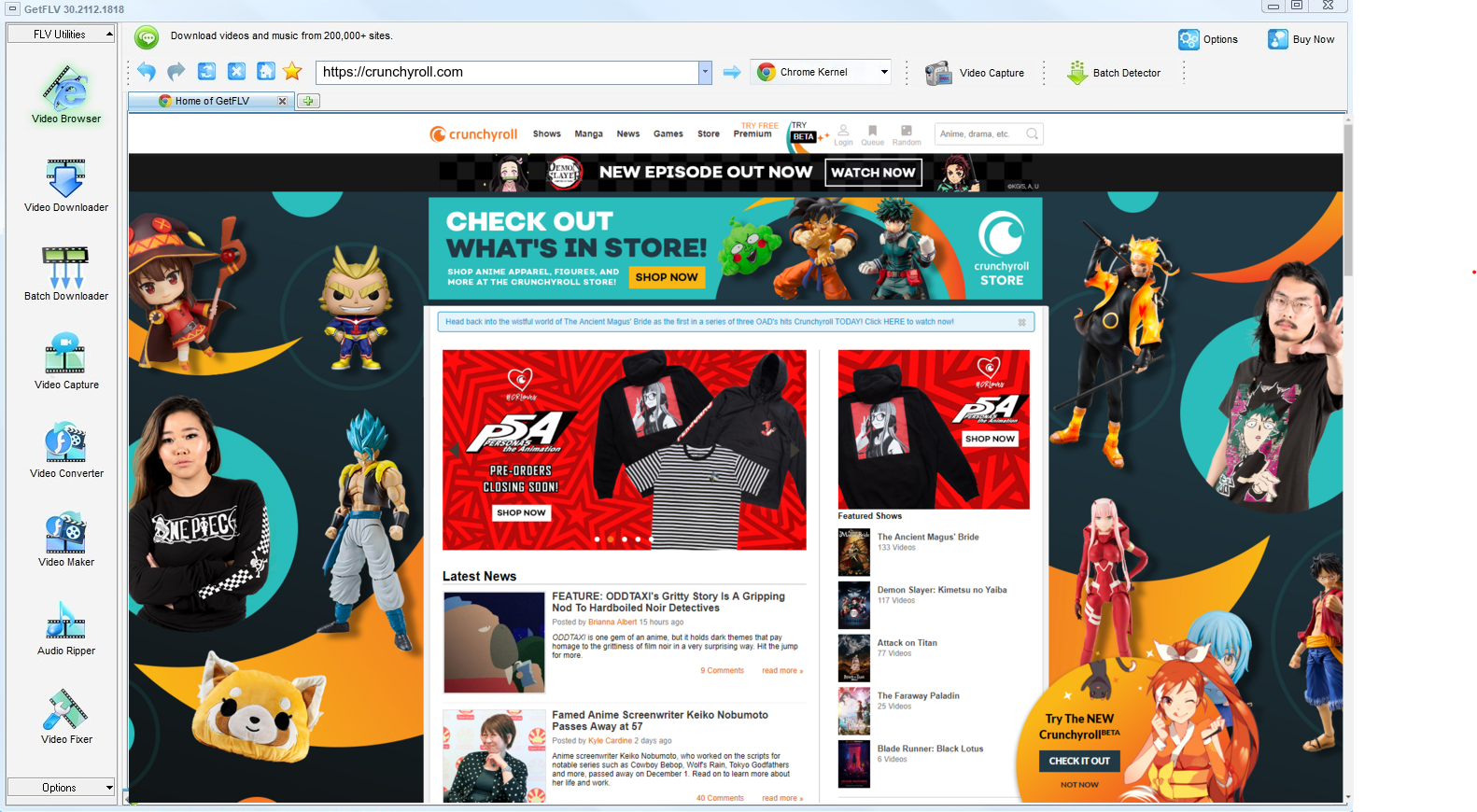
2. Launch GetFLV, navigate to the Crunchyroll website, play your video, and get the URL

3. Save Crunchyroll videos for offline viewing

Keep it private, keep it local, keep it temporary. That is the whole rule.
Method 2: Online Crunchyroll downloader pages ★★☆☆☆
Paste the Crunchyroll link into a free web-based downloader and hope it can see the stream.
Step by step
- Open crunchyroll.com and copy the URL of the title you want.
- Open one of the free downloader pages in another tab.
- Paste the link and choose a format if you are offered one.
- Check the result before trusting it — most attempts on Crunchyroll end with a 0KB file.
Method 3: Internet Download Manager ★☆☆☆☆
Built for speed on normal downloads; needs a lot of configuration and still misses protected streams.
Step by step
- Install IDM, then tune its advanced settings for streaming media.
- Reload crunchyroll.com and start the title.
- Watch for the capture bar.
- On segmented delivery it either stays silent or grabs a fragment you cannot use.
Overall Comparison of the Ways to Download Crunchyroll Videos
| GetFLV Crunchyroll Downloader for Windows and Mac | Online Crunchyroll downloader pages | Internet Download Manager | |
|---|---|---|---|
| Success rate | Around 90% | 4/10 | Roughly 4/10 |
| Protected content | Supported for entitled titles | Rarely works | Mostly fails |
| Audio and subtitles | All detected tracks | Sometimes missing | Often audio only |
| Effort per title | Set and forget | Low effort, low yield | Quick to try |
| Cost | Trial first, paid upgrade | Free but ad-heavy | Free, paid for by advertising |
| Login-only / paid titles | Yes | No | No |
| Ads and pop-ups | No ads | Aggressive advertising | Aggressive advertising |
| After a platform update | Stays current | Unpredictable | Often stops working |
| Playback on TV or car stereo | Works out of the box | Unlikely to play at all | Format roulette |
How to read the table: Read the table as a story about where the authorised session lives. Remote tools guess and mostly fail; recording works but costs the full runtime; local capture keeps both the quality and your evening.
Worth Remembering: Safety and Copyright Guidelines for Crunchyroll
Worth remembering:
- Copyright boundary: anything you keep is for your own offline viewing — never for re-uploading, reselling or commercial redistribution.
- Read the permissions before installing: a "helper" that wants to read all data on all sites is not helping.
- File size is a useful tell: a long title that arrives suspiciously small has been compressed, whatever the label claims.
- Save for personal offline viewing only — treat every file as a private backup.
- Terms of service vary by region — check the rules that apply to crunchyroll.com where you live.
Is It Legal to Download Crunchyroll Videos?
Our editorial rule is conservative by design:
- Stay within valid access — an active subscription or a purchased title.
- Use the file for personal offline viewing only.
- Never share, repost or sell anything you save.
- Respect regional age and content rules that apply to Crunchyroll.
Settled? Then the interesting question is which method survives contact with the crunchyroll.com player.
What People Recommend After Trying Every Crunchyroll Downloader in 2026
Specialised forums and general tech subreddits agree on the diagnosis even when they disagree on details. Saving Crunchyroll videos is easy in principle and unreliable in practice unless the tool runs on your own machine and respects how the stream is delivered.
Why Link-Based Pages Break: Reading the reports in order gives a clear timeline: a service works, becomes popular, then degrades as Crunchyroll hardens its player. Users who relied on it for anything important are left with broken links and files that never finished writing.
Why Screen Capture Disappoints: The recurring advice is that if a method requires watching the video in real time, it cannot scale. Users who tried to capture a full list this way describe it as the least sustainable option available.
The Agreement Among Veterans: Ask about saving content for travel or unreliable connections and the community answer rarely varies. Install desktop software, capture properly, carry real files — advice that follows directly from everyone else's failed attempts.
How GetFLV Crunchyroll Downloader Answers These Problems: Every recurring failure has a counterpart in GetFLV Crunchyroll Downloader: 0KB downloads met by direct stream handling; black screens met by working with the source; endless single downloads met by multi-threaded transfers; obsolete methods met by frequent updates.
FAQs About Crunchyroll Videos
QIs downloading Crunchyroll videos for offline viewing allowed?
AKeeping a private, offline copy of media you already have access to is generally treated as personal backup. What is not permitted is re-uploading, reselling or redistributing it, because the rights remain with the creator. Follow the terms of crunchyroll.com and the copyright rules in your country.
QWhy does every free Crunchyroll downloader site return nothing?
AThose tools cannot replay the negotiation that happens inside the player: tokens expire in minutes and the segments are protected. GetFLV Crunchyroll Downloader handles the stream on your own machine, where the playback session is already authorised.
QCan I use it on iPhone, iPad or Android?
AYou can also convert to device profiles inside the app, so the file is already the right size and format when it reaches your tablet.
QDo I have to log in before I can download anything?
AThe rule is identical to normal viewing: if you would have to log in to watch it, you have to log in to download it. No workaround is involved.
QWill this method keep working next month?
AYes. GetFLV Crunchyroll Downloader works with the stream rather than the page layout, and the development team ships an update whenever Crunchyroll alters its player or embedding model.
QDo subtitles and metadata come along?
ASubtitles delivered as separate text tracks are detected and can be kept as files or muxed into the MP4. Burned-in captions are already part of the picture.
QHow often is this workflow re-tested?
AThis is the main advantage of an actively maintained tool over a one-off script or a bookmarklet, both of which tend to break silently.
Update Log
Verification history for Crunchyroll:
- August 2026 — Confirmed downloading still works after the Crunchyroll layout change.
- July 2026 — Added notes on subtitle handling for videos saved from Crunchyroll.
- May 2026 — Removed a method that no longer returns a playable file.
- February 2026 — Clarified the resolution limits for free versus paid Crunchyroll accounts.
What Users Are Saying About This Crunchyroll Downloader
Selected reviews from 2026, covering download speed, output quality and how the software holds up after site updates.
I wasted an evening on free web tools before finding this. The difference is night and day: one clean file, full length, no re-encoding.
Free tools are fine until Crunchyroll changes something, then they are useless. I have been using this for months with the same result every time.
For anything the downloader cannot parse directly, the capture plugin is the fallback that actually delivers.
Most downloaders are abandoned after six months. This one is visibly still maintained.
Conclusion
To summarise the comparison above:
Keeping Crunchyroll videos offline should not mean re-recording your own screen every time. Above we tested three routes; all of them can produce a file, but only one does it consistently. GetFLV Crunchyroll Downloader was built for exactly this job: support for over 600 platforms and a multi-threaded engine that downloads several segments at once while preserving the source bitrate up to 4K. When a site rearranges its player or switches embedding technology, we publish an update rather than leaving you with an error. There is nothing to pay up front — the trial is free and needs no card.
-
1 GetFLV Crunchyroll Downloader Our pick
This is the one we would actually use ourselves — 88% success, offline playback afterwards, no ads and no waiting rooms.
-
2 Online Crunchyroll downloader pages
Convenient until it is not. No installation, but no consistency either, and several attempts stalled on a "processing" screen.
-
3 Internet Download Manager
Free and instant to test, which earns it a place on this list — but we would not build a workflow around it.
Make the first title the one you were most worried about losing. That is usually the best test.
A tidy library is a private library. Do not let copies outlive your access.
About the Author & How We Tested

Mandatory disclaimer: Respect the creator, respect the platform terms, and keep the files to yourself.