

- Download videos from CW TV in up to 1080p and in AAC 2.0 audio track
- Standard MP4 output that plays on any device, phone included
- Subtitles and multiple audio tracks preserved where available
How to Download CW TV Videos Permanently — 3 Approaches Tried in 2026
Summary: Everything below comes from hands-on testing on cwtv.com: which CW TV downloader methods still return a file, which produce an empty one, and how to keep HD quality without recording your screen in real time.
If you have already tried to save CW TV videos, you probably met one of these: the download never starts, the file is empty, or the recording comes out black. This guide compares the three practical approaches and shows which one still delivers a complete, full-quality file in 2026.
Quick Navigation
This page is long on purpose, so here is the quick route through it:
- Three methods, tested on cwtv.com, ranked honestly → start here.
- Quality, speed and success rate compared in one table → read the comparison.
- The FAQ section, including the legal baseline → see the answers.
⚠ Do not share anything you save.
Introduction: Why Downloading CW TV Videos Is Hard
Bandwidth is not the only reason. Plenty of viewers want to archive a series before it is edited, dubbed or removed, and a local copy is the only way to be sure the version you saw stays available to you.
CW TV Basics: Positioning, Library and Access Model
The CW is home to popular prime-time dramas and superhero series. Their stream protection is designed to enforce platform engagement, yet we offer a reliable way to capture these episodes, letting you download your favorite shows to your local library.
Where it sits: The catalogue on cwtv.com is assembled from several sources at once — full-length titles, short-form clips, trailers, live feeds and recorded sessions — and they are not necessarily delivered the same way. A season episode, a thirty-second promo and a live stream can each sit behind different players, different bitrate ladders and different rules.
Behind the player: CW TV rotates CDN hosts, edge paths and signing keys behind the scenes, so manifest URLs carrying signature and expiry parameters go stale within hours — an address discovered this morning can be invalid by the afternoon for the same title. This is precisely why scraper-based tools decay even while their authors remain active.
Why titles disappear: Taken together, availability here is always temporary: geographically filtered, contractually windowed and subject to rotation. Any reason for wanting a local archive has to be measured against that clock.
Why CW TV Resists Ordinary Downloaders
None of this is accidental. Segment delivery protects the stream from hotlinking and makes casual copying impractical, which is why a dedicated desktop tool is the realistic answer.
The rest of this guide is built around that constraint, because every recommendation follows from it.
Discover how to save your favorite prime-time TV shows, dramatic series, and exclusive web streams from The CW website. This tutorial highlights the most efficient video extraction workflows compatible with modern operating systems.
Official Download Function Lacking
That design choice protects the licence, and it also means your access is rented rather than owned — the core motivation behind every CW TV downloader search.
3 Methods to Download CW TV Videos
You will notice the methods differ in one fundamental way: whether they see the stream or only the page.
| Method | How & what is it? | Rating |
|---|---|---|
| Capture the CW TV stream with GetFLV | Everything runs locally, so nothing depends on a remote service guessing your link. | ★★★★★ |
| Screen recording | Nothing needs to understand the stream — you simply capture the output. | ★★☆☆☆ |
| Downloader extensions for cwtv.com | An add-on lives inside the browser and looks for media on the page you are viewing. | ★☆☆☆☆ |
What we measured on
- Network: broadband connection, 100 Mbps or faster
- Playback: standard browser playback, no modified clients
- Hardware: mid-range laptop, SSD, 16 GB RAM
- Online tools tested: five of the highest-ranking free downloader pages
Method 1: Capture the CW TV stream with GetFLV ★★★★★
Everything runs locally, so nothing depends on a remote service guessing your link.
- Captures the original stream — no plug-ins, no screen recording, no quality loss from re-encoding.
- Keeps the best available quality — HD, 1080p or 4K, exactly as delivered by CW TV.
- Ready for any device — save as MP4, or convert for iPad, iPhone, iPod, PSP and Android.
- Private by design — everything runs on your machine; nothing is uploaded anywhere.
- Clean installer — no bundled adware, signed and verified.
- Video Capture Plugin — a fallback for anything CW TV protects: record it while it plays, picture and audio together.
- Batch Downloader Plugin — line up title after title without babysitting; coverage is restricted to 1200+ supported sites.
Last release: 32.2609.15 on September 18, 2026. Older builds are replaced automatically.
- 100% Virus-Free & No Adware
- No Registration or Credit Card Required
- Refund Guarantee Within 30 Days
- Free Trial Available
1. First step: Free download CW TV Downloader
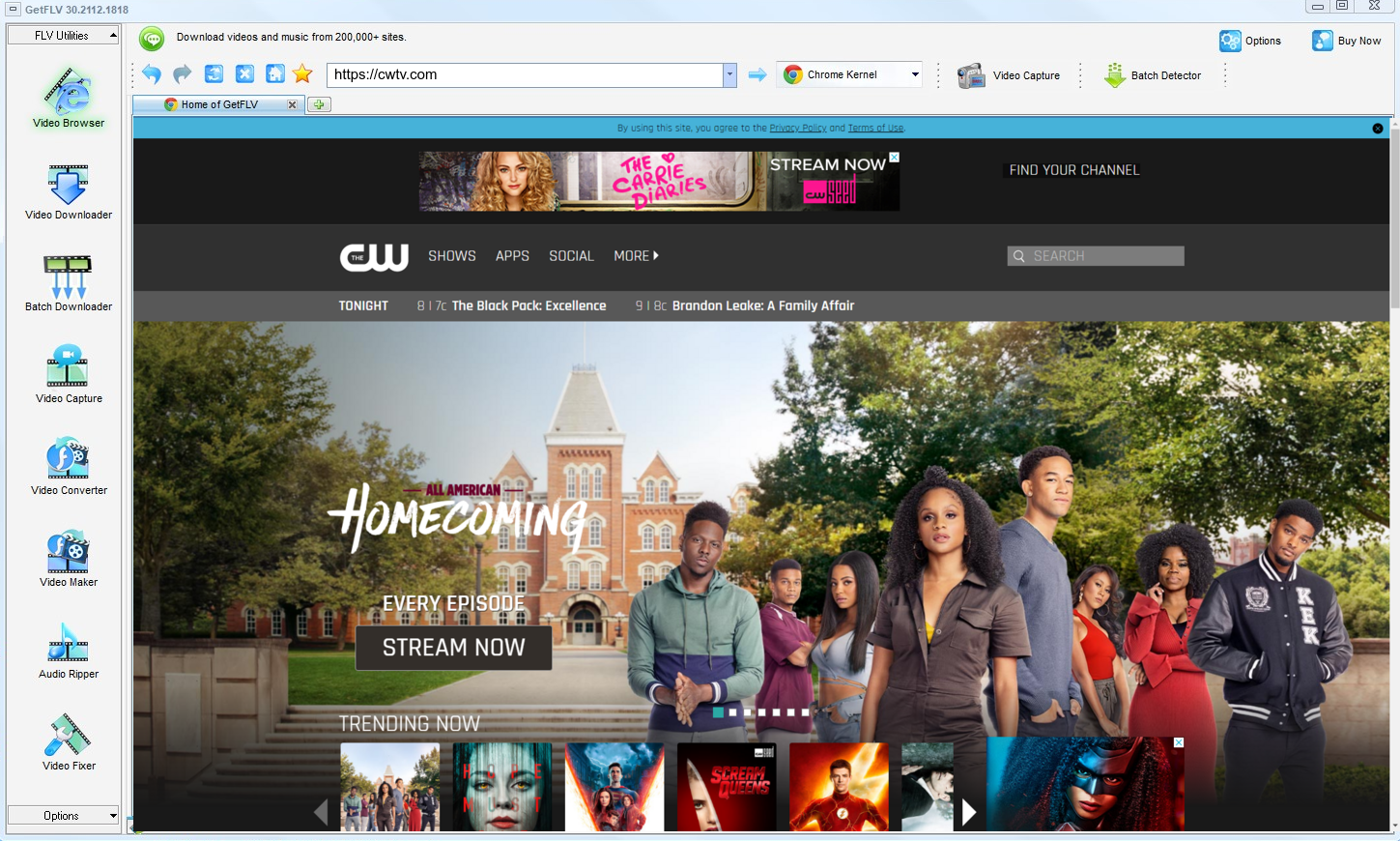
2. Open GetFLV, head over to the CW TV website, play your favorite media, and copy the link

3. Save your CW TV videos

Treat the output like a backup, not like a master copy you are free to publish.
Method 2: Screen recording ★★☆☆☆
Nothing needs to understand the stream — you simply capture the output.
Follow these steps
- Open OBS or your preferred recorder and create a window capture.
- Play the videos on CW TV in full screen.
- Record for the entire runtime; there is no shortcut.
- Stop, export and check for the black-screen problem.
Method 3: Downloader extensions for cwtv.com ★☆☆☆☆
An add-on lives inside the browser and looks for media on the page you are viewing.
Follow these steps
- Install a media downloader add-on and grant its permissions.
- Sign in to cwtv.com and start the title.
- Look for a download badge or a popup entry.
- With segmented, token-protected playback the badge never appears.
Overall Comparison of the Ways to Download CW TV Videos
| Capture the CW TV stream with GetFLV | Screen recording | Downloader extensions for cwtv.com | |
|---|---|---|---|
| Protected content | Supported for entitled titles | Often black | Rarely works |
| Speed (2 hour title) | Roughly 15 min | 2 hours minimum | Fails before finishing |
| Audio and subtitles | Kept as delivered | Captured as played | Sometimes missing |
| Effort per title | Low | Very high | Low effort, low yield |
| Ads and pop-ups | None | No ads | Intrusive |
| Playback on TV or car stereo | No conversion needed | Works after conversion | Format roulette |
What the table shows: Note that the recording column looks acceptable until you reach the protected-content row, where the picture goes black.
Worth Remembering: Safety and Copyright Guidelines for CW TV
Worth remembering:
- Leave watermarks, credits and embedded metadata exactly as they are.
- Keep two-factor authentication on, and never disable it just to make some tool cooperate.
- Higher bitrate means larger files, so plan storage before you archive a long playlist.
- Save for personal offline viewing only — treat every file as a private backup.
- Terms of service vary by region — check the rules that apply to cwtv.com where you live.
Is It Legal to Download CW TV Videos?
Read the CW TV terms once, then apply the common-sense rules below:
- Never share, repost or sell anything you save.
- Follow the terms of cwtv.com and the law in your country.
- Delete the copy when your access to the title ends.
- Do not upload saved files to public or shared storage.
Those four points are the filter we applied to every method below.
Community Verdict: The Best Way to Keep CW TV Videos in 2026
On forums dedicated to storage and media archiving, requests for help with CW TV videos follow a familiar arc. Free services are tried, fail silently, and are abandoned; the advice that survives is always to install professional desktop software and keep it updated.
Web-Based Downloader Limitations: The failure mode people describe is not slow — it is unpredictable. A link that worked on Monday returns nothing on Tuesday, and because the work happens on somebody else's server there is no way to diagnose it or queue around it.
The Black Screen Problem: Sceptical users have tested recorders extensively and posted their findings. Their summary: the technique is universal in theory and unreliable in practice for CW TV, particularly once the account session or paid tier introduces protection.
What Actually Works Reliably: Members who archive at scale are very clear about requirements: original quality, no re-encoding, regular updates. Those criteria filter out every approach except desktop software, which is why the recommendation is repeated verbatim.
How GetFLV CW TV Downloader Answers These Problems: Reliability at scale is the whole point. GetFLV CW TV Downloader processes large lists unattended across more than 1200 websites, maintains the original 1080p or 4K rendition, and adapts quickly to changes at cwtv.com through sustained development.
FAQs About CW TV Videos
QIs it legal to download videos from CW TV?
APersonal use, no redistribution, and legitimate access — those three conditions cover most situations. Anything beyond them, such as sharing files or removing credits, is where users get into trouble.
QCan I use it on iPhone, iPad or Android?
ADesktop for the capture, phone for the watching. That split is deliberate — mobile operating systems sandbox the very playback session a downloader needs.
QWhat happens when CW TV updates its website?
AIf something does stop working, an update is what restores it — not a new workaround you have to find yourself. That is the difference between maintained software and an abandoned script.
QWhy does my screen recording come out black?
ASome users report success with hardware capture, but that adds cost and still costs real time. Capturing the stream avoids the problem entirely.
QIs the output MP4 or something else?
AExpect the same weight as the stream you watched. A 1080p title runs about 2 GB per hour; 4K can be several times that.
QAre captions downloaded together with the video?
AWhere CW TV serves them as part of the stream, yes — available subtitle tracks are listed alongside the video formats and can be downloaded or embedded.
QWhat if CW TV changes its player and the method stops working?
AIf you hit a failure, check the update log first. Most reader reports turn out to be a player change that was already addressed in a newer build.
Update Log
This page is maintained, not abandoned. Here is the record:
- August 2026 — Re-tested all three methods against the current cwtv.com player.
- July 2026 — Refreshed the FAQ with the questions readers ask most this quarter.
- May 2026 — Verified the workflow on the newest Windows 11 and macOS builds.
Community Feedback: GetFLV CW TV Downloader Reviews
Selected reviews from 2026, covering download speed, output quality and how the software holds up after site updates.
The free online pages kept saying "unsupported URL". I installed GetFLV CW TV Downloader, and the title saved straight from the player instead.
Two of the free sites gave me a file with no sound at all. This kept both the picture and the audio at full resolution.
I archive paid tutorials for offline travel. Nothing else managed it reliably until now.
There was one title that stopped working after an update. The next release fixed it.
The version history on the download page tells the story — they ship updates constantly.
Conclusion
Final assessment, in order:
Long lists are where the difference becomes obvious. Ask for fifty videos and only one method on this page will still be working at the end of the afternoon. GetFLV CW TV Downloader handles upwards of 1200 websites, runs every title through multi-threaded download pipelines so even a long list finishes fast, with each file saved at native quality up to 4K. Because our team updates it whenever CW TV changes its player or its embedding, reliability does not decay over time. Try the trial build and see how much of your list completes.
-
1 GetFLV CW TV Downloader Our pick
Quality-safe and consistent: 91% of our test titles completed, each file identical to what CW TV delivered.
-
2 Screen recording
Needs no technical knowledge and no third party, but the fidelity depends entirely on your recorder rather than on CW TV.
-
3 Downloader extensions for cwtv.com
Some days it handles everything short; other days it fails on titles it managed yesterday. That unpredictability is the real problem.
Ready to stop experimenting? GetFLV CW TV Downloader is the one that ends with a file, not an error message.
Keep it lawful, keep it private, and tidy up afterwards.
About the Author & How We Tested

Mandatory disclaimer: Editorial policy: personal, private, temporary copies of content you are entitled to watch. Nothing else is endorsed.