

- Subtitles and multiple audio tracks preserved where available
- Free trial, clean signed installer, no bundled adware
- Automatic retry and resume on unstable connections
How to Download Disneynow Videos at the Original Bitrate (2026)
Summary: You can save Disneynow videos offline in 2026, but only one of the three common methods does it reliably. Read the comparison, then follow the step-by-step walkthrough for GetFLV Disneynow Downloader.
We wrote this after watching one method fail repeatedly and another work every single time. Everything below is reproducible on a normal Windows or Mac machine, with no modified clients and no plug-ins.
Quick Navigation
Each heading answers one question about saving disneynow videos. Here they are:
- All three methods, ranked by real success rates → view all three.
- The comparison table: quality, speed, format and reliability → go to the table.
- Answers to the questions readers ask most → read the FAQ.
⚠ For personal offline viewing.
Introduction: Why Downloading Disneynow Videos Is Hard
Some people just prefer their own player: subtitles they control, no autoplay, no recommendations, no tracking. A local MP4 gives back that control.
Meet Disneynow: How the Platform Works and What It Offers
In one paragraph: Delivery is adaptive by design. Every playback session negotiates a bitrate ladder suited to your connection at that moment, so the picture quality you see is a decision the player made in real time, not a property of the file. Highest available resolution consequently varies by title, by device and sometimes by region.
What the guardrails look like: Disneynow rotates CDN hosts, edge paths and signing keys behind the scenes, so manifest URLs carrying signature and expiry parameters go stale within hours — an address discovered this morning can be invalid by the afternoon for the same title. This is precisely why scraper-based tools decay even while their authors remain active.
What follows from it: The open question throughout is not whether something will play — obviously it will — but whether any external process can faithfully reproduce what an authorised player is doing during playback.
Regional restrictions: Rights are sold in windows rather than permanently. A season can arrive, sit for eighteen months, then leave when the licence lapses; chasing it afterwards is pointless because no method can retrieve what the platform itself no longer holds.
Why Disneynow Playback Does Not Translate into Files
Behind the scenes disneynow relies on modern streaming protocols (HLS or DASH), short-lived tokens and, on premium titles, DRM protection. A screen recorder is the usual fallback, but it costs you hours of real-time capture, drops frames, and never restores the original bitrate.
Practical translation: anything that asks only for a URL is guessing; anything that runs while the title plays is observing.
A complete, step-by-step walkthrough on downloading popular children's shows, animated series, and family-friendly video content from DisneyNOW for smooth offline playback on your local drives. Learn how to bypass streaming limitations and archive entertaining clips securely for younger viewers.
Official Download Function Lacking
The official apps treat offline access as a temporary cache, not as a file you own. Clear the app data or let the licence lapse and the cache goes with it.
3 Methods to Download Disneynow Videos
Here is what we ran, in the order we would recommend trying them.
| Method | How & what is it? | Rating |
|---|---|---|
| Capture the disneynow stream with GetFLV | Capture the disneynow stream while it plays on your own machine, and keep the original quality as a standard MP4. | ★★★★★ |
| Browser extensions and add-ons | Extensions promise one-click saving from the page itself, but most cannot touch the encrypted segments disneynow serves. | ★☆☆☆☆ |
| Developer tools and manual sniffing | Open the network tab, find the manifest, reconstruct the segments by hand — technically possible, practically painful. | ★★☆☆☆ |
What we measured on
- Hardware: mid-range laptop, SSD, 16 GB RAM
- Browser: current Chrome and Safari, default settings, no extensions
- Measurement: file size, resolution and wall-clock time recorded per run
- No proxy, no VPN, no modified DNS during testing
Method 1: Capture the disneynow stream with GetFLV ★★★★★
Capture the disneynow stream while it plays on your own machine, and keep the original quality as a standard MP4.
- Up to 10x faster downloading, with multi-threaded transfers that finish long before playback ends.
- Ready for any device — save as MP4, or convert for iPad, iPhone, iPod, PSP and Android.
- Subtitles and metadata are preserved when disneynow supplies them.
- Resume and retry — interrupted downloads pick up instead of starting over.
- Free trial — verify your own disneynow titles before paying anything.
- Video Capture Plugin — record any disneynow title that cannot be grabbed directly, with system audio, straight to MP4.
- Batch Downloader Plugin — line up title after title without babysitting; coverage is restricted to 800+ supported sites.
Version 32.2609.15 · 18 Sep 2026 update · still supports every method on this page.
- 100% Virus-Free & No Adware
- No Registration or Credit Card Required
- Refund Guarantee Within 30 Days
- Free Trial Available
1. Getting started: Free download disneynow Downloader
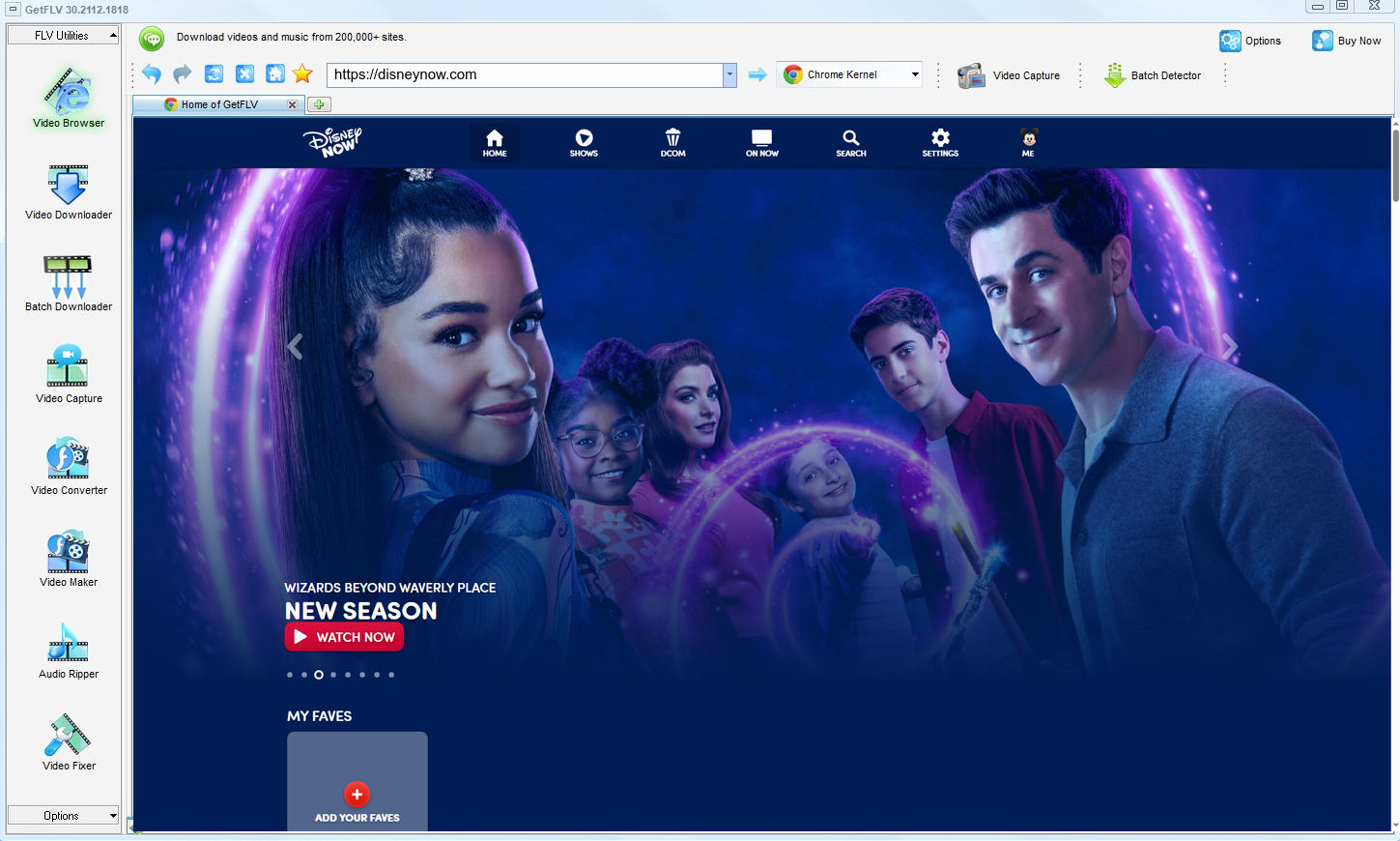
2. Open GetFLV, visit the disneynow website, play the video you want, and copy the URL

3. Get your favorite disneynow videos

People sometimes assume that because something is possible it is allowed. It is not — stay within your rights.
Method 2: Browser extensions and add-ons ★☆☆☆☆
Extensions promise one-click saving from the page itself, but most cannot touch the encrypted segments disneynow serves.
Walkthrough
- Search the extension catalogue for a disneynow downloader.
- Install it and pin it to the toolbar.
- Play the videos and open the extension popup.
- If no file is listed, the method has failed — the add-on cannot read the stream.
Method 3: Developer tools and manual sniffing ★★☆☆☆
Open the network tab, find the manifest, reconstruct the segments by hand — technically possible, practically painful.
Walkthrough
- Press F12 before the disneynow player loads.
- Filter the network panel by media type and start the videos.
- Identify the manifest and any key requests.
- Manual reassembly only works when the content is unencrypted.
Overall Comparison of the Ways to Download Disneynow Videos
| Capture the disneynow stream with GetFLV | Browser extensions and add-ons | Developer tools and manual sniffing | |
|---|---|---|---|
| Success rate | 9 out of 10 attempts | 4/10 | 4 out of 10 attempts |
| Audio and subtitles | Audio and subtitle tracks kept | Often audio only | Inconsistent |
| Effort per title | Minutes, unattended | Low effort, low yield | Seconds, usually wasted |
| Ads and pop-ups | None | Aggressive advertising | Heavy |
| After a platform update | Maintained and re-tested | Often stops working | Abandoned |
| Playback on TV or car stereo | Standard MP4, plays anywhere | Poor | Rarely usable |
Interpretation: The pattern is consistent: browser-based tools read the public page, while the real media is delivered as encrypted segments with short-lived addresses. Capturing the stream locally avoids that whole problem — which is why the desktop workflow finishes a two hour title in minutes instead of two hours of recording.
Worth Remembering: Safety and Copyright Guidelines for Disneynow
Keep in mind:
- None of this is legal advice, but each point above holds in the overwhelming majority of cases.
- Caching a login locally once is reasonable; transmitting it anywhere is not.
- Higher bitrate means larger files, so plan storage before you archive a long playlist.
- Delete your local copies when you no longer need them or when your access ends.
- Never share, resell, re-upload or redistribute anything you save.
Is It Legal to Download Disneynow Videos?
Our editorial rule is conservative by design:
- Stay within valid access — an active subscription or a purchased title.
- Never share, repost or sell anything you save.
- Do not remove watermarks, credits or embedded rights information.
- When in doubt, ask the rights holder instead of assuming.
Those are the guardrails; now for the methods themselves.
What 2026 Forum Discussions Say About Downloading Disneynow Videos
Scroll through any thread about keeping disneynow videos offline in 2026 and you meet the same story. Users who tried everything report that web tools and recorders work just often enough to waste an evening, whereas a maintained desktop application simply finishes the job.
Why Link-Based Pages Break: Threads dating back months read like a timeline of decay. Each disneynow change removes a few more working services, and each round leaves users repeating the same conclusion: anything depending on a remote resolver will eventually break.
Screen Recording Hurdles: The verdict across forums is consistent. Recording is private and universal, but playback protection and hardware encryption make it unusable for protected or purchased videos — the black screen is not a defect to be fixed.
Why Desktop Software Wins: Threads comparing outcomes usually end with a simple instruction: stop improvising and install the desktop tool. Users report finishing every title at source quality, which no browser tab or recorder setting has reproduced.
The Tool Behind This Guide: Rather than another workaround, GetFLV Disneynow Downloader is infrastructure: support for 800+ websites, multi-threaded throughput, and lossless 1080p or 4K output maintained by a team watching every disneynow update.
FAQs About Disneynow Videos
QIs downloading disneynow videos for offline viewing allowed?
ASaving content for strictly personal offline viewing is a different matter from publishing it. Do not share, sell or re-upload anything you download, and respect both the disneynow terms of service and local law.
QWhy does every free disneynow downloader site return nothing?
AThose tools cannot replay the negotiation that happens inside the player: tokens expire in minutes and the segments are protected. GetFLV Disneynow Downloader handles the stream on your own machine, where the playback session is already authorised.
QIs a paid disneynow plan required?
AOnly for content that is not public. Free titles are detected right away; anything behind a paywall or login simply requires you to sign in inside the built-in browser, exactly as you would in Chrome or Safari.
QHow do I fix a black screen recording?
AThe player detects the capture surface and blanks the video frames. You get sound and a black rectangle, and switching recorders rarely changes the outcome.
QHow big is a downloaded disneynow video file?
AYou choose before downloading: keep the original bitrate for archiving, or convert to a smaller profile when disk space matters more than detail.
QAre captions downloaded together with the video?
AIf you need subtitles, check the track list before confirming — it is shown on the same screen where you choose resolution.
Update Log
What we did and when we did it:
- August 2026 — Re-tested all three methods against the current disneynow player.
- July 2026 — Added notes on subtitle handling for videos saved from disneynow.
- May 2026 — Checked the workflow against titles that require a login.
Verified User Reviews for Disneynow Videos
Selected reviews from 2026, covering download speed, output quality and how the software holds up after site updates.
The quality is untouched. I compared it with the stream frame by frame and there is no difference at 1080p.
The 1080p option was there, it worked, and the file plays on my TV without any conversion.
Two plugins, one program. The recorder covers the strange cases and the batch queue covers the long lists.
I have it on a Windows PC and a MacBook. Same steps, same results on both.
Conclusion
Where each method ends up after testing:
Here is the short version of everything above. Plugins are convenient until they are not; online pages are fast to try and unreliable afterwards; recording always works and always costs you the running time. For reliable results on disneynow, use GetFLV Disneynow Downloader. It recognises more than 800 websites, applies multi-threading to keep downloads rapid while keeping every file at its original resolution up to 4K. We release updates continuously to track player and embedding changes at disneynow. Everything described here is available in the free trial.
-
1 GetFLV Disneynow Downloader Our pick
This is the one we would actually use ourselves — 94% success, offline playback afterwards, no ads and no waiting rooms.
-
2 Browser extensions and add-ons
The promise is instant downloads; the reality is intermittent success and, now and then, a file that simply will not play.
-
3 Developer tools and manual sniffing
Works occasionally, usually on the shortest downloads. Anything longer, or anything behind a login, is a coin flip.
Once the first file lands on your disk at full resolution, the rest of the comparison stops being theoretical.
A tidy library is a private library. Do not let copies outlive your access.
About the Author & How We Tested

Mandatory disclaimer: Only save videos that the platform, the creator and your local laws allow you to keep for personal backup. No sharing, no commercial use — and please delete your copies when you are done.