

- Download videos from Disneyplus in up to 1080p and in AAC 2.0 audio track
- Multi-threaded download, up to 10x faster
- Built-in browser: log in once and every entitled title is detected
How to Download Disneyplus Videos on Windows and Mac (2026 Guide)
Summary: We tested every realistic way to download Videos from Disneyplus in 2026 and ranked them by how often they produced a complete, playable file. Online downloader websites rarely survive the encrypted segments used by disneyplus.com; screen recording always works but costs real time and often returns a black picture; GetFLV Disneyplus Downloader captures the original stream and finishes a two hour title in minutes.
Every method here was run on the same machine, on the same connection, against the same disneyplus.com title. That makes the differences in quality, speed and reliability easy to see.
Quick Navigation
Whether you want the steps, the numbers or the legal background, start here:
- Compare the methods, then pick one — start here → go to the methods.
- Which method wins? The comparison table answers it → see the comparison.
- Everything else you may want to know → see the answers.
⚠ Personal offline backup only.
Introduction: Why Downloading Disneyplus Videos Is Hard
Disneyplus works beautifully as long as you are online. The moment you need it on a plane, on a train, or on a device that is not signed in, the model shows its limits.
Meet Disneyplus: How the Platform Works and What It Offers
Disney Plus provides a vast library of movies and series from Disney, Pixar, Marvel, Star Wars, and National Geographic, catering to families and fans of all ages. Because Disneyplus.com employs advanced DRM encryption like Widevine and PlayReady alongside encrypted HLS segment delivery, standard downloading methods are ineffective. Simple browser extensions or online link grabbers cannot process these secured streams, and right-clicking to download is impossible. Screen recording often results in a black screen or significant quality loss due to these built-in protections. However, a specialized desktop downloader designed to handle encrypted delivery can successfully capture these videos. These tools allow you to download your favorite content directly to your Windows or Mac drive in its original high-definition quality for seamless offline viewing.
Rights and rotation: Access is territorial. Licensing is negotiated country by country, so availability is decided by geo-location and often by the country attached to your payment method — which is why some titles simply do not exist in your region no matter how you reach disneyplus.com.
Why Disneyplus Playback Does Not Translate into Files
Once you know that disneyplus.com sends fragments instead of files, the ranking of the three methods below becomes almost predictable.
With that in mind, the three methods differ mainly in where the authorised session lives — and that single difference explains almost all of the results.
Discover how to capture your favorite movies and series from disneyplus.com for permanent offline access. Because Disney+ uses sophisticated encrypted delivery systems, finding a direct download button is impossible for most users. This guide shows how to save these videos anyway, ensuring you enjoy original quality playback on both Windows and Mac without an active internet connection.
Official Download Function Lacking
What viewers actually want is unremarkable: an MP4 they can put on a laptop or a tablet. Disneyplus has never shipped that.
3 Methods to Download Disneyplus Videos
What follows is ordered by reliability, not by popularity in search results.
| Method | How & what is it? | Rating |
|---|---|---|
| GetFLV Disneyplus Downloader for Windows and Mac | A desktop application listens to the playback session you have already authorised and saves the media directly. | ★★★★★ |
| Command-line tools such as yt-dlp | Firmly geek territory: no interface, no support, and no guarantee the extractor still understands disneyplus.com. | ★★☆☆☆ |
| Older one-trick download programs | Freeware from a few years ago that still promises disneyplus downloads — and no longer delivers them. | ★☆☆☆☆ |
Testing conditions
- Network: broadband connection, 100 Mbps or faster
- Playback: standard browser playback, no modified clients
- Test title: a full-length disneyplus videos title with a login requirement
- Repeat count: each method run three times to rule out flukes
Method 1: GetFLV Disneyplus Downloader for Windows and Mac ★★★★★
A desktop application listens to the playback session you have already authorised and saves the media directly.
- Up to 10x faster downloading, with multi-threaded transfers that finish long before playback ends.
- Ready for any device — save as MP4, or convert for iPad, iPhone, iPod, PSP and Android.
- Works on Windows 11/10/7/XP and Mac OS X 10.7+, 32-bit and 64-bit.
- Subtitles and metadata are preserved when disneyplus supplies them.
- Private by design — everything runs on your machine; nothing is uploaded anywhere.
- Resume and retry — interrupted downloads pick up instead of starting over.
- Video Capture Plugin — record any disneyplus title that cannot be grabbed directly, with system audio, straight to MP4.
- Batch Downloader Plugin — handle a long list automatically, limited to the 1000+ websites where batch grabbing is supported.
Last release: 32.2609.15 on September 18, 2026. Older builds are replaced automatically.
- 100% Virus-Free & No Adware
- No Registration or Credit Card Required
- Refund Guarantee Within 30 Days
- Free Trial Available
1. Easy setup: Free download disneyplus Downloader
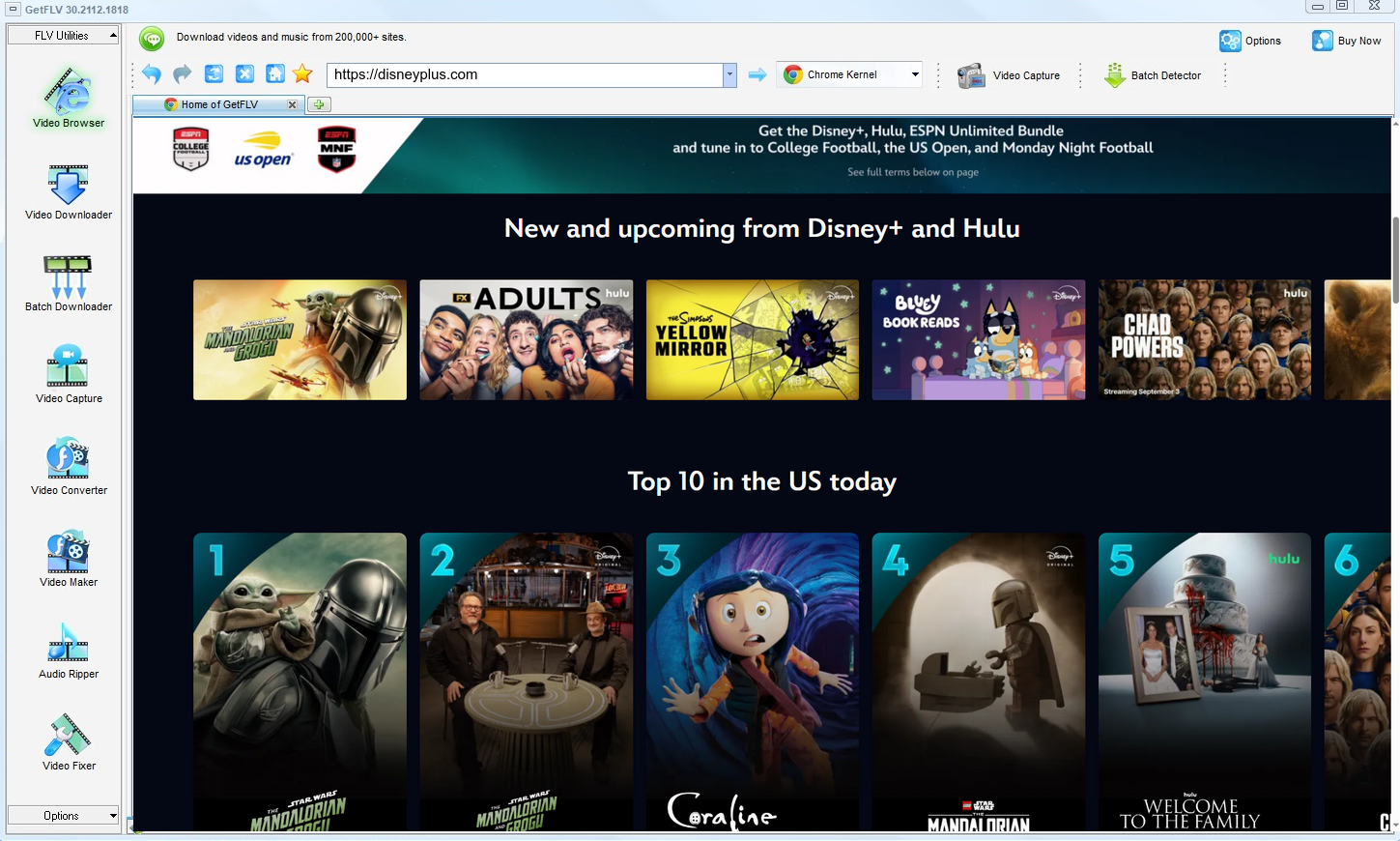
2. Launch GetFLV, browse over to the disneyplus website, play the stream, and copy its URL

3. Begin downloading disneyplus videos

A personal library on your own disk is one thing. Uploading it anywhere is another, and not one we endorse.
Method 2: Command-line tools such as yt-dlp ★★☆☆☆
Firmly geek territory: no interface, no support, and no guarantee the extractor still understands disneyplus.com.
How to do it
- Get yt-dlp running from the command line and keep it updated.
- Add authentication where the title requires an account.
- Request the best available format.
- Then debug whatever the extractor reports — not most people's idea of a Friday night.
Method 3: Older one-trick download programs ★☆☆☆☆
Freeware from a few years ago that still promises disneyplus downloads — and no longer delivers them.
How to do it
- Download one of the older freeware downloaders still listed in search results.
- Install it and paste the disneyplus link.
- Press the download button and wait.
- It fails, because the detection rules were written for a player that no longer exists.
Overall Comparison of the Ways to Download Disneyplus Videos
| GetFLV Disneyplus Downloader for Windows and Mac | Command-line tools such as yt-dlp | Older one-trick download programs | |
|---|---|---|---|
| Success rate | 9/10 | 4/10 | About 40% |
| Protected content | Supported for entitled titles | Very limited | Limited |
| Audio and subtitles | All detected tracks | Inconsistent | Inconsistent |
| Cost | Paid, with a refund window | Free but ad-heavy | Free with limits |
| Privacy | No upload at all | Opaque | Opaque |
| Learning curve | Four clicks | No setup | One field |
| Playback on TV or car stereo | Standard MP4, plays anywhere | Unlikely to play at all | Unlikely to play at all |
The takeaway: The online column is genuinely convenient on the rare title it handles. The problem is that you cannot know in advance which those are.
Worth Remembering: Safety and Copyright Guidelines for Disneyplus
Ground rules:
- Passing a private copy to people who have not paid is the fastest way to lose your account.
- Prefer local parsing. Anything you can already play should never have to leave your own machine.
- Do not convert "just in case" — every re-encode costs quality and solves nothing.
- Delete your local copies when you no longer need them or when your access ends.
- An active subscription or a purchased title is the baseline for a legitimate personal copy.
Is It Legal to Download Disneyplus Videos?
Two ideas matter here: whether you had legitimate access, and whether you keep the copy private.
- Use the file for personal offline viewing only.
- Respect regional age and content rules that apply to disneyplus.
- Do not upload saved files to public or shared storage.
- Do not use saved files commercially, in any form.
We will not repeat this later, so note it now: legitimate access only.
What Repeated Threads Say About Disneyplus Videos Downloads in 2026
Users comparing notes on disneyplus.com generally agree on two things. Quick web services are fine for a throwaway clip, and anything worth keeping demands proper software installed locally, updated often, and consistent enough to reuse every time.
What Users Report About Online Downloaders: Members often point out the maintenance asymmetry: disneyplus has engineers updating its player continuously, while a free downloader page usually has nobody. The result is predictable, and users have stopped being surprised by it.
Issues Users Hit When Recording: The community consensus is that recording is a fallback, not a method. It works when nothing else does, which is precisely why relying on it for anything valuable means accepting black screens, audio drift and real-time waiting.
Why Desktop Software Wins: Threads comparing outcomes usually end with a simple instruction: stop improvising and install the desktop tool. Users report finishing every title at source quality, which no browser tab or recorder setting has reproduced.
How GetFLV Disneyplus Downloader Answers These Problems: The difference is design intent. GetFLV Disneyplus Downloader exists for archiving rather than novelty, so it pairs multi-threaded downloading with original-quality output, support spanning 1000+ websites, and updates that keep pace with disneyplus changes instead of waiting to be fixed.
FAQs About Disneyplus Videos
QWhat makes browser extensions useless on disneyplus?
AThose tools cannot replay the negotiation that happens inside the player: tokens expire in minutes and the segments are protected. GetFLV Disneyplus Downloader handles the stream on your own machine, where the playback session is already authorised.
QHow good is the downloaded file compared with the stream?
AWhatever the player would show you at its best setting. Because the method captures rather than recompresses, there is no generational loss between the stream and your file.
QHow long does a two hour title actually take?
ASpeed also affects reliability: the longer a capture runs, the more chances something interrupts it. Shorter jobs fail less.
QIs the output MP4 or something else?
AExpect the same weight as the stream you watched. A 1080p title runs about 2 GB per hour; 4K can be several times that.
QCan I keep the subtitle tracks as well?
ASubtitles delivered as separate text tracks are detected and can be kept as files or muxed into the MP4. Burned-in captions are already part of the picture.
QDo you update the tool when disneyplus breaks it?
AThat happens periodically, and it is why this page carries an update log. The downloader is updated to follow player changes, and we re-verify the workflow after each release.
Update Log
What we did and when we did it:
- September 2026 — Confirmed downloading still works after the disneyplus layout change.
- August 2026 — Re-measured capture speed after a network upgrade in our test lab.
- June 2026 — Checked the workflow against titles that require a login.
Community Feedback: GetFLV Disneyplus Downloader Reviews
Reviews below are grouped by the reason each person installed the program in the first place.
Fast, and no re-encoding. The file I got is exactly what disneyplus was sending to my browser.
Fast downloads and the original resolution — the two things every other tool I tried got wrong.
The built-in browser means I never have to hand my credentials to a random website.
The trial let me verify my own disneyplus titles before paying anything. That is how it should be done.
Conclusion
Final assessment, in order:
The honest summary is that only one option here scales beyond a handful of clips. GetFLV Disneyplus Downloader was built for volume from the start: support for more than 1000 websites, multi-threaded downloads that keep even large files moving at speed while retaining every pixel of the original 1080p or 4K rendition. Add regular updates that track how disneyplus delivers media, and it becomes the obvious default. If you are unsure, the free trial settles the question faster than any amount of reading.
-
1 GetFLV Disneyplus Downloader Our pick
What separates it from the others is consistency: 91% across our 2026 run against the current disneyplus.com player.
-
2 Command-line tools such as yt-dlp
Convenient until it is not. No installation, but no consistency either, and several attempts stalled on a "processing" screen.
-
3 Older one-trick download programs
Works occasionally, usually on the shortest downloads. Anything longer, or anything behind a login, is a coin flip.
Start with one title you already have access to. If it saves at full quality, work through the rest of your list and you are done.
One last reminder: private copy, no sharing, delete when done.
About the Author & How We Tested

Mandatory disclaimer: Only save videos that the platform, the creator and your local laws allow you to keep for personal backup. No sharing, no commercial use — and please delete your copies when you are done.