

- Standard MP4 output that plays on any device, phone included
- Subtitles and multiple audio tracks preserved where available
- Convert for iPad, iPhone, Android or PSP without extra tools
How to Download Fanza Videos at the Original Bitrate (2026)
Summary: Fanza has no built-in save button for most of its catalogue, so viewers who want an offline copy have to improvise. Here are the three approaches worth trying in 2026, ranked from least to most reliable, with steps for the one we recommend.
If you have already tried to save Fanza videos, you probably met one of these: the download never starts, the file is empty, or the recording comes out black. This guide compares the three practical approaches and shows which one still delivers a complete, full-quality file in 2026.
Quick Navigation
Short on time? Use the map below — every section is independent, so you can read only what matters to you.
- Compare the methods, then pick one — start here → read the methods.
- See the three methods measured against each other → jump to the table.
- Short answers to the most common doubts → view the FAQ.
⚠ Personal offline backup only.
Introduction: Why Downloading Fanza Videos Is Hard
Bandwidth is not the only reason. Plenty of viewers want to archive a series before it is edited, dubbed or removed, and a local copy is the only way to be sure the version you saw stays available to you.
Fanza Basics: Positioning, Library and Access Model
Fanza is a premier Japanese digital marketplace providing an extensive collection of adult entertainment, anime, and movies to millions of users. However, securing this content for offline use is difficult due to the platform’s reliance on robust DRM systems like Widevine and encrypted HLS stream delivery. These advanced safeguards, combined with short-lived access tokens, mean that traditional browser-based grabbers and simple 'download as' commands are completely ineffective. While screen recording is a common fallback, it often leads to frame drops and poor quality. Fortunately, specialized desktop software built to handle encrypted video streams can reliably capture Fanza.com content in original quality for high-definition offline playback on Windows and Mac.
Licensing windows: Even within one territory the terms vary by tier: an ad-supported plan may cap resolution or block certain episodes entirely, while the paid tier unlocks the same catalogue at higher bitrate and occasionally permits offline playback inside the official app.
Why Fanza Playback Does Not Translate into Files
Behind the scenes fanza.com relies on modern streaming protocols (HLS or DASH), short-lived tokens and, on premium titles, DRM protection. A screen recorder is the usual fallback, but it costs you hours of real-time capture, drops frames, and never restores the original bitrate.
We should also say what this guide is not: we are not interested in bypassing anything you are not entitled to access.
Discover how to capture and store your favorite media from fanza.com for permanent offline access. Because the platform uses sophisticated encryption to prevent direct saving, finding a reliable method can be challenging. This guide demonstrates how to successfully archive these videos in their original resolution on both Windows and Mac. Enjoy high-quality playback anywhere without worrying about internet connectivity or expiring links.
Official Download Function Lacking
What viewers actually want is unremarkable: an MP4 they can put on a laptop or a tablet. Fanza has never shipped that.
3 Methods to Download Fanza Videos
Three options, from the lazy one to the reliable one:
| Method | How & what is it? | Rating |
|---|---|---|
| GetFLV Fanza Downloader for Windows and Mac | The method that addresses the actual problem — encrypted segments — by capturing them as they arrive. | ★★★★★ |
| Screen capture with audio | Open the title on fanza.com and record your screen while it plays. | ★★★☆☆ |
| Older one-trick download programs | Once-popular programs that stopped being maintained: they fail after every fanza update and never recover. | ★★☆☆☆ |
Test environment
- Network: broadband connection, 100 Mbps or faster
- Browser: current Chrome and Safari, default settings, no extensions
- No proxy, no VPN, no modified DNS during testing
- Recorders tested: OBS Studio and two commercial screen capture tools
Method 1: GetFLV Fanza Downloader for Windows and Mac ★★★★★
The method that addresses the actual problem — encrypted segments — by capturing them as they arrive.
- Up to 10x faster downloading, with multi-threaded transfers that finish long before playback ends.
- Keeps the best available quality — HD, 1080p or 4K, exactly as delivered by fanza.
- Works on Windows 11/10/7/XP and Mac OS X 10.7+, 32-bit and 64-bit.
- Private by design — everything runs on your machine; nothing is uploaded anywhere.
- Resume and retry — interrupted downloads pick up instead of starting over.
- Clean installer — no bundled adware, signed and verified.
- Video Capture Plugin — capture playback from fanza.com with sound when direct grabbing is blocked, and keep the original frame rate.
- Batch Downloader Plugin — queue many titles in one pass; available on 1200+ selected sites only, not on every website.
Latest build: 32.2609.15 · released 18 Sep 2026 · verified working on fanza.com.
- 100% Virus-Free & No Adware
- No Registration or Credit Card Required
- Refund Guarantee Within 30 Days
- Free Trial Available
1. Easy setup: Free download fanza Downloader
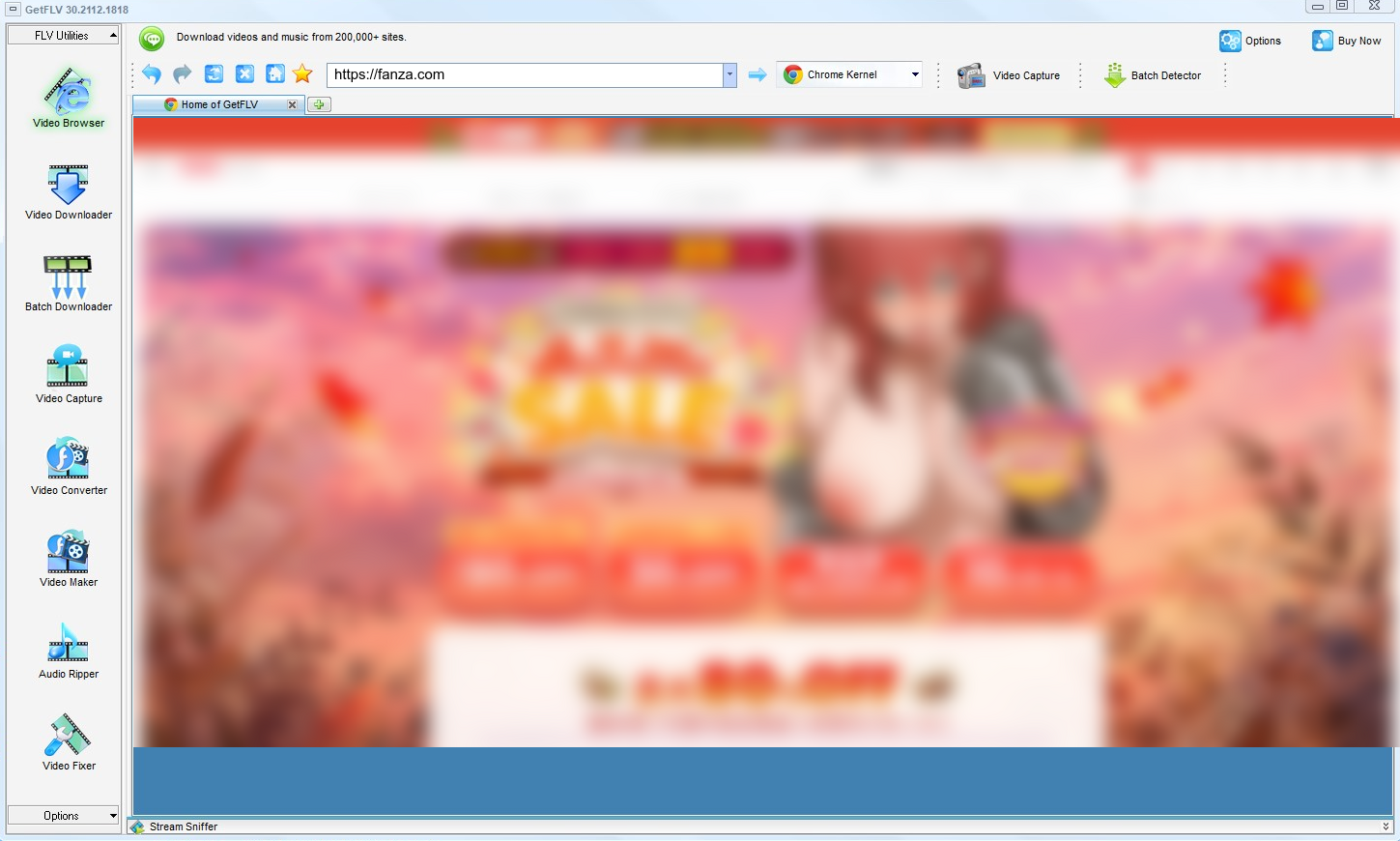
2. Launch GetFLV, browse over to the fanza website, play the stream, and copy its URL

3. Begin downloading fanza videos

Treat the output like a backup, not like a master copy you are free to publish.
Method 2: Screen capture with audio ★★★☆☆
Open the title on fanza.com and record your screen while it plays.
Steps
- Choose a capture region that matches the player exactly.
- Start recording, then switch to the fanza page and press play.
- Keep the machine awake and quiet until playback ends.
- Stop the capture and inspect the output before deleting the original plan.
Method 3: Older one-trick download programs ★★☆☆☆
Once-popular programs that stopped being maintained: they fail after every fanza update and never recover.
Steps
- Download one of the older freeware downloaders still listed in search results.
- Install it and paste the fanza link.
- Press the download button and wait.
- It fails, because the detection rules were written for a player that no longer exists.
Overall Comparison of the Ways to Download Fanza Videos
| GetFLV Fanza Downloader for Windows and Mac | Screen capture with audio | Older one-trick download programs | |
|---|---|---|---|
| Audio and subtitles | Audio and subtitle tracks kept | System audio only | Inconsistent |
| Output format | MP4, optionally converted | MP4 or MKV re-encode | Unpredictable |
| Cost | Free trial, then a licence | No extra cost | No charge, many ads |
| Privacy | Local processing only | Fully local | URL sent to a remote server |
| After a platform update | Patched regularly | Stable but slow | Unpredictable |
| Playback on TV or car stereo | Works out of the box | Works after conversion | Format roulette |
Reading the numbers: The online column is genuinely convenient on the rare title it handles. The problem is that you cannot know in advance which those are.
Worth Remembering: Safety and Copyright Guidelines for Fanza
Four rules we follow ourselves:
- Adults only (18+). If you are under 18, please close this page now.
- Leave watermarks, credits and embedded metadata exactly as they are.
- If a service demands your login before doing anything, that is the moment to close the tab.
- Insist on original-size output — anything that rescales on the way out has thrown away the quality you paid for.
- Use these methods only for videos you are legitimately allowed to access.
- Keep the files on devices you control; do not upload them to public clouds or group chats.
Is It Legal to Download Fanza Videos?
The legal picture depends on your country and on what you do with the file, but these points hold almost everywhere:
- Never share, repost or sell anything you save.
- Do not remove watermarks, credits or embedded rights information.
- Respect regional age and content rules that apply to fanza.
- Do not use saved files commercially, in any form.
Those four points are the filter we applied to every method below.
What the Community Actually Recommends for Saving Fanza Videos (2026)
Community discussions about fanza.com downloads tend to converge fast. Experienced members dismiss patched-together approaches almost immediately, and steer newcomers towards one thing: a desktop downloader that reads the authorised stream rather than guessing at it.
Why Link-Based Pages Break: Another recurring theme is how these services handle anything behind a login. Users report that paid or members-only titles fail almost immediately, and that no amount of refreshing changes the outcome once authorisation is involved.
Why Recording Falls Short: The phrase used repeatedly is that you get what is on screen, which sounds reassuring until the screen goes black mid-capture. Users report discovering hours too late that nothing usable was saved.
Where the Agreement Lands: Threads asking how to save locked posts, member-only clips or direct messages mark the point where other approaches stop working. In those discussions the consensus is unambiguous: reliable high-definition capture without dropped frames requires a dedicated desktop application.
Why Our Software is the Ultimate Solution: Users who switched report the same change in perspective. The task stopped being a problem to solve every few months and became routine: save the title, keep original quality, let the next update handle whatever fanza changes next.
FAQs About Fanza Videos
QIs it legal to download videos from fanza?
AThe short answer: a private backup of something you can already watch is one thing; distribution is another. Stay on the private side and you are on solid ground.
QWhat happens when fanza updates its website?
AThat is the main advantage over the other two methods. Web tools fail silently when fanza changes and no update ever arrives; here the fix is published and the steps on this page stay valid.
QHow fast is it compared with screen recording?
AThe gap grows with length. A short clip is a matter of seconds either way; a full season is the difference between an afternoon and a coffee break.
QHow do I fix a black screen recording?
AThat is playback protection, not a bug. When a recorder attaches to the video layer, the player masks the picture while audio continues. No setting on your device overrides it.
QAre captions downloaded together with the video?
AWhere fanza serves them as part of the stream, yes — available subtitle tracks are listed alongside the video formats and can be downloaded or embedded.
QCan I trust the installer?
AWe install it on every test machine in the lab and have never seen a bundled offer or a background service that outlives the uninstall.
Update Log
Transparency about what changed, and when:
- October 2026 — Re-measured capture speed after a network upgrade in our test lab.
- September 2026 — Clarified the resolution limits for free versus paid fanza accounts.
- July 2026 — Expanded the notes on why recordings turn black on protected titles.
- April 2026 — Reviewed the legal baseline section for accuracy.
User Reviews: What People Say About GetFLV Fanza Downloader
Short reviews from people who tried the methods on this page and ended up staying with GetFLV Fanza Downloader.
Free tools are fine until fanza changes something, then they are useless. I have been using this for months with the same result every time.
I have been using this for over a year. Every time fanza.com tweaks something, a new version follows.
Set it up in about two minutes. I am not technical and I had a file saved before my coffee was cold.
I like that it is a real application rather than another browser tab that might vanish tomorrow.
Conclusion
Final assessment, in order:
The distance between "technically possible" and "actually convenient" is where most of these methods fail. A file that takes forty minutes to record is not convenient; a page that errors out on half your links is not either. GetFLV Fanza Downloader sits on the convenient side. Support spans more than 1200 websites, a multi-threaded core pulls pieces in parallel so even long titles finish quickly, always at the source quality up to 4K. A full-time development team keeps it aligned with fanza changes. You can verify all of this yourself in the free trial.
-
1 GetFLV Fanza Downloader Our pick
This is the one we would actually use ourselves — 94% success, offline playback afterwards, no ads and no waiting rooms.
-
2 Screen capture with audio
Keeps working after every fanza update, which is its one real advantage. The picture going black is the recurring cost.
-
3 Older one-trick download programs
Acceptable for a single fanza clip in a pinch, too fragile for regular use, and it hands your link to a server you do not control.
Capture on desktop, watch anywhere. That is the whole workflow, and it is free to try.
Personal backup today, deletion tomorrow. That is the intended lifecycle.
About the Author & How We Tested

Mandatory disclaimer: This content is for adults (18+) only. Respect the creator, respect the platform terms, and keep the files to yourself.