

- Keep the original stream — no screen recording, no re-encoding
- Standard MP4 output that plays on any device, phone included
- Works on Windows 11/10 and macOS, 32-bit and 64-bit
How to Download Filmin Videos at the Original Bitrate (2026)
Summary: Filmin has no built-in save button for most of its catalogue, so viewers who want an offline copy have to improvise. Here are the three approaches worth trying in 2026, ranked from least to most reliable, with steps for the one we recommend.
If you have already tried to save Filmin videos, you probably met one of these: the download never starts, the file is empty, or the recording comes out black. This guide compares the three practical approaches and shows which one still delivers a complete, full-quality file in 2026.
Quick Navigation
No need to read top to bottom — the links below take you straight to the useful parts.
- How each method works, with what we liked and did not → see all methods.
- Which method wins? The comparison table answers it → read the comparison.
- FAQ — from file format to whether you need an account → read the questions.
⚠ Lawful access assumed throughout.
Introduction: Why Downloading Filmin Videos Is Hard
There is a quiet difference between watching something and having it. filmin.es is built around the first; this guide is written for people who need the second.
What Filmin Is — and Why That Shapes How You Can Keep Anything
Filmin specializes in curated independent cinema and festival films. Since their platform utilizes strict video protection to safeguard artistic works, our download service offers a reliable way to secure these hard-to-find films for your private offline viewing.
The short version: Metadata is richer than most people expect: chapters, multiple audio tracks, subtitle languages and alternate cuts all travel alongside the picture. Whatever you capture later should ideally keep those tracks rather than flattening everything into one silent video file.
What the guardrails look like: Even without full DRM, encryption is common at the segment level: AES-128 or SAMPLE-AES keys delivered over a separate request, rotated regularly, and valid only for a short window. Anyone replaying the request outside that window receives an error instead of video.
Where and when it plays: Access is territorial. Licensing is negotiated country by country, so availability is decided by geo-location and often by the country attached to your payment method — which is why some titles simply do not exist in your region no matter how you reach filmin.es.
The Technical Reasons Downloading from Filmin Is Not Straightforward
The practical consequence is that the easy methods fail late. You paste a link, wait, and only discover at the very end that the output is 0KB or unplayable.
The good news is that the reliable path is also the least effortful one once it is set up.
Discover how to archive independent European movies, festival selections, and curated cinema streams from the specialized Spanish platform Filmin. Keep your artistic film collection accessible without a network connection.
Official Download Function Lacking
Even the download icons inside the filmin app produce encrypted containers you cannot play elsewhere — convenient on the same phone, useless anywhere else.
3 Methods to Download Filmin Videos
Here is what we ran, in the order we would recommend trying them.
| Method | How & what is it? | Rating |
|---|---|---|
| GetFLV Filmin Downloader (Windows and Mac) | Work with the stream instead of the page: install GetFLV Filmin Downloader, play the title, pick a resolution, save. | ★★★★★ |
| Terminal tools like yt-dlp | A scriptable downloader that depends on community-written extractors — when filmin changes, the extractor breaks. | ★★☆☆☆ |
| Browser developer tools (F12) | A manual method: watch the requests, copy the playlist URL and stitch the pieces together yourself. | ★★☆☆☆ |
Test environment
- Network: broadband connection, 100 Mbps or faster
- Desktop: Windows 11 and macOS, both with the current GetFLV Filmin Downloader build
- Repeat count: each method run three times to rule out flukes
- Measurement: file size, resolution and wall-clock time recorded per run
Method 1: GetFLV Filmin Downloader (Windows and Mac) ★★★★★
Work with the stream instead of the page: install GetFLV Filmin Downloader, play the title, pick a resolution, save.
- Up to 10x faster downloading, with multi-threaded transfers that finish long before playback ends.
- Keeps the best available quality — HD, 1080p or 4K, exactly as delivered by filmin.
- Works on Windows 11/10/7/XP and Mac OS X 10.7+, 32-bit and 64-bit.
- Resume and retry — interrupted downloads pick up instead of starting over.
- Video Capture Plugin — a fallback for anything filmin protects: record it while it plays, picture and audio together.
- Batch Downloader Plugin — queue many titles in one pass; available on 800+ selected sites only, not on every website.
Latest build: 32.2609.15 · released 18 Sep 2026 · verified working on filmin.es.
- 100% Virus-Free & No Adware
- No Registration or Credit Card Required
- Refund Guarantee Within 30 Days
- Free Trial Available
1. Jump right in: Free download filmin Downloader
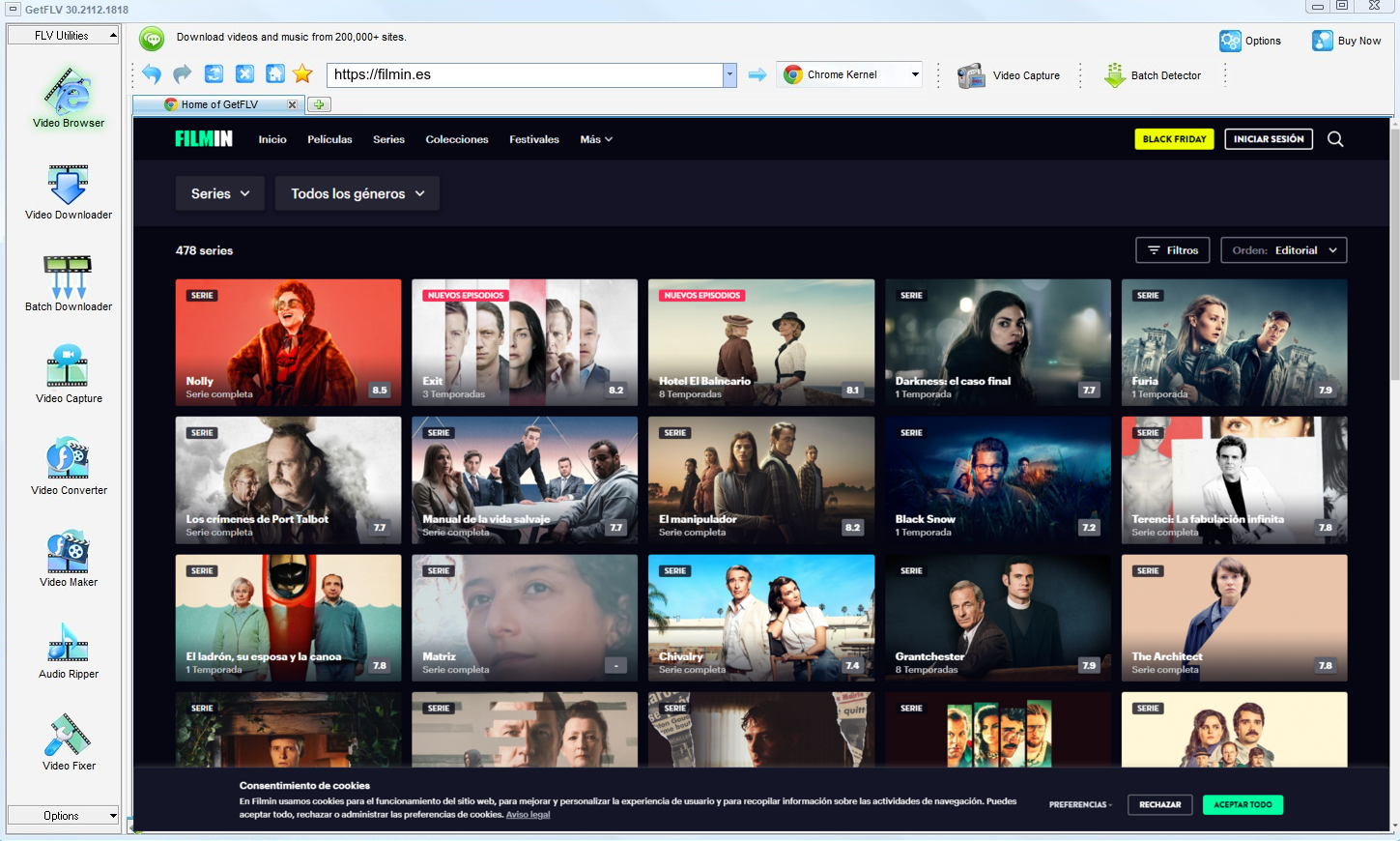
2. Open GetFLV, visit the filmin website, start playing the video, and grab its address

3. Enjoy downloading filmin videos

The point is convenience, not avoidance of the rights holder. Act accordingly.
Method 2: Terminal tools like yt-dlp ★★☆☆☆
A scriptable downloader that depends on community-written extractors — when filmin changes, the extractor breaks.
Follow these steps
- Install Python and yt-dlp, then update to the newest build.
- Export cookies from your browser so titles behind a login can be reached.
- Run the command with the filmin URL and the format options you want.
- If the extractor fails — common after a site update — you are left with an error log.
Method 3: Browser developer tools (F12) ★★☆☆☆
A manual method: watch the requests, copy the playlist URL and stitch the pieces together yourself.
Follow these steps
- Open filmin.es, press F12 and switch to the Network tab.
- Reload the page and filter requests for manifest, m3u8 or mpd files.
- Copy the playlist URL and open it to see the segment list.
- Download each segment and merge them — unless the keys are protected, in which case the files stay unreadable.
Overall Comparison of the Ways to Download Filmin Videos
| GetFLV Filmin Downloader (Windows and Mac) | Terminal tools like yt-dlp | Browser developer tools (F12) | |
|---|---|---|---|
| Success rate | Around 90% | 4/10 | 4 out of 10 attempts |
| Resolution | Source quality, up to 4K | 720p, medium | 720p, medium |
| Speed (2 hour title) | About 15 minutes | Fails before finishing | Often fails |
| Effort per title | Low | Low effort, low yield | Quick to try |
| Cost | Paid, with a refund window | Free with limits | Free with limits |
| Privacy | Local processing only | Unknown logging | Unknown logging |
The takeaway: Two columns fail for the same underlying reason, and the third succeeds for the opposite one. Everything else — speed, format, staying power — follows from that single difference.
Worth Remembering: Safety and Copyright Guidelines for Filmin
Ground rules:
- Downloading does not transfer ownership: the creator still holds the rights and every condition attached to them.
- Online download services see every URL you submit and sometimes more — a trade-off you do not have to make.
- Keep subtitles and chapters when the platform provides them, and check what the tool actually carries across.
- Never share, resell, re-upload or redistribute anything you save.
- Keep the files on devices you control; do not upload them to public clouds or group chats.
Is It Legal to Download Filmin Videos?
A short, practical baseline before you save anything:
- Never share, repost or sell anything you save.
- Follow the terms of filmin.es and the law in your country.
- Respect regional age and content rules that apply to filmin.
- Do not upload saved files to public or shared storage.
Everything that follows assumes those conditions hold.
What Experienced Users Advise About Saving Filmin Videos in 2026
Reading dozens of filmin threads produces a clear picture. Users are not short of options; they are short of dependable ones. The options that hold up under scrutiny are desktop applications that handle the stream directly and are updated when platforms change.
What Users Report About Online Downloaders: Community veterans advise against building any routine around web downloaders. These services were never designed for archival reliability; they were designed for quick single use, and they break the instant a platform revises its embedding technology.
Limitations of Screen Capture: Users appreciate that recording always appears to work, and learn quickly why that impression is misleading. Real-time capture cannot read encrypted playback, so on filmin it frequently produces hours of black video rather than a single usable file.
The Desktop Advantage: Ask about saving content for travel or unreliable connections and the community answer rarely varies. Install desktop software, capture properly, carry real files — advice that follows directly from everyone else's failed attempts.
Why Our Software is the Ultimate Solution: Reliability at scale is the whole point. GetFLV Filmin Downloader processes large lists unattended across more than 800 websites, maintains the original 1080p or 4K rendition, and adapts quickly to changes at filmin.es through sustained development.
FAQs About Filmin Videos
QWhy do online downloaders and browser extensions fail on filmin?
ARemote downloaders see the shop window, not the stock room. Only a tool that participates in the live session can see what the player is actually fetching.
QDo I have to log in before I can download anything?
AOnly for content that is not public. Free titles are detected right away; anything behind a paywall or login simply requires you to sign in inside the built-in browser, exactly as you would in Chrome or Safari.
QWhat happens when filmin updates its website?
APlayer redesigns break browser extensions and online pages first. Because this runs locally and reads the stream directly, changes are absorbed by a software update instead of leaving you with an error.
QHow long does a two hour title actually take?
AMulti-threaded transfer compounds it — a two hour title finishes in minutes instead of two hours of real-time recording.
QHow big is a downloaded filmin video file?
AStandard MP4 with the original video and audio tracks, so file size follows the bitrate: roughly 1 to 3 GB per hour at 1080p, less if you pick a lower profile.
QDo you update the tool when filmin breaks it?
AStreaming platforms change their players every few months. When they do, the detector is patched; the update log at the bottom records the date we last re-tested.
Update Log
Maintenance log:
- August 2026 — Refreshed the FAQ with the questions readers ask most this quarter.
- July 2026 — Removed a method that no longer returns a playable file.
- May 2026 — Clarified the resolution limits for free versus paid filmin accounts.
Verified User Reviews for Filmin Videos
Read what happened when people swapped the methods above for GetFLV Filmin Downloader on filmin.es.
I wasted an evening on free web tools before finding this. The difference is night and day: one clean file, full length, no re-encoding.
The 1080p option was there, it worked, and the file plays on my TV without any conversion.
Protected playback was the sticking point for every downloader I tried before. Not for this one.
Conclusion
Where each method ends up after testing:
There is a reason desktop software still wins this category. It sees the authorised stream directly instead of guessing from a URL, which is why results stay consistent. GetFLV Filmin Downloader extends that advantage further: support for upwards of 800 websites including filmin.es, multi-threaded pipelines that finish quickly, and output that stays untouched at native 1080p or 4K. A dedicated team keeps it current as filmin evolves its front end and delivery methods. All of it is testable in the free trial, which requires no payment details.
-
1 GetFLV Filmin Downloader Our pick
The only one of the three that finished every title we queued on filmin.es: a 94% success rate, full source resolution, and no re-encoding.
-
2 Terminal tools like yt-dlp
Some days it handles everything short; other days it fails on titles it managed yesterday. That unpredictability is the real problem.
-
3 Browser developer tools (F12)
Fastest to try and free, but it only resolved short filmin clips for us — full titles timed out or came back at reduced quality.
The trial costs nothing and needs no card, so the only thing you risk is a couple of minutes.
Save what you are entitled to, keep it to yourself, remove it when you are finished.
About the Author & How We Tested

Mandatory disclaimer: The guidance above assumes you already have the right to watch the videos; it does not create that right.