

- Download videos from your Collections fastly
- Keep the original stream — no screen recording, no re-encoding
- Subtitles and multiple audio tracks preserved where available
How to Download ITV Player Videos in 2026 (Step by Step Guide)
Summary: If you want ITV Player videos on your laptop, tablet or phone without streaming them again, you have three options. We tried all three on itv.com and documented the results, including the quality you actually get and how long a two hour title takes.
We wrote this after watching one method fail repeatedly and another work every single time. Everything below is reproducible on a normal Windows or Mac machine, with no modified clients and no plug-ins.
Quick Navigation
No need to read top to bottom — the links below take you straight to the useful parts.
- All three methods, ranked by real success rates → start here.
- See the three methods measured against each other → see the comparison.
- Answers to the questions readers ask most → read the FAQ.
⚠ Lawful access assumed throughout.
Introduction: Why Downloading ITV Player Videos Is Hard
Ask anyone who travels for work why they want ITV Player videos offline and you get the same answer: streaming assumes a connection you do not always have. A local file removes that assumption entirely.
ITV Player 101: Understanding the Platform First
The short version: Delivery is adaptive by design. Every playback session negotiates a bitrate ladder suited to your connection at that moment, so the picture quality you see is a decision the player made in real time, not a property of the file. Highest available resolution consequently varies by title, by device and sometimes by region.
Streaming architecture: Where advertising is inserted, it is stitched into the timeline rather than shown alongside it, which shifts fragment boundaries with every playback. Timestamps captured on one run are therefore rarely reproducible on the next.
The takeaway: Rights holders benefit from this design and viewers inherit its constraints: the more valuable the catalogue, the more carefully it is wrapped, and the fewer generic methods will ever touch it.
How long it stays available: Rights are sold in windows rather than permanently. A season can arrive, sit for eighteen months, then leave when the licence lapses; chasing it afterwards is pointless because no method can retrieve what the platform itself no longer holds.
So Why Does Downloading from ITV Player Fail So Often?
Behind the scenes itv.com relies on modern streaming protocols (HLS or DASH), short-lived tokens and, on premium titles, DRM protection. A screen recorder is the usual fallback, but it costs you hours of real-time capture, drops frames, and never restores the original bitrate.
That is the lens we used for the comparison below: not features on paper, but whether the method ends with a file you can play.
Learn how to archive and download British television programs, hit drama series, and catch-up videos from the ITV platform. Follow our expert tips to ensure your favorite UK media is stored safely on your computer storage.
Official Download Function Lacking
Practically speaking, if you need a file rather than a temporary cache, you need a method that captures the stream while it plays.
3 Methods to Download ITV Player Videos
Here is what we ran, in the order we would recommend trying them.
| Method | How & what is it? | Rating |
|---|---|---|
| GetFLV: ITV Player Videos Downloader | A desktop application listens to the playback session you have already authorised and saves the media directly. | ★★★★★ |
| Real-time screen capture | Play the videos and capture the screen with a recorder. | ★★★☆☆ |
| Browser extensions and add-ons | An add-on lives inside the browser and looks for media on the page you are viewing. | ★☆☆☆☆ |
How we tested
- Network: broadband connection, 100 Mbps or faster
- Playback: standard browser playback, no modified clients
- Measurement: file size, resolution and wall-clock time recorded per run
- Online tools tested: five of the highest-ranking free downloader pages
Method 1: GetFLV: ITV Player Videos Downloader ★★★★★
A desktop application listens to the playback session you have already authorised and saves the media directly.
- Captures the original stream — no plug-ins, no screen recording, no quality loss from re-encoding.
- Up to 10x faster downloading, with multi-threaded transfers that finish long before playback ends.
- Keeps the best available quality — HD, 1080p or 4K, exactly as delivered by ITV Player.
- Built-in browser — log in once and every title you can watch becomes available to save.
- Private by design — everything runs on your machine; nothing is uploaded anywhere.
- Clean installer — no bundled adware, signed and verified.
- Video Capture Plugin — record any ITV Player title that cannot be grabbed directly, with system audio, straight to MP4.
- Batch Downloader Plugin — queue many titles in one pass; available on 1000+ selected sites only, not on every website.
Latest build: 32.2609.15 · released 18 Sep 2026 · verified working on itv.com.
- 100% Virus-Free & No Adware
- No Registration or Credit Card Required
- Refund Guarantee Within 30 Days
- Free Trial Available
1. Easy setup: Free download ITV Player Downloader
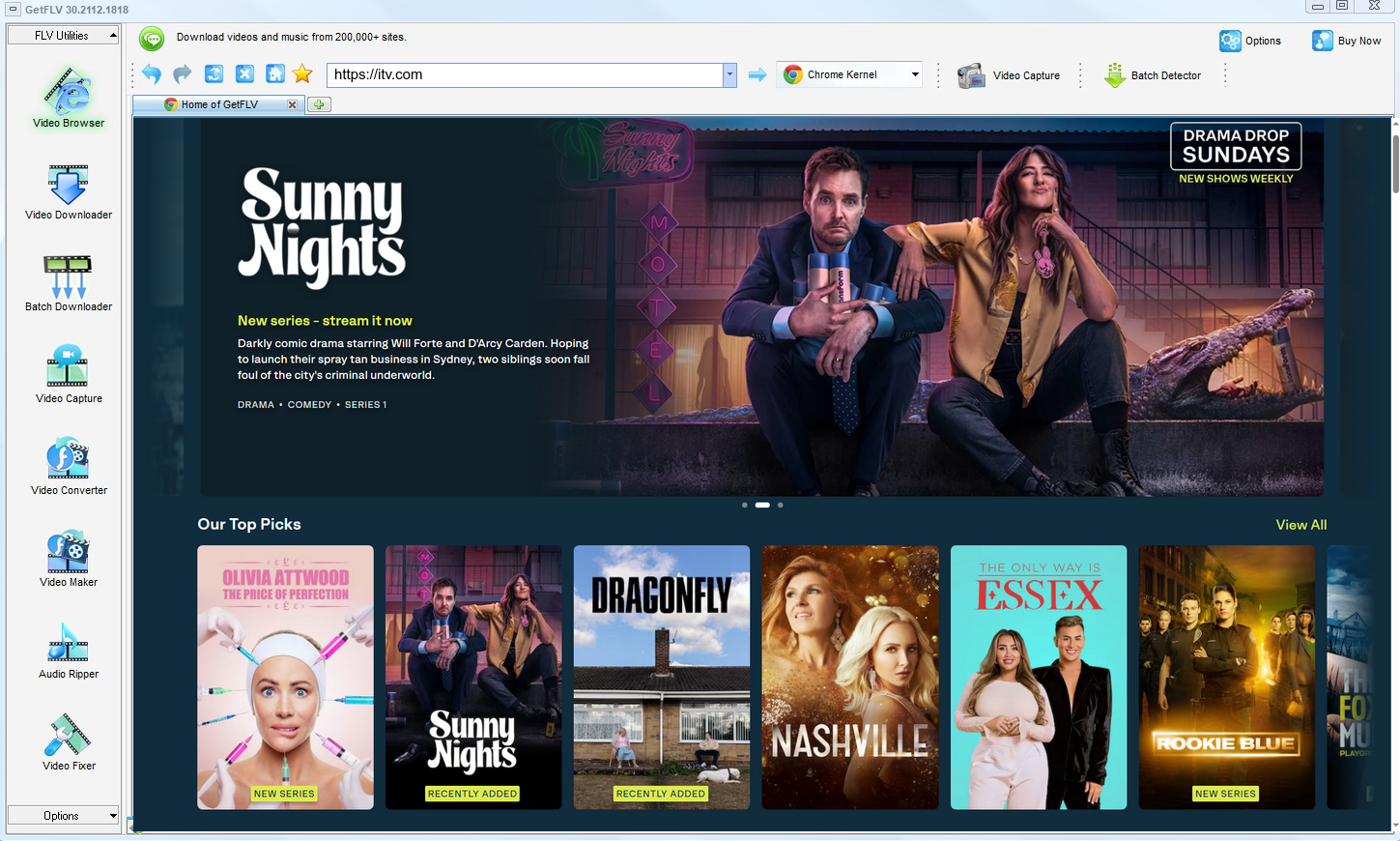
2. Launch GetFLV, browse over to the ITV Player website, play the stream, and copy its URL

3. Begin downloading ITV Player videos

A personal library on your own disk is one thing. Uploading it anywhere is another, and not one we endorse.
Method 2: Real-time screen capture ★★★☆☆
Play the videos and capture the screen with a recorder.
Walkthrough
- Launch a screen recorder and confirm system audio is captured.
- Open itv.com, sign in, and start the title.
- Record in one continuous take — pausing usually breaks the file.
- Trim and export; expect a re-encode at whatever your screen resolution was.
Method 3: Browser extensions and add-ons ★☆☆☆☆
An add-on lives inside the browser and looks for media on the page you are viewing.
Walkthrough
- Open the Chrome Web Store or the Firefox add-ons site and search for a video downloader extension.
- Install it and accept the permissions it asks for.
- Reload itv.com and play the title you want.
- Click the extension icon — on protected pages the list is usually empty.
Overall Comparison of the Ways to Download ITV Player Videos
| GetFLV: ITV Player Videos Downloader | Real-time screen capture | Browser extensions and add-ons | |
|---|---|---|---|
| Protected content | Handles entitled streams | Unreliable | Limited |
| Resolution | HD, 1080p or 4K as delivered | Screen resolution only | Medium quality |
| Speed (2 hour title) | Roughly 15 min | Exactly 2 hours | Usually no result |
| Effort per title | Minutes, unattended | High | Seconds, usually wasted |
| Cost | Free trial, then a licence | No extra cost | Free but ad-heavy |
| Login-only / paid titles | Works exactly as in your browser | Plays, capture may be masked | Cannot authenticate |
| Privacy | Everything stays on your machine | Private | Opaque |
| Playback on TV or car stereo | Universal compatibility | Extra step | Poor |
Data interpretation: Whenever ITV Player changes its player, the first two columns tend to get worse. The third is maintained to keep pace.
Worth Remembering: Safety and Copyright Guidelines for ITV Player
The short checklist:
- Treat every local copy as a private backup rather than as material you can publish anywhere else.
- Shady browser plugins have been caught harvesting cookies and session tokens — a far bigger loss than one video.
- Insist on original-size output — anything that rescales on the way out has thrown away the quality you paid for.
- Never share, resell, re-upload or redistribute anything you save.
- Do not remove or alter watermarks, credits or embedded metadata.
Is It Legal to Download ITV Player Videos?
Everything below assumes you are not trying to profit from someone else`s work:
- Stay within valid access — an active subscription or a purchased title.
- Use the file for personal offline viewing only.
- Respect regional age and content rules that apply to ITV Player.
- When in doubt, ask the rights holder instead of assuming.
Those four points are the filter we applied to every method below.
What 2026 Forum Discussions Say About Downloading ITV Player Videos
On forums dedicated to storage and media archiving, requests for help with ITV Player videos follow a familiar arc. Free services are tried, fail silently, and are abandoned; the advice that survives is always to install professional desktop software and keep it updated.
Why Link-Based Pages Break: People do not object to trying a web downloader; they object to depending on one. The objection is well founded. Every report of a failed job, corrupt download or vanished service traces back to depending on infrastructure nobody else maintains for you.
What Recorders Cannot Do: The phrase used repeatedly is that you get what is on screen, which sounds reassuring until the screen goes black mid-capture. Users report discovering hours too late that nothing usable was saved.
What Actually Works Reliably: Members who archive at scale are very clear about requirements: original quality, no re-encoding, regular updates. Those criteria filter out every approach except desktop software, which is why the recommendation is repeated verbatim.
Where GetFLV ITV Player Downloader Fits In: Users want three things spelled out repeatedly in these threads: speed, fidelity and longevity. GetFLV ITV Player Downloader addresses all three — multi-threaded transfers, untouched 1080p or 4K files, and an update cycle that tracks itv.com continuously.
FAQs About ITV Player Videos
QIs downloading ITV Player videos for offline viewing allowed?
AKeeping a private, offline copy of media you already have access to is generally treated as personal backup. What is not permitted is re-uploading, reselling or redistributing it, because the rights remain with the creator. Follow the terms of itv.com and the copyright rules in your country.
QCan I use it on iPhone, iPad or Android?
ADesktop for the capture, phone for the watching. That split is deliberate — mobile operating systems sandbox the very playback session a downloader needs.
QDo I need a ITV Player account or subscription?
AFree tiers work fine; paid ones simply widen what you can keep and at what resolution.
QDoes it still work after ITV Player changes its player?
AITV Player ships front-end changes regularly, and every one of them is a chance for fragile methods to break. This one is tracked by a full-time team, so compatibility is repaired rather than lost.
QCan I trust the installer?
AYou can also run it in a virtual machine if you prefer to evaluate software in isolation — it needs no special drivers.
QDo you update the tool when ITV Player breaks it?
AThat happens periodically, and it is why this page carries an update log. The downloader is updated to follow player changes, and we re-verify the workflow after each release.
Update Log
We re-test this guide whenever ITV Player changes its player. The entries below are the most recent checks.
- August 2026 — Verified the workflow on the newest Windows 11 and macOS builds.
- July 2026 — Re-measured capture speed after a network upgrade in our test lab.
- May 2026 — Checked the workflow against titles that require a login.
What People Say About Downloading ITV Player Videos
Reviews below are grouped by the reason each person installed the program in the first place.
The quality is untouched. I compared it with the stream frame by frame and there is no difference at 1080p.
Multi-threaded downloading is not marketing talk here. It really is several times faster than real time.
Being able to record when a stream refuses to be grabbed directly has saved me more than once.
I like that it is a real application rather than another browser tab that might vanish tomorrow.
Conclusion
If you only take one thing from this page, take this ranking:
There is a reason desktop software still wins this category. It sees the authorised stream directly instead of guessing from a URL, which is why results stay consistent. GetFLV ITV Player Downloader extends that advantage further: support for upwards of 1000 websites including itv.com, multi-threaded pipelines that finish quickly, and output that stays untouched at native 1080p or 4K. A dedicated team keeps it current as ITV Player evolves its front end and delivery methods. All of it is testable in the free trial, which requires no payment details.
-
1 GetFLV ITV Player Downloader Our pick
What separates it from the others is consistency: 93% across our 2026 run against the current itv.com player.
-
2 Real-time screen capture
Spend one hour to save one hour of video, and on itv.com you may still end up with nothing visible to show for it.
-
3 Browser extensions and add-ons
The promise is instant downloads; the reality is intermittent success and, now and then, a file that simply will not play.
Everything described above is available in the trial — verify it on your own machine before deciding anything.
Save what you are entitled to, keep it to yourself, remove it when you are finished.
About the Author & How We Tested

Mandatory disclaimer: This page documents methods for personal backup of videos you can legitimately access. Nothing here authorises redistribution or commercial use.