

- Standard MP4 output that plays on any device, phone included
- Works on Windows 11/10 and macOS, 32-bit and 64-bit
- Convert for iPad, iPhone, Android or PSP without extra tools
How to Download MasterClass Videos — 3 Real Methods, Ranked by Success Rate
Summary: Everything below comes from hands-on testing on masterclass.com: which MasterClass downloader methods still return a file, which produce an empty one, and how to keep HD quality without recording your screen in real time.
Every method here was run on the same machine, on the same connection, against the same masterclass.com title. That makes the differences in quality, speed and reliability easy to see.
Quick Navigation
Whether you want the steps, the numbers or the legal background, start here:
- Every working method, with steps and screenshots → start here.
- The comparison table: quality, speed, format and reliability → see the comparison.
- Frequently asked questions about saving MasterClass videos → read the FAQ.
⚠ Do not share anything you save.
Introduction: Why Downloading MasterClass Videos Is Hard
The demand to save MasterClass videos keeps growing because an official offline mode is not available on every platform, and where it exists the files are usually locked inside the app and vanish as soon as the subscription ends.
MasterClass in Context: Content, Audience and Access Rules
Platform positioning: Metadata is richer than most people expect: chapters, multiple audio tracks, subtitle languages and alternate cuts all travel alongside the picture. Whatever you capture later should ideally keep those tracks rather than flattening everything into one silent video file.
The protection layer: Authorisation is per title and per session rather than per account. Entitlement is re-evaluated as you play, which is why a stream can fail half way through even though it started perfectly — something no downloader that only reads HTML can anticipate.
The net effect: Update cadence matters more than feature lists for the same reason: masterclass.com changes something, and any tool that is not maintained stops working without ever announcing a reason.
Regional restrictions: Titles rotate continuously. Back-catalogue entries are pulled for tax reasons, music substitutions, expired contracts or simple strategy, and the removal usually happens without any announcement to subscribers who had it on a list.
Why Downloading from MasterClass Trips Up Most Tools
The player does not fetch a video file; it fetches a playlist of fragments and asks for each one with a token that expires in minutes. Anything that copies the page URL instead of participating in that session gets nothing useful.
The methods below are ordered by how often they succeed, not by how easy they look on a search results page.
Capture high-quality lessons from MasterClass experts. This tutorial shows you how to save video content so you can learn anytime, anywhere without an internet connection.
Official Download Function Lacking
Even the download icons inside the MasterClass app produce encrypted containers you cannot play elsewhere — convenient on the same phone, useless anywhere else.
3 Methods to Download MasterClass Videos
Here is what we ran, in the order we would recommend trying them.
| Method | How & what is it? | Rating |
|---|---|---|
| GetFLV MasterClass Downloader | Save the original stream on Windows or Mac first, then watch it anywhere — including on your phone. | ★★★★★ |
| Screen recorder (OBS and similar) | The universal fallback: whatever the player shows, you record. | ★★☆☆☆ |
| Developer tools and manual sniffing | Open the network tab, find the manifest, reconstruct the segments by hand — technically possible, practically painful. | ★☆☆☆☆ |
Test environment
- Network: broadband connection, 100 Mbps or faster
- Hardware: mid-range laptop, SSD, 16 GB RAM
- Browser: current Chrome and Safari, default settings, no extensions
- Measurement: file size, resolution and wall-clock time recorded per run
Method 1: GetFLV MasterClass Downloader ★★★★★
Save the original stream on Windows or Mac first, then watch it anywhere — including on your phone.
- Up to 10x faster downloading, with multi-threaded transfers that finish long before playback ends.
- Keeps the best available quality — HD, 1080p or 4K, exactly as delivered by MasterClass.
- Works on Windows 11/10/7/XP and Mac OS X 10.7+, 32-bit and 64-bit.
- Resume and retry — interrupted downloads pick up instead of starting over.
- Library management — rename, sort and convert finished files without leaving the app.
- Free trial — verify your own MasterClass titles before paying anything.
- Video Capture Plugin — record any MasterClass title that cannot be grabbed directly, with system audio, straight to MP4.
- Batch Downloader Plugin — line up title after title without babysitting; coverage is restricted to 800+ supported sites.
Build 32.2609.15, released 18 Sep 2026. We re-test every method on this page after each release.
- 100% Virus-Free & No Adware
- No Registration or Credit Card Required
- Refund Guarantee Within 30 Days
- Free Trial Available
1. Jump right in: Free download MasterClass Downloader
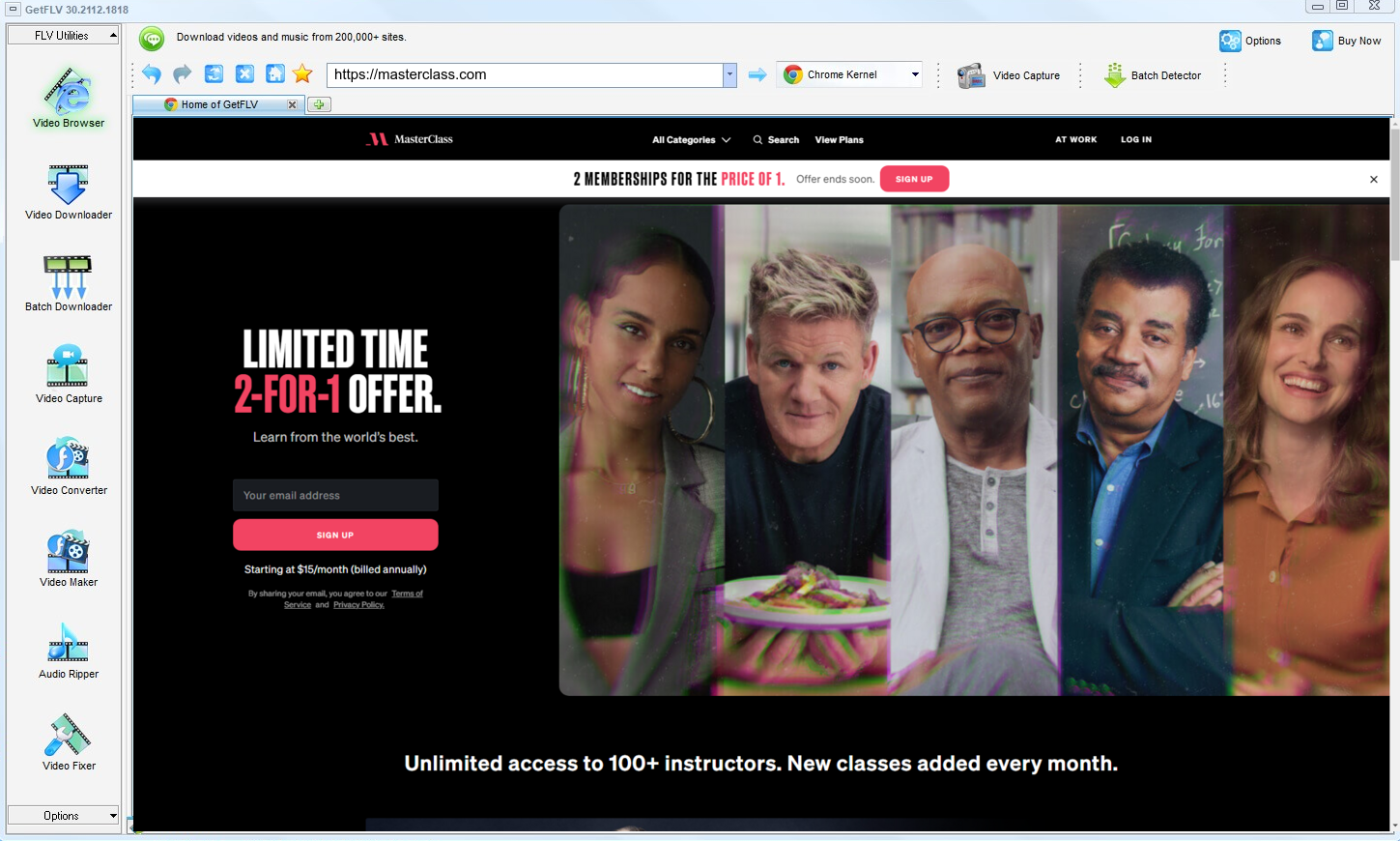
2. Open GetFLV, visit the MasterClass website, start playing the video, and grab its address

3. Enjoy downloading MasterClass videos

Treat the output like a backup, not like a master copy you are free to publish.
Method 2: Screen recorder (OBS and similar) ★★☆☆☆
The universal fallback: whatever the player shows, you record.
How to do it
- Set your recorder to capture the browser window and system audio.
- Open the videos on masterclass.com and start playback.
- Leave it running for the full duration; nothing can be fast-forwarded.
- Save the capture and verify the picture is not black.
Method 3: Developer tools and manual sniffing ★☆☆☆☆
Open the network tab, find the manifest, reconstruct the segments by hand — technically possible, practically painful.
How to do it
- Open DevTools and reload masterclass.com with the network log recording.
- Find the streaming manifest among hundreds of requests.
- Copy it, then work out the segment and key structure by hand.
- On protected titles the key request is refused and the exercise ends there.
Overall Comparison of the Ways to Download MasterClass Videos
| GetFLV MasterClass Downloader | Screen recorder (OBS and similar) | Developer tools and manual sniffing | |
|---|---|---|---|
| Protected content | Handles entitled streams | Often black | Mostly fails |
| Resolution | HD, 1080p or 4K as delivered | Whatever your monitor shows | 720p, medium |
| Speed (2 hour title) | 10–20 minutes | Real time + editing | Usually no result |
| Audio and subtitles | All detected tracks | Usually included | Sometimes missing |
| Output format | Standard MP4 | Re-encoded capture | Mixed formats |
| Cost | Free trial, then a licence | Free if you already own a recorder | Free but ad-heavy |
| Ads and pop-ups | Clean installer, no adware | Clean | Aggressive advertising |
| After a platform update | Stays current | Unaffected by player changes | Often stops working |
| Playback on TV or car stereo | Standard MP4, plays anywhere | Extra step | Unlikely to play at all |
Data interpretation: Read the table as a story about where the authorised session lives. Remote tools guess and mostly fail; recording works but costs the full runtime; local capture keeps both the quality and your evening.
Worth Remembering: Safety and Copyright Guidelines for MasterClass
Four rules we follow ourselves:
- Leave watermarks, credits and embedded metadata exactly as they are.
- Shady browser plugins have been caught harvesting cookies and session tokens — a far bigger loss than one video.
- Keep subtitles and chapters when the platform provides them, and check what the tool actually carries across.
- An active subscription or a purchased title is the baseline for a legitimate personal copy.
- If saving is not permitted in your jurisdiction, close this page and use the official app instead.
Is It Legal to Download MasterClass Videos?
If your situation is unusual, get advice. For everyone else, this is the short version:
- Stay within valid access — an active subscription or a purchased title.
- Follow the terms of masterclass.com and the law in your country.
- Keep the copies on devices only you control.
- If the creator withdraws the title, treat your copy as expired too.
Everything that follows assumes those conditions hold.
Community Data: How Users Really Archive MasterClass Videos in 2026
Survey the community answers and the ranking is stable across 2026. Browser-based services rank last for reliability, recording ranks last for convenience, and maintained desktop downloaders come first for anything the user intends to keep.
Web-Based Downloader Limitations: Community veterans advise against building any routine around web downloaders. These services were never designed for archival reliability; they were designed for quick single use, and they break the instant a platform revises its embedding technology.
The Recording Trade-Off: The verdict across forums is consistent. Recording is private and universal, but playback protection and hardware encryption make it unusable for protected or purchased videos — the black screen is not a defect to be fixed.
The Desktop Advantage: Ask about saving content for travel or unreliable connections and the community answer rarely varies. Install desktop software, capture properly, carry real files — advice that follows directly from everyone else's failed attempts.
How GetFLV MasterClass Downloader Answers These Problems: That is exactly what GetFLV MasterClass Downloader was built to solve. Multi-threaded downloading keeps speeds high while preserving pristine 1080p and 4K quality, our developers ship updates as soon as MasterClass alters its layout or embedding technology, and coverage of more than 800 websites — a combination that keeps working long after fragile alternatives stop.
FAQs About MasterClass Videos
QIs it legal to download videos from MasterClass?
APersonal use, no redistribution, and legitimate access — those three conditions cover most situations. Anything beyond them, such as sharing files or removing credits, is where users get into trouble.
QWhat makes browser extensions useless on MasterClass?
ARemote downloaders see the shop window, not the stock room. Only a tool that participates in the live session can see what the player is actually fetching.
QIs there a mobile version for phones and tablets?
ACapture happens on desktop (Windows or Mac), and the MP4 files can then be moved to any mobile device. An Android build is also available from the download page.
QDo I have to log in before I can download anything?
APublic pages need nothing at all. For members-only media, log in through the integrated browser and the stream becomes available to the detector.
QIs the output MP4 or something else?
AStandard MP4 with the original video and audio tracks, so file size follows the bitrate: roughly 1 to 3 GB per hour at 1080p, less if you pick a lower profile.
QAre captions downloaded together with the video?
ATitle, cover art and chapter information are written into the file when the source supplies them, which keeps a large library tidy.
QWhat if MasterClass changes its player and the method stops working?
AStreaming platforms change their players every few months. When they do, the detector is patched; the update log at the bottom records the date we last re-tested.
Update Log
The dates below reflect hands-on re-testing on the current masterclass.com player.
- August 2026 — Confirmed downloading still works after the MasterClass layout change.
- July 2026 — Checked the workflow against titles that require a login.
- May 2026 — Expanded the notes on why recordings turn black on protected titles.
User Reviews: Does GetFLV MasterClass Downloader Actually Work?
Short reviews from people who tried the methods on this page and ended up staying with GetFLV MasterClass Downloader.
I wasted an evening on free web tools before finding this. The difference is night and day: one clean file, full length, no re-encoding.
There was one title that stopped working after an update. The next release fixed it.
The version history on the download page tells the story — they ship updates constantly.
Conclusion
Final assessment, in order:
The honest summary is that only one option here scales beyond a handful of clips. GetFLV MasterClass Downloader was built for volume from the start: support for more than 800 websites, multi-threaded downloads that keep even large files moving at speed while retaining every pixel of the original 1080p or 4K rendition. Add regular updates that track how MasterClass delivers media, and it becomes the obvious default. If you are unsure, the free trial settles the question faster than any amount of reading.
-
1 GetFLV MasterClass Downloader Our pick
The only one of the three that finished every title we queued on masterclass.com: a 88% success rate, full source resolution, and no re-encoding.
-
2 Screen recorder (OBS and similar)
Costs nothing and works on every platform, yet any protected playback path turns the result into an unusable black video.
-
3 Developer tools and manual sniffing
Convenient until it is not. No installation, but no consistency either, and several attempts stalled on a "processing" screen.
Once the first file lands on your disk at full resolution, the rest of the comparison stops being theoretical.
A tidy library is a private library. Do not let copies outlive your access.
About the Author & How We Tested

Mandatory disclaimer: Only save videos that the platform, the creator and your local laws allow you to keep for personal backup. No sharing, no commercial use — and please delete your copies when you are done.