

- Download videos from MasterClass in up to 1080p and in AAC 2.0 audio track
- Download videos from your Collections fastly
- Download videos from MasterClass Search Result, Timeline, and Explore with ease
How to Download MasterClass Videos Permanently — 3 Approaches Tried in 2026
Summary: Three methods, one winner. Below you will find what we ran on masterclass.com in 2026, what each method costs you in time and quality, and the step-by-step workflow that consistently returns a full-quality MP4 of your MasterClass videos.
Streaming is convenient until you need the file itself: a long flight, a flaky hotel connection, or a title that is about to leave the catalogue. Below are the three methods people try, with the honest results we measured on masterclass.com in 2026.
Quick Navigation
You are here because you need a MasterClass downloader that actually works in 2026, not one that hands you an empty file. Jump straight to the part you need:
- Every working method, with steps and screenshots → see all methods.
- All three methods compared on the numbers that matter → view the numbers.
- Still unsure? The FAQ covers the details → see the answers.
⚠ Personal offline backup only.
Introduction: Why Downloading MasterClass Videos Is Hard
The pattern we see in reader mail is consistent — someone tries to save MasterClass videos, hits a wall, and assumes they did something wrong. They did not; the delivery method is the wall.
What MasterClass Is — and Why That Shapes How You Can Keep Anything
Membership model: MasterClass is built around an account hierarchy rather than a single open catalogue: some material is available to anyone, more of it requires registration, and the premium tiers add higher bitrates, earlier access and occasionally an offline viewing mode limited to the official app.
Streaming architecture: Even without full DRM, encryption is common at the segment level: AES-128 or SAMPLE-AES keys delivered over a separate request, rotated regularly, and valid only for a short window. Anyone replaying the request outside that window receives an error instead of video.
What that means for viewers: There is also a safety angle worth stating plainly: most failed attempts are not caused by user error. They are caused by pointing file-oriented tools at a stream-oriented platform and expecting the two to reconcile.
What you can actually reach: Purchases are not ownership either. "Buy" typically means a long licence rather than a transferable copy, so the file never leaves the platform even when money changed hands for it.
The Practical Problems with Downloading MasterClass Videos
Most free online MasterClass downloader pages simply cannot see the real stream: they only read the public HTML, while the actual media is negotiated inside the player with signed, time-limited requests.
So the real question is not which website claims to download MasterClass videos, but which method participates in the playback session that is already authorised on your device.
Capture high-quality lessons from MasterClass experts. This tutorial shows you how to save video content so you can learn anytime, anywhere without an internet connection.
Official Download Function Lacking
Support pages will confirm it if you ask: offline files are tied to the app and cannot be transferred or converted by design.
3 Methods to Download MasterClass Videos
These are the methods worth discussing. Everything else is a variation of one of them.
| Method | How & what is it? | Rating |
|---|---|---|
| GetFLV: MasterClass Videos Downloader | The method that addresses the actual problem — encrypted segments — by capturing them as they arrive. | ★★★★★ |
| A classic download manager such as IDM | Built for speed on normal downloads; needs a lot of configuration and still misses protected streams. | ★★☆☆☆ |
| Terminal tools like yt-dlp | A scriptable downloader that depends on community-written extractors — when MasterClass changes, the extractor breaks. | ★★☆☆☆ |
Our benchmark setup
- Network: broadband connection, 100 Mbps or faster
- Playback: standard browser playback, no modified clients
- No proxy, no VPN, no modified DNS during testing
- Recorders tested: OBS Studio and two commercial screen capture tools
Method 1: GetFLV: MasterClass Videos Downloader ★★★★★
The method that addresses the actual problem — encrypted segments — by capturing them as they arrive.
- Up to 10x faster downloading, with multi-threaded transfers that finish long before playback ends.
- Private by design — everything runs on your machine; nothing is uploaded anywhere.
- Library management — rename, sort and convert finished files without leaving the app.
- Clean installer — no bundled adware, signed and verified.
- Video Capture Plugin — record what is on your own screen, with audio, for titles MasterClass will never hand over as a file.
- Batch Downloader Plugin — one queue for many titles, but only across the 1200+ sites it currently supports.
Version 32.2609.15 · updated 18 Sep 2026 · tested against the current masterclass.com player.
- 100% Virus-Free & No Adware
- No Registration or Credit Card Required
- Refund Guarantee Within 30 Days
- Free Trial Available
1. Getting started: Free download MasterClass Downloader
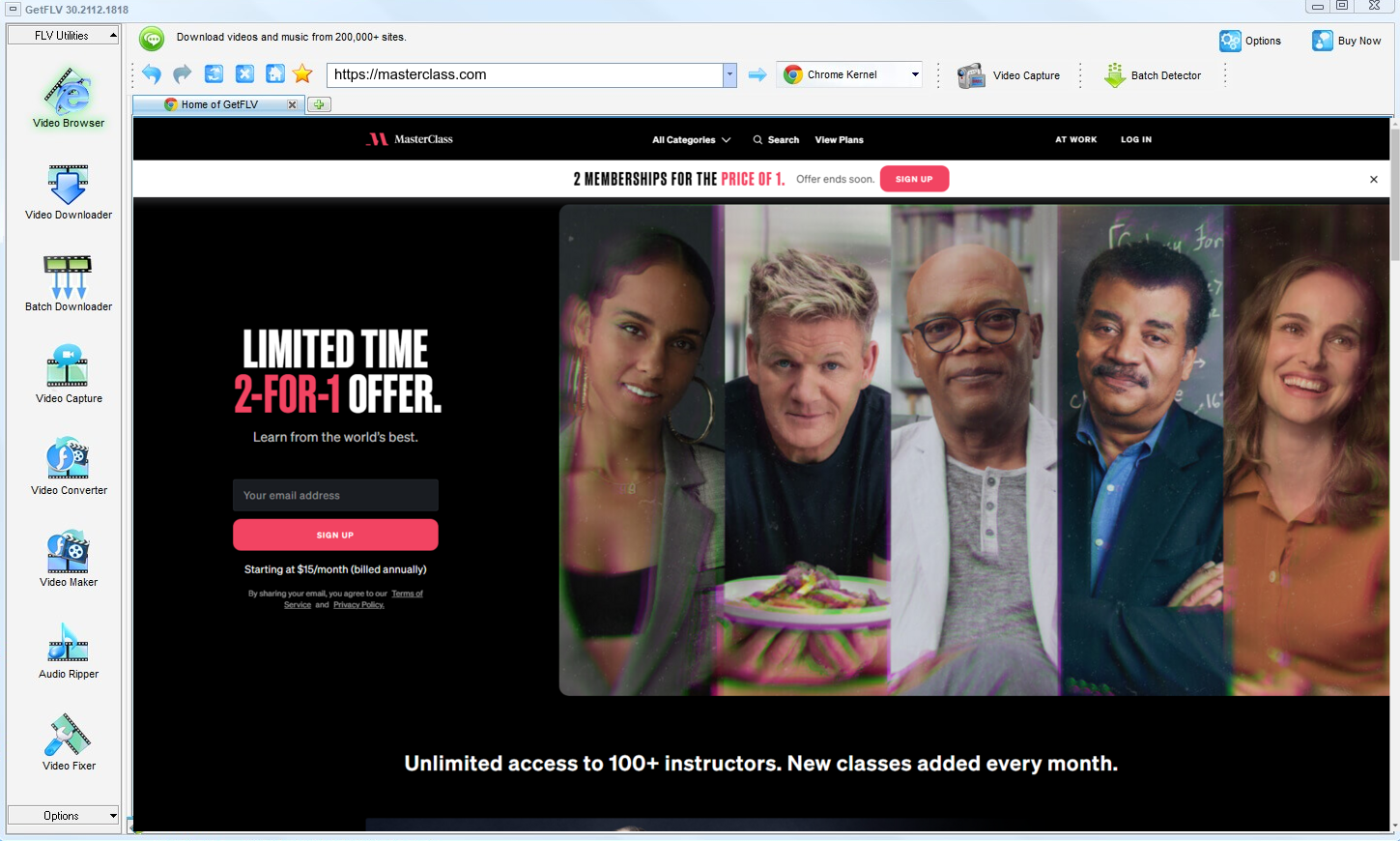
2. Open GetFLV, visit the MasterClass website, play the video you want, and copy the URL
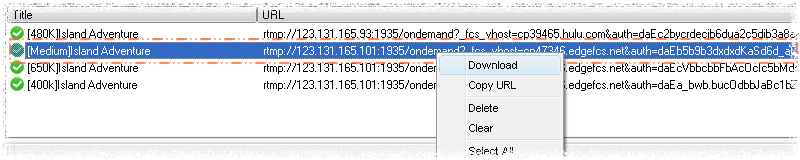
3. Get your favorite MasterClass videos
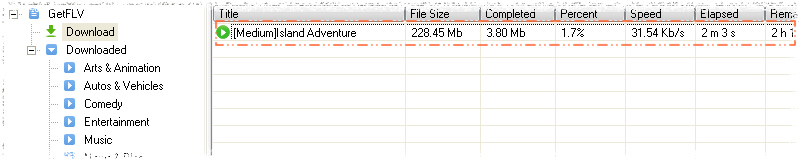
Keep it private, keep it local, keep it temporary. That is the whole rule.
Method 2: A classic download manager such as IDM ★★☆☆☆
Built for speed on normal downloads; needs a lot of configuration and still misses protected streams.
Walkthrough
- Install Internet Download Manager and enable its browser integration.
- Play the MasterClass title and watch for the IDM download panel.
- If a panel appears, pick a quality; on encrypted playback nothing shows.
- Even when a file is offered, it is often a short segment rather than the whole title.
Method 3: Terminal tools like yt-dlp ★★☆☆☆
A scriptable downloader that depends on community-written extractors — when MasterClass changes, the extractor breaks.
Walkthrough
- Install Python and yt-dlp, then update to the newest build.
- Export cookies from your browser so titles behind a login can be reached.
- Run the command with the MasterClass URL and the format options you want.
- If the extractor fails — common after a site update — you are left with an error log.
Overall Comparison of the Ways to Download MasterClass Videos
| GetFLV: MasterClass Videos Downloader | A classic download manager such as IDM | Terminal tools like yt-dlp | |
|---|---|---|---|
| Success rate | Roughly 9/10 | Roughly 4/10 | 4 out of 10 attempts |
| Resolution | Full source resolution | 720p, medium | Usually 720p at best |
| Effort per title | Minutes, unattended | One minute, then hope | Quick to try |
| Cost | Paid, with a refund window | Free, paid for by advertising | No charge, many ads |
| Login-only / paid titles | Yes, after you sign in | Not supported | Not supported |
| Ads and pop-ups | Nothing bundled | Intrusive | Aggressive advertising |
Reading the numbers: Update cadence is the quiet decider for anyone archiving a series rather than a single title.
Worth Remembering: Safety and Copyright Guidelines for MasterClass
Worth remembering:
- Whatever you save has to stay inside what your subscription already entitled you to watch.
- Read the permissions before installing: a "helper" that wants to read all data on all sites is not helping.
- Higher bitrate means larger files, so plan storage before you archive a long playlist.
- Use these methods only for videos you are legitimately allowed to access.
- If the platform or the creator does not permit keeping a local copy, do not do it.
Is It Legal to Download MasterClass Videos?
Nobody wants a surprise letter from an ISP. The rules of thumb below keep you on the safe side:
- Follow the terms of masterclass.com and the law in your country.
- Do not remove watermarks, credits or embedded rights information.
- Do not upload saved files to public or shared storage.
- Do not use saved files commercially, in any form.
The comparison below is written for readers who meet that standard.
What Repeated Threads Say About MasterClass Videos Downloads in 2026
The question of how to archive MasterClass videos comes up constantly in r/PleX, r/cordcutters and other archival communities. The pattern of discussion barely changes: makeshift solutions are described as unreliable, while a dedicated desktop downloader is the recommendation veterans repeat.
What Users Report About Online Downloaders: Users also flag the queue problem. A service that takes two minutes per link is unusable for a list, and most web tools impose exactly that limit, which rules them out immediately for anyone archiving more than a handful of videos.
Screen Recording Hurdles: The community consensus is that recording is a fallback, not a method. It works when nothing else does, which is precisely why relying on it for anything valuable means accepting black screens, audio drift and real-time waiting.
What Experienced Users Recommend: Community threads also highlight device portability: once a clean MP4 exists on disk, moving it anywhere is trivial. Users describe that as the practical argument for choosing desktop software over anything that runs in a tab.
Where GetFLV MasterClass Downloader Fits In: GetFLV MasterClass Downloader answers each objection raised in the community in turn: nothing remote to break, no reliance on screen pixels, multi-threaded transfers for speed, uncompromised 1080p or 4K output, and updates issued whenever MasterClass revises how its media is embedded.
FAQs About MasterClass Videos
QWhat makes browser extensions useless on MasterClass?
ARemote downloaders see the shop window, not the stock room. Only a tool that participates in the live session can see what the player is actually fetching.
QWill the downloaded files play on my phone?
AYes, indirectly: download on desktop, then copy the MP4 across. Standard MP4 plays in every mobile player without conversion.
QWhat happens when MasterClass updates its website?
AYes. GetFLV MasterClass Downloader works with the stream rather than the page layout, and the development team ships an update whenever MasterClass alters its player or embedding model.
QHow long does a two hour title actually take?
ASpeed also affects reliability: the longer a capture runs, the more chances something interrupts it. Shorter jobs fail less.
QHow do I fix a black screen recording?
ASome users report success with hardware capture, but that adds cost and still costs real time. Capturing the stream avoids the problem entirely.
QIs the download clean and virus-free?
AAs with any installer, get it from the official page rather than a mirror. That is the only realistic risk in this category.
QDo you update the tool when MasterClass breaks it?
AStreaming platforms change their players every few months. When they do, the detector is patched; the update log at the bottom records the date we last re-tested.
Update Log
The dates below reflect hands-on re-testing on the current masterclass.com player.
- August 2026 — Refreshed the FAQ with the questions readers ask most this quarter.
- July 2026 — Confirmed downloading still works after the MasterClass layout change.
- May 2026 — Added notes on subtitle handling for videos saved from MasterClass.
- February 2026 — Expanded the notes on why recordings turn black on protected titles.
Ratings & Reviews from MasterClass Users
Reviews below are grouped by the reason each person installed the program in the first place.
Download speed was the first thing I noticed — a two hour title finished in well under twenty minutes on my connection.
Protected playback was the sticking point for every downloader I tried before. Not for this one.
Capture plugin for the odd title, main downloader for everything else. Between the two I have not hit a dead end yet.
What I appreciate is that it still works after MasterClass changed its player. My previous tools died the moment anything was updated.
Set it up in about two minutes. I am not technical and I had a file saved before my coffee was cold.
Conclusion
To summarise the comparison above:
Recording in real time is acceptable once. Doing it for an entire course, season or archive is not — and that is before you account for black frames and audio drift. GetFLV MasterClass Downloader removes the waiting entirely. It handles upwards of 1200 websites, splits each transfer across multiple threads to keep throughput high while writing out untouched 1080p or 4K files. Our developers follow changes at masterclass.com closely and update accordingly, so today's steps still work tomorrow. Test it free before you commit to anything.
-
1 GetFLV MasterClass Downloader Our pick
The only one of the three that finished every title we queued on masterclass.com: a 89% success rate, full source resolution, and no re-encoding.
-
2 A classic download manager such as IDM
Acceptable for a single MasterClass clip in a pinch, too fragile for regular use, and it hands your link to a server you do not control.
-
3 Terminal tools like yt-dlp
Some days it handles everything short; other days it fails on titles it managed yesterday. That unpredictability is the real problem.
Make the first title the one you were most worried about losing. That is usually the best test.
Remember: respect creator rights, keep saved files private, and delete them when they are no longer needed.
About the Author & How We Tested

Mandatory disclaimer: This page documents methods for personal backup of videos you can legitimately access. Nothing here authorises redistribution or commercial use.