

- Download videos from Mindvalley in up to 1080p and in AAC 2.0 audio track
- Download videos from your Collections fastly
- Multi-threaded download, up to 10x faster
How to Download Mindvalley Videos for Offline Viewing — 3 Methods Compared
Summary: You can save Mindvalley videos offline in 2026, but only one of the three common methods does it reliably. Read the comparison, then follow the step-by-step walkthrough for GetFLV Mindvalley Downloader.
There is no download button on mindvalley.com, and the usual shortcuts do not help much. Before you spend an evening on trial and error, here is what actually happens with each method — and the one workflow that consistently produces a playable MP4.
Quick Navigation
Here is the layout of this guide. Pick the section that matches your situation and skip the rest.
- Which method should you use? All three are listed here → jump to the methods.
- The head-to-head comparison of the three approaches → jump to the table.
- Everything else you may want to know → see the answers.
⚠ Lawful access assumed throughout.
Introduction: Why Downloading Mindvalley Videos Is Hard
For many readers the trigger is simple: a title they loved is leaving mindvalley at the end of the month, and the countdown makes the lack of a download button suddenly annoying.
Understanding Mindvalley: From Catalogue to Playback
Mindvalley is a premier global platform dedicated to transformational education, mindfulness, and personal growth masterclasses. To help you learn without internet limits, our professional video downloader utilizes secure HLS streaming extraction technology, allowing you to easily and safely backup your favorite courses in original high-definition quality for smooth offline viewing anytime, anywhere.
Access limits and timing: The licensing calendar also explains why different regions get different release dates, why some episodes appear late, and why a title available to a friend abroad may be invisible to you at home.
Why Mindvalley Videos Are Difficult to Download
Technically, mindvalley.com delivers media as thousands of small encrypted segments that are assembled by the player at run time, and the addresses of those segments expire within minutes. That is exactly why browser extensions and generic online downloader websites tend to fail: by the time they request the file, the link is already dead.
With that in mind, the three methods differ mainly in where the authorised session lives — and that single difference explains almost all of the results.
Keep your personal growth journey accessible offline. This guide teaches you how to download transformative video courses from Mindvalley to your PC or Mac.
Official Download Function Lacking
There is no export button on mindvalley.com, and no supported way to take a title elsewhere. That absence is the entire reason this page exists.
3 Methods to Download Mindvalley Videos
Same test setup for all three — the only variable is the method itself:
| Method | How & what is it? | Rating |
|---|---|---|
| GetFLV Mindvalley Downloader (Windows and Mac) | Work with the stream instead of the page: install GetFLV Mindvalley Downloader, play the title, pick a resolution, save. | ★★★★★ |
| Manual network capture in DevTools | The most hands-on approach on this page, and the one with the highest failure rate on encrypted delivery. | ★☆☆☆☆ |
| Old single-purpose desktop downloaders | Abandoned tools written for the old mindvalley layout, never rewritten for the one running today. | ★☆☆☆☆ |
How we tested
- Network: broadband connection, 100 Mbps or faster
- Hardware: mid-range laptop, SSD, 16 GB RAM
- Browser: current Chrome and Safari, default settings, no extensions
- Recorders tested: OBS Studio and two commercial screen capture tools
Method 1: GetFLV Mindvalley Downloader (Windows and Mac) ★★★★★
Work with the stream instead of the page: install GetFLV Mindvalley Downloader, play the title, pick a resolution, save.
- Ready for any device — save as MP4, or convert for iPad, iPhone, iPod, PSP and Android.
- Works on Windows 11/10/7/XP and Mac OS X 10.7+, 32-bit and 64-bit.
- Subtitles and metadata are preserved when mindvalley supplies them.
- Built-in browser — log in once and every title you can watch becomes available to save.
- Private by design — everything runs on your machine; nothing is uploaded anywhere.
- Resume and retry — interrupted downloads pick up instead of starting over.
- Video Capture Plugin — record any mindvalley title that cannot be grabbed directly, with system audio, straight to MP4.
- Batch Downloader Plugin — handle a long list automatically, limited to the 1000+ websites where batch grabbing is supported.
Version 32.2609.15 shipped 18 Sep 2026 with improved stream detection for mindvalley.
- 100% Virus-Free & No Adware
- No Registration or Credit Card Required
- Refund Guarantee Within 30 Days
- Free Trial Available
1. Let's start: Free download mindvalley Downloader
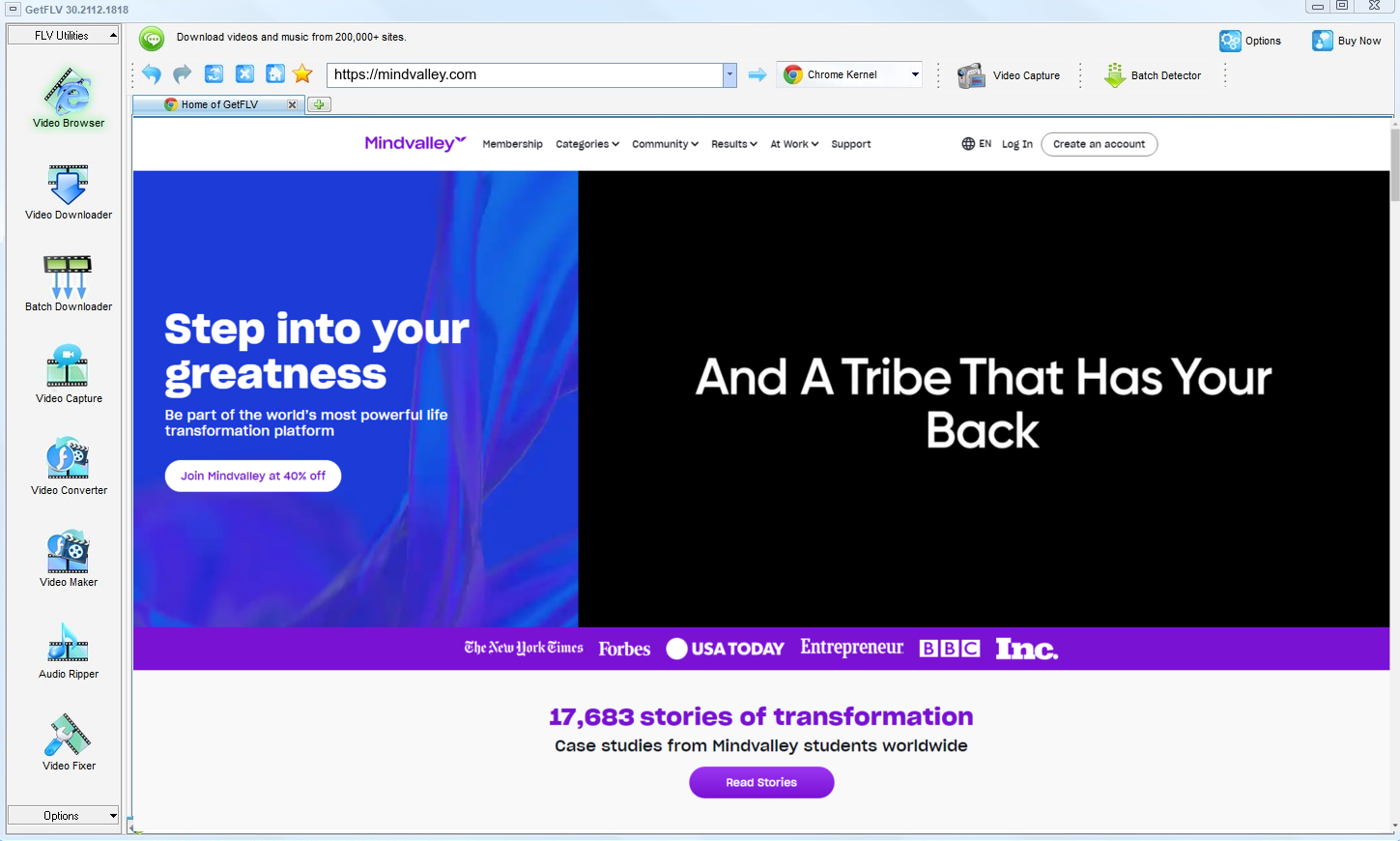
2. Launch GetFLV, navigate to the mindvalley website, play your video, and get the URL

3. Save mindvalley videos for offline viewing

No redistribution, no commercial use, no exceptions — that is the condition attached to every step above.
Method 2: Manual network capture in DevTools ★☆☆☆☆
The most hands-on approach on this page, and the one with the highest failure rate on encrypted delivery.
How to do it
- Start playback with the developer console already open.
- Look through the network log for the playlist request.
- Save the manifest and inspect the segments it points to.
- Fetching them one by one is slow, and encrypted ones cannot be decrypted.
Method 3: Old single-purpose desktop downloaders ★☆☆☆☆
Abandoned tools written for the old mindvalley layout, never rewritten for the one running today.
How to do it
- Download one of the older freeware downloaders still listed in search results.
- Install it and paste the mindvalley link.
- Press the download button and wait.
- It fails, because the detection rules were written for a player that no longer exists.
Overall Comparison of the Ways to Download Mindvalley Videos
| GetFLV Mindvalley Downloader (Windows and Mac) | Manual network capture in DevTools | Old single-purpose desktop downloaders | |
|---|---|---|---|
| Success rate | Roughly 9/10 | Roughly 4/10 | 4 out of 10 attempts |
| Speed (2 hour title) | Under 20 minutes | Unpredictable | Fails before finishing |
| Audio and subtitles | Kept as delivered | Inconsistent | Sometimes missing |
| Output format | Clean MP4 | Mixed formats | Unpredictable |
| Cost | Trial first, paid upgrade | Free, paid for by advertising | No charge, many ads |
| Ads and pop-ups | Clean installer, no adware | Heavy | Intrusive |
| After a platform update | Patched regularly | Unpredictable | Breaks until the site catches up |
| Playback on TV or car stereo | No conversion needed | Format roulette | Poor |
Reading the numbers: Read the table as a story about where the authorised session lives. Remote tools guess and mostly fail; recording works but costs the full runtime; local capture keeps both the quality and your evening.
Worth Remembering: Safety and Copyright Guidelines for Mindvalley
Four rules we follow ourselves:
- None of this is legal advice, but each point above holds in the overwhelming majority of cases.
- Your session token effectively is your account. Do not paste it into a page you found through a search result.
- Higher bitrate means larger files, so plan storage before you archive a long playlist.
- Use these methods only for videos you are legitimately allowed to access.
- Save for personal offline viewing only — treat every file as a private backup.
Is It Legal to Download Mindvalley Videos?
Two ideas matter here: whether you had legitimate access, and whether you keep the copy private.
- Use the file for personal offline viewing only.
- Follow the terms of mindvalley.com and the law in your country.
- Do not remove watermarks, credits or embedded rights information.
- Keep the copies on devices only you control.
We will not repeat this later, so note it now: legitimate access only.
What Reddit Threads Reveal About Saving Mindvalley Videos in 2026
Anyone who follows request threads asking how to save a video will recognise the cycle: enthusiasm, a broken link, disappointment, then advice to use real software. That cycle has played out for mindvalley videos throughout 2026 without exception.
What Goes Wrong With Online Downloaders: The 0KB download comes up so often it has become shorthand for the whole category. Users paste a link, wait through processing, receive something unopenable, and learn that remote tools cannot keep pace with changes at mindvalley.com.
The Recording Trade-Off: The objection most often raised is time. A recorder needs the full duration of every item, so a sizeable library costs days of sitting in front of a screen — and may still end with nothing visible because of the way protection is enforced.
Where the Agreement Lands: What experienced users emphasise is predictability. They accept a one-time setup cost in exchange for knowing that each title will finish as a playable, full-resolution file rather than another experiment.
Our Answer to Every Objection Above: Users who switched report the same change in perspective. The task stopped being a problem to solve every few months and became routine: save the title, keep original quality, let the next update handle whatever mindvalley changes next.
FAQs About Mindvalley Videos
QWhy does every free mindvalley downloader site return nothing?
AThose tools cannot replay the negotiation that happens inside the player: tokens expire in minutes and the segments are protected. GetFLV Mindvalley Downloader handles the stream on your own machine, where the playback session is already authorised.
QIs there a mobile version for phones and tablets?
ADesktop for the capture, phone for the watching. That split is deliberate — mobile operating systems sandbox the very playback session a downloader needs.
QDoes it still work after mindvalley changes its player?
AIf something does stop working, an update is what restores it — not a new workaround you have to find yourself. That is the difference between maintained software and an abandoned script.
QHow fast is it compared with screen recording?
ASpeed also affects reliability: the longer a capture runs, the more chances something interrupts it. Shorter jobs fail less.
QHow do I fix a black screen recording?
AIt depends on the title: unprotected clips record normally, protected ones go dark. That inconsistency is why recording is unreliable as a general method.
QHow big is a downloaded mindvalley video file?
AMP4 by default, with conversion profiles for devices that need something else. Because nothing is re-encoded by default, the size is the size of the stream.
QIs the download clean and virus-free?
AYou can also run it in a virtual machine if you prefer to evaluate software in isolation — it needs no special drivers.
Update Log
Maintenance log:
- August 2026 — Updated the comparison table with the latest quality and speed measurements.
- July 2026 — Added notes on subtitle handling for videos saved from mindvalley.
- May 2026 — Re-measured capture speed after a network upgrade in our test lab.
- February 2026 — Expanded the notes on why recordings turn black on protected titles.
What People Say About Downloading Mindvalley Videos
Reviews below are grouped by the reason each person installed the program in the first place.
The output is a normal MP4. I dropped it straight into my media library without touching a converter.
I archive paid tutorials for offline travel. Nothing else managed it reliably until now.
Mindvalley has redesigned twice since I installed this. Both times an update arrived and the workflow stayed the same.
Conclusion
The short version of everything above:
Archiving videos you have legitimate access to should feel routine, not experimental. Everything above is available to you, but the option that behaves like real software is GetFLV Mindvalley Downloader. It recognises upwards of 1000 sites, including mindvalley.com, uses multi-threaded transfer for every title, and uses multi-threaded transfer to complete large jobs quickly while preserving the original picture in 1080p or 4K. Quality never depends on how fast your screen recorder happens to be running. Updates arrive regularly to match mindvalley when it changes its player or embedding model. Install the free build and run it on the title you care about most.
-
1 GetFLV Mindvalley Downloader Our pick
The one that still works on titles behind a login — 93% success, with subtitles and audio tracks kept where mindvalley offers them.
-
2 Manual network capture in DevTools
Worth trying first because it takes ten seconds. Not worth planning around, because it rarely survives a mindvalley player update.
-
3 Old single-purpose desktop downloaders
You paste a link and hope. Roughly half our attempts produced something usable; the rest produced an error or nothing at all.
The trial costs nothing and needs no card, so the only thing you risk is a couple of minutes.
Rights stay with the creator in every case — a local copy never changes that.
About the Author & How We Tested

Mandatory disclaimer: We do not endorse copying videos you have no right to keep, and we do not provide tools for defeating protection you are not licensed to bypass.