

- Download videos from Nowtv in up to 1080p and in AAC 2.0 audio track
- Download videos from your Collections fastly
- Convert for iPad, iPhone, Android or PSP without extra tools
How to Download Nowtv Videos — 3 Real Methods, Ranked by Success Rate
Summary: Nowtv has no built-in save button for most of its catalogue, so viewers who want an offline copy have to improvise. Here are the three approaches worth trying in 2026, ranked from least to most reliable, with steps for the one we recommend.
Every method here was run on the same machine, on the same connection, against the same nowtv.com title. That makes the differences in quality, speed and reliability easy to see.
Quick Navigation
Before the details, the outline. Choose your entry point:
- Three methods, tested on nowtv.com, ranked honestly → jump to the methods.
- See the three methods measured against each other → read the comparison.
- The FAQ section, including the legal baseline → read the questions.
⚠ Do not share anything you save.
Introduction: Why Downloading Nowtv Videos Is Hard
Consider what you actually own after years of subscriptions. For most viewers the answer is nothing — which explains the interest in keeping a personal copy of Nowtv videos.
Nowtv Platform Profile: What You Are Actually Dealing With
NOW provides a vast array of premium entertainment, ranging from the latest cinematic releases and live sports to critically acclaimed television box sets tailored for a UK audience. To protect this high-value video library, Nowtv.com utilizes advanced security measures including Widevine and PlayReady DRM encryption, coupled with encrypted HLS segment delivery and time-sensitive signed tokens. These sophisticated protections ensure that conventional methods like browser extensions, online grabbers, or right-click downloading are unable to access the underlying video data. Using a dedicated desktop downloader built specifically to handle encrypted delivery systems allows users to reliably download their favorite content to a local drive. These tools are designed to work with protected streams on Windows and Mac, ensuring the original quality is preserved for offline viewing.
Regional restrictions: Device limits are enforced by invalidating older sessions. Register one more screen than the plan allows and an established playback elsewhere can be cut off mid-title, along with anything being captured at the time.
Why Nowtv Videos Are Difficult to Download
Most free online nowtv downloader pages simply cannot see the real stream: they only read the public HTML, while the actual media is negotiated inside the player with signed, time-limited requests.
We should also say what this guide is not: we are not interested in bypassing anything you are not entitled to access.
Discover how to easily capture and archive your favorite content from nowtv.com. Since the platform uses encrypted media delivery and lacks a direct download feature, traditional tools often fail to save the files. This guide shows you how to overcome these technical hurdles to save video streams securely. Enjoy your movies and shows in original quality on your Windows or Mac computer for seamless offline viewing anytime.
Official Download Function Lacking
Rotations make this worse. A title can leave the catalogue with a few weeks of notice, and after that no method helps if you never had a copy.
3 Methods to Download Nowtv Videos
Three options, from the lazy one to the reliable one:
| Method | How & what is it? | Rating |
|---|---|---|
| GetFLV: Nowtv Videos Downloader | Work with the stream instead of the page: install GetFLV Nowtv Downloader, play the title, pick a resolution, save. | ★★★★★ |
| Web-based downloader services | Copy the URL of a nowtv title into one of the many free web tools and let it try to resolve the media. | ★★☆☆☆ |
| A browser add-on for nowtv | Install a download helper, reload nowtv.com, and hope it detects something. | ★☆☆☆☆ |
Our test setup
- Desktop: Windows 11 and macOS, both with the current GetFLV Nowtv Downloader build
- Playback: standard browser playback, no modified clients
- Hardware: mid-range laptop, SSD, 16 GB RAM
- No proxy, no VPN, no modified DNS during testing
Method 1: GetFLV: Nowtv Videos Downloader ★★★★★
Work with the stream instead of the page: install GetFLV Nowtv Downloader, play the title, pick a resolution, save.
- Captures the original stream — no plug-ins, no screen recording, no quality loss from re-encoding.
- Up to 10x faster downloading, with multi-threaded transfers that finish long before playback ends.
- Keeps the best available quality — HD, 1080p or 4K, exactly as delivered by nowtv.
- Ready for any device — save as MP4, or convert for iPad, iPhone, iPod, PSP and Android.
- Library management — rename, sort and convert finished files without leaving the app.
- Video Capture Plugin — capture playback from nowtv.com with sound when direct grabbing is blocked, and keep the original frame rate.
- Batch Downloader Plugin — line up title after title without babysitting; coverage is restricted to 1200+ supported sites.
Version 32.2609.15 · updated 18 Sep 2026 · tested against the current nowtv.com player.
- 100% Virus-Free & No Adware
- No Registration or Credit Card Required
- Refund Guarantee Within 30 Days
- Free Trial Available
1. Let's start: Free download nowtv Downloader
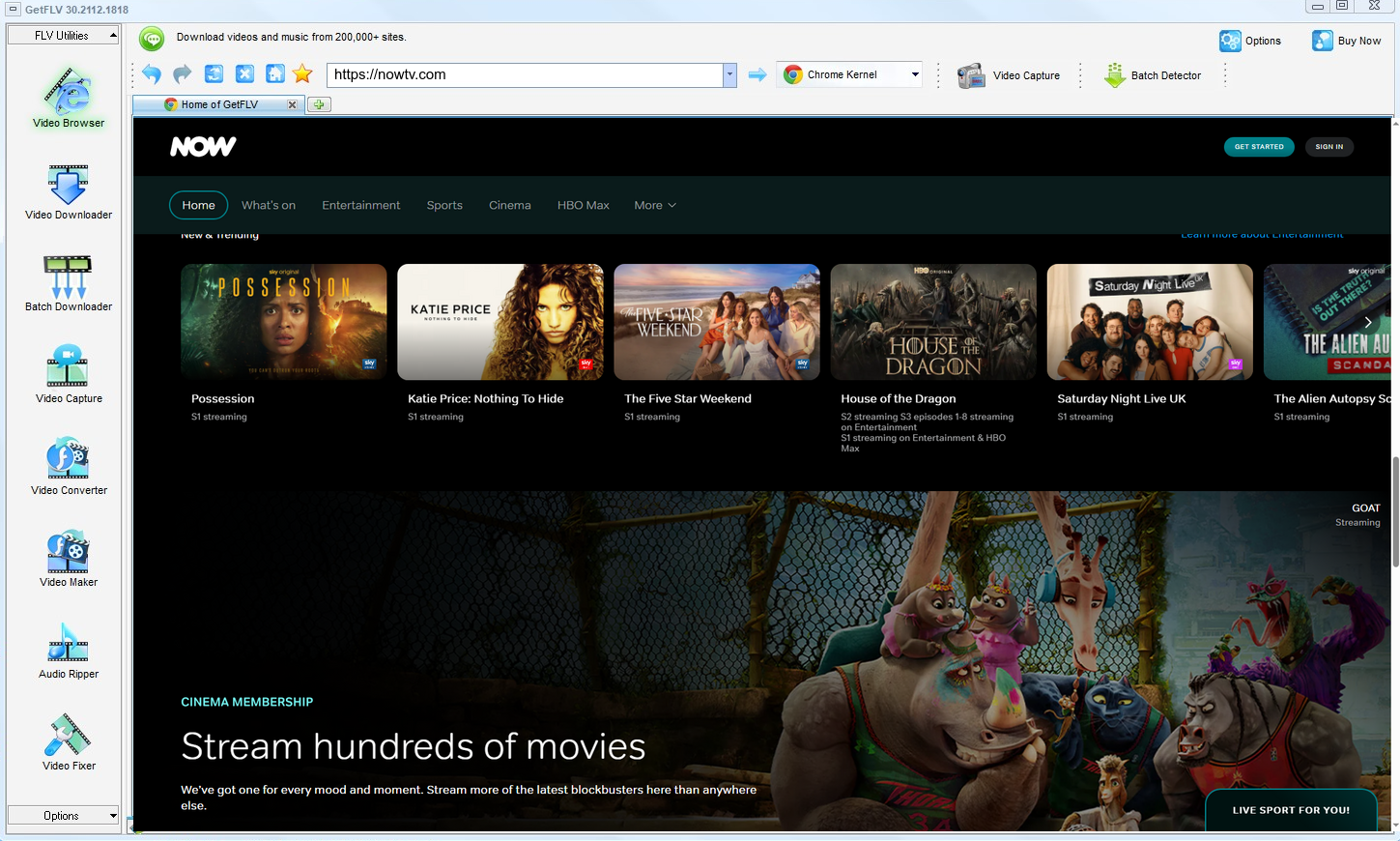
2. Launch GetFLV, navigate to the nowtv website, play your video, and get the URL

3. Save nowtv videos for offline viewing

The capability is not permission. Keep copies private, temporary and few.
Method 2: Web-based downloader services ★★☆☆☆
Copy the URL of a nowtv title into one of the many free web tools and let it try to resolve the media.
Follow these steps
- Copy the address of the nowtv page you are watching.
- Paste it into a web downloader and submit.
- Wait for the service to scan the page.
- Download whatever comes back, then open it immediately to confirm it plays.
Method 3: A browser add-on for nowtv ★☆☆☆☆
Install a download helper, reload nowtv.com, and hope it detects something.
Follow these steps
- Add a downloader extension from the official store.
- Restart the browser so the add-on can hook into page loads.
- Open nowtv and start playback.
- Check the extension panel; encrypted streams typically show nothing.
Overall Comparison of the Ways to Download Nowtv Videos
| GetFLV: Nowtv Videos Downloader | Web-based downloader services | A browser add-on for nowtv | |
|---|---|---|---|
| Protected content | Higher for eligible content | Mostly fails | Limited |
| Speed (2 hour title) | 10–20 minutes | Usually no result | Fails before finishing |
| Audio and subtitles | Preserved from source | Unreliable | Inconsistent |
| Output format | Standard MP4 | Mixed formats | Whatever it finds |
| Effort per title | Set and forget | Low effort, low yield | Low effort, low yield |
| Cost | Free trial, then a licence | Free, paid for by advertising | Free, paid for by advertising |
| Learning curve | Easy | Trivial | No setup |
| After a platform update | Patched regularly | Breaks until the site catches up | Breaks until the site catches up |
| Playback on TV or car stereo | Works out of the box | Poor | Unlikely to play at all |
The takeaway: The online column is genuinely convenient on the rare title it handles. The problem is that you cannot know in advance which those are.
Worth Remembering: Safety and Copyright Guidelines for Nowtv
Worth remembering:
- None of this is legal advice, but each point above holds in the overwhelming majority of cases.
- The safest setups run entirely on your computer, reusing the session your browser already established.
- Keep subtitles and chapters when the platform provides them, and check what the tool actually carries across.
- Making a copy does not transfer any rights to you; the creator still owns the work.
- If saving is not permitted in your jurisdiction, close this page and use the official app instead.
Is It Legal to Download Nowtv Videos?
A short, practical baseline before you save anything:
- Stay within valid access — an active subscription or a purchased title.
- Never share, repost or sell anything you save.
- Keep the copies on devices only you control.
- If the creator withdraws the title, treat your copy as expired too.
With that baseline in place, the rest of this page is about which method actually works.
What Users Learned Downloading Nowtv Videos in 2026
Threads about offline viewing of nowtv videos tend to be generous with hard-won detail: which failures are normal, which errors mean nothing, and which approach consistently produces watchable files. That consensus points to desktop software every time.
Why Link-Based Pages Break: Users also flag the queue problem. A service that takes two minutes per link is unusable for a list, and most web tools impose exactly that limit, which rules them out immediately for anyone archiving more than a handful of videos.
Why Recording Falls Short: Experienced users point out that the black screen is not something to troubleshoot. It signals that the content is protected, and attempting to work around it is both unreliable and, in many jurisdictions, the wrong thing to attempt.
The Local Workflow Consensus: What experienced users emphasise is predictability. They accept a one-time setup cost in exchange for knowing that each title will finish as a playable, full-resolution file rather than another experiment.
Why Our Software is the Ultimate Solution: GetFLV Nowtv Downloader was built for people who decided to stop experimenting. It works across more than 1200 websites, uses multi-threading to keep large files moving quickly, preserves true 1080p or 4K detail, and stays compatible through regular development updates.
FAQs About Nowtv Videos
QWhy do online downloaders and browser extensions fail on nowtv?
AThey ask for a URL and then guess. The stream is never exposed as a URL at all — it is a sequence of fragments requested during playback, which is why the same extension works on one site and fails on the next.
QWill I get the same resolution nowtv plays?
AWhatever the player would show you at its best setting. Because the method captures rather than recompresses, there is no generational loss between the stream and your file.
QIs there a mobile version for phones and tablets?
ACapture happens on desktop (Windows or Mac), and the MP4 files can then be moved to any mobile device. An Android build is also available from the download page.
QWhat happens when nowtv updates its website?
APlayer redesigns break browser extensions and online pages first. Because this runs locally and reads the stream directly, changes are absorbed by a software update instead of leaving you with an error.
QHow long does a two hour title actually take?
AMulti-threaded transfer compounds it — a two hour title finishes in minutes instead of two hours of real-time recording.
QHow big is a downloaded nowtv video file?
AStandard MP4 with the original video and audio tracks, so file size follows the bitrate: roughly 1 to 3 GB per hour at 1080p, less if you pick a lower profile.
QHow often is this workflow re-tested?
AOur own re-tests are listed with dates below, so you can tell at a glance how current the instructions are.
Update Log
Updated whenever the workflow changes or a method stops working:
- September 2026 — Updated the comparison table with the latest quality and speed measurements.
- August 2026 — Confirmed downloading still works after the nowtv layout change.
- June 2026 — Re-measured capture speed after a network upgrade in our test lab.
What People Say About Downloading Nowtv Videos
Short reviews from people who tried the methods on this page and ended up staying with GetFLV Nowtv Downloader.
Fast, and no re-encoding. The file I got is exactly what nowtv was sending to my browser.
I archive paid tutorials for offline travel. Nothing else managed it reliably until now.
The developers clearly watch for site changes. I have never had to wait long for a fix.
The interface is plain and obvious. No settings to fight with and no codec packs to install.
Conclusion
Ranked by whether you end up with a file you can actually play:
Online tools rent you convenience; they rarely hand you dependable files. A local application is the opposite trade, and it is the one worth making for anything you intend to keep. GetFLV Nowtv Downloader covers more than 1200 websites, including nowtv.com, uses multi-threaded transfer to keep throughput high. Nothing is re-encoded, so what arrives on disk is the same 1080p or 4K stream the source provided. Our engineers publish updates whenever nowtv changes how the media is delivered. Download the trial and run it against the hardest title on your list.
-
1 GetFLV Nowtv Downloader Our pick
Once it is installed it becomes a one-click job per title, and 93% of our queue finished without any intervention.
-
2 Web-based downloader services
Fine for a one-off short video, unreliable as an ongoing solution: most full-length attempts failed or returned an audio-only file.
-
3 A browser add-on for nowtv
Free and instant to test, which earns it a place on this list — but we would not build a workflow around it.
If you want a dependable offline library of the nowtv videos you are allowed to keep, GetFLV Nowtv Downloader is the clear winner: capture on Windows or Mac, then move the MP4 to any device you like.
A tidy library is a private library. Do not let copies outlive your access.
About the Author & How We Tested

Mandatory disclaimer: This page documents methods for personal backup of videos you can legitimately access. Nothing here authorises redistribution or commercial use.