

- Download videos from your Collections fastly
- Standard MP4 output that plays on any device, phone included
- Automatic retry and resume on unstable connections
How to Download Paramountplus Videos at the Original Bitrate (2026)
Summary: Paramountplus has no built-in save button for most of its catalogue, so viewers who want an offline copy have to improvise. Here are the three approaches worth trying in 2026, ranked from least to most reliable, with steps for the one we recommend.
Streaming is convenient until you need the file itself: a long flight, a flaky hotel connection, or a title that is about to leave the catalogue. Below are the three methods people try, with the honest results we measured on paramountplus.com in 2026.
Quick Navigation
Three methods, one comparison table, a FAQ and a changelog. Use these shortcuts:
- The methods section — where the actual steps live → jump to the methods.
- Side-by-side comparison of every method above → view the numbers.
- Short answers to the most common doubts → see the answers.
⚠ For personal offline viewing.
Introduction: Why Downloading Paramountplus Videos Is Hard
Ask anyone who travels for work why they want paramountplus videos offline and you get the same answer: streaming assumes a connection you do not always have. A local file removes that assumption entirely.
Paramountplus at a Glance: What Kind of Platform It Is
Paramount+ provides a massive library of blockbuster films, original series, and live sports catering to a global audience. To safeguard its premium catalog, Paramountplus.com employs sophisticated security measures including Widevine and PlayReady DRM encryption alongside encrypted HLS segment delivery. These protections ensure that traditional methods like browser extensions or generic URL sniffers are unable to access the raw stream, while basic screen recording often results in stuttering, low-resolution files. Since the platform uses short-lived tokens and strict referer checks, simply trying to download a video link directly through a web browser is impossible. Fortunately, professional desktop downloader software is specifically engineered to handle these complex, encrypted delivery systems. These tools allow users to securely archive their favorite shows to a local drive on Windows or Mac in full quality for seamless offline viewing.
Regional restrictions: The licensing calendar also explains why different regions get different release dates, why some episodes appear late, and why a title available to a friend abroad may be invisible to you at home.
What Makes Paramountplus Streams Hard to Capture
Every workaround people share in forums is an attempt to answer the same question: who holds a valid, authorised session — the remote website, or your own machine? Only one of them can.
Keep this in the back of your mind while reading the comparison: remote tools guess, local tools observe.
Discover how to download movies and series from paramountplus.com for high-quality offline playback. While the platform uses encrypted delivery to prevent direct downloads, this guide explains how to capture your favorite content without limitations. Learn the best methods to save media from paramountplus.com directly to your local storage, ensuring original quality on both Windows and Mac.
Official Download Function Lacking
Rotations make this worse. A title can leave the catalogue with a few weeks of notice, and after that no method helps if you never had a copy.
3 Methods to Download Paramountplus Videos
Three options, from the lazy one to the reliable one:
| Method | How & what is it? | Rating |
|---|---|---|
| GetFLV Paramountplus Downloader | Save the original stream on Windows or Mac first, then watch it anywhere — including on your phone. | ★★★★★ |
| Screen recording | A screen recorder watches the pixels instead of the protocol. | ★★☆☆☆ |
| Downloader extensions for paramountplus.com | An add-on lives inside the browser and looks for media on the page you are viewing. | ★★☆☆☆ |
Test environment
- Account: active access to paramountplus.com where the title requires it
- Browser: current Chrome and Safari, default settings, no extensions
- Recorders tested: OBS Studio and two commercial screen capture tools
- Online tools tested: five of the highest-ranking free downloader pages
Method 1: GetFLV Paramountplus Downloader ★★★★★
Save the original stream on Windows or Mac first, then watch it anywhere — including on your phone.
- Works on Windows 11/10/7/XP and Mac OS X 10.7+, 32-bit and 64-bit.
- Subtitles and metadata are preserved when paramountplus supplies them.
- Private by design — everything runs on your machine; nothing is uploaded anywhere.
- Resume and retry — interrupted downloads pick up instead of starting over.
- Video Capture Plugin — a fallback for anything paramountplus protects: record it while it plays, picture and audio together.
- Batch Downloader Plugin — handle a long list automatically, limited to the 800+ websites where batch grabbing is supported.
Latest build: 32.2609.15 · released 18 Sep 2026 · verified working on paramountplus.com.
- 100% Virus-Free & No Adware
- No Registration or Credit Card Required
- Refund Guarantee Within 30 Days
- Free Trial Available
1. Start here: Free download paramountplus Downloader
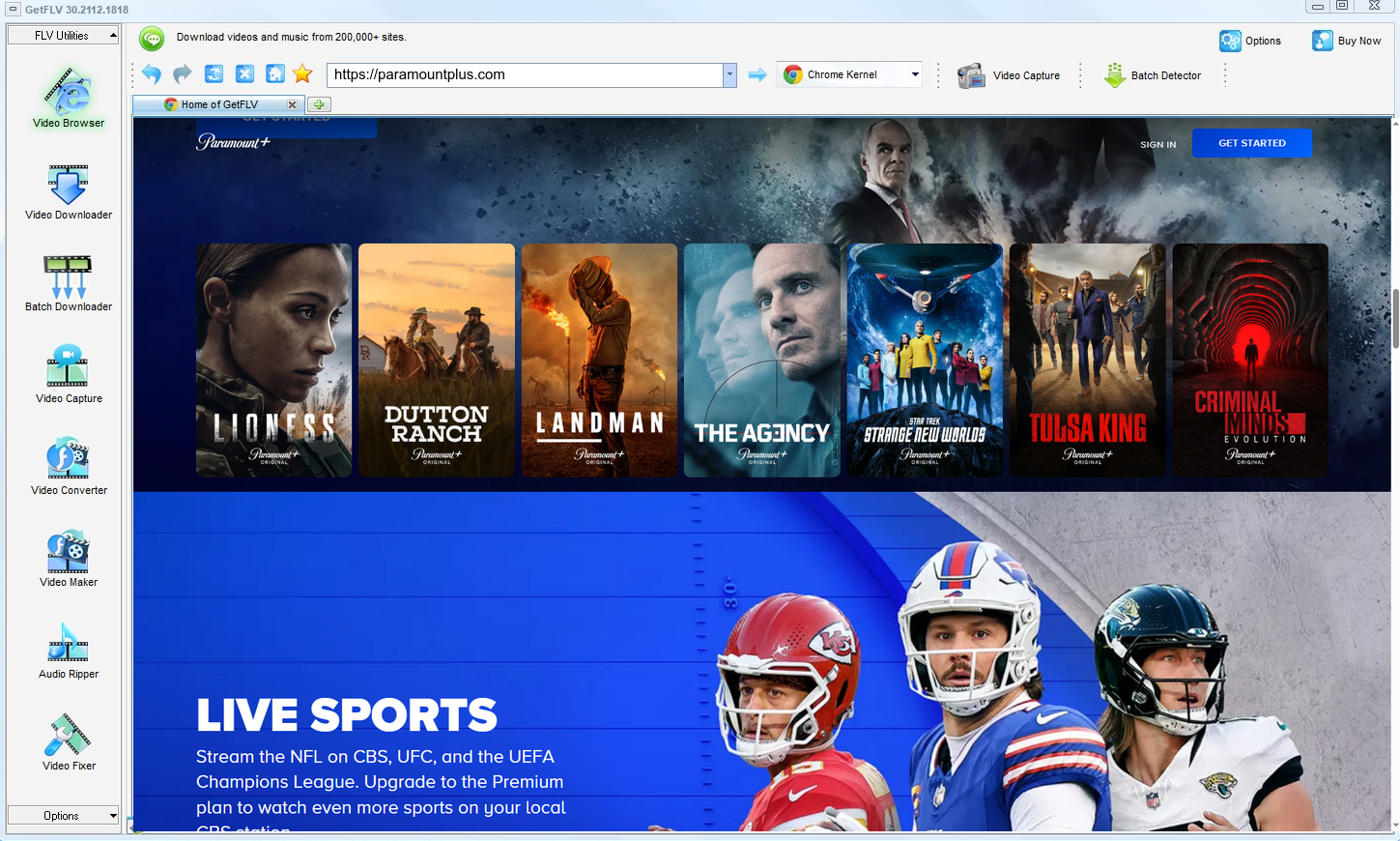
2. Launch the app, browse to the paramountplus website, play the stream, and capture its address
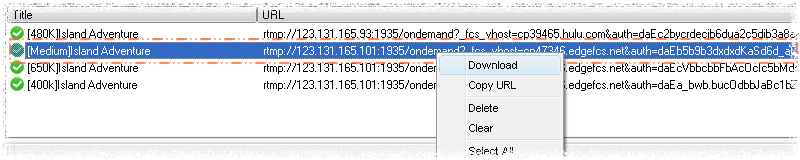
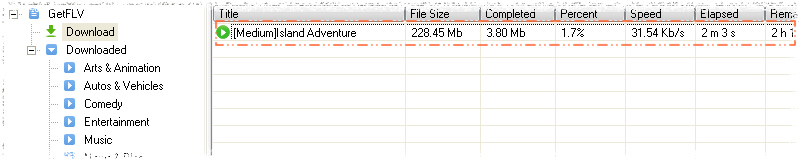
3. Start downloading paramountplus videos
If your access to a title ends, so should your copy of it.
Method 2: Screen recording ★★☆☆☆
A screen recorder watches the pixels instead of the protocol.
The procedure
- Start a screen recorder and set the capture area to the player window.
- Open paramountplus.com, log in if needed, and start the videos.
- Record the part you need in real time — you cannot skip ahead.
- Stop the recording and trim the result; the file is a re-encode, not the original stream.
Method 3: Downloader extensions for paramountplus.com ★★☆☆☆
An add-on lives inside the browser and looks for media on the page you are viewing.
The procedure
- Install a media downloader add-on and grant its permissions.
- Sign in to paramountplus.com and start the title.
- Look for a download badge or a popup entry.
- With segmented, token-protected playback the badge never appears.
Overall Comparison of the Ways to Download Paramountplus Videos
| GetFLV Paramountplus Downloader | Screen recording | Downloader extensions for paramountplus.com | |
|---|---|---|---|
| Protected content | Supported for entitled titles | Often black | Rarely works |
| Speed (2 hour title) | About 15 minutes | 2 hours minimum | Fails before finishing |
| Audio and subtitles | All detected tracks | Depends on mixer settings | Often audio only |
| Login-only / paid titles | Works exactly as in your browser | Plays, capture may be masked | Not supported |
| Privacy | Everything stays on your machine | Private | Opaque |
| Playback on TV or car stereo | Works out of the box | Extra step | Format roulette |
How to read the table: Read the table as a story about where the authorised session lives. Remote tools guess and mostly fail; recording works but costs the full runtime; local capture keeps both the quality and your evening.
Worth Remembering: Safety and Copyright Guidelines for Paramountplus
Keep in mind:
- Copyright boundary: anything you keep is for your own offline viewing — never for re-uploading, reselling or commercial redistribution.
- Prefer local parsing. Anything you can already play should never have to leave your own machine.
- Insist on original-size output — anything that rescales on the way out has thrown away the quality you paid for.
- Never share, resell, re-upload or redistribute anything you save.
- Age restrictions on paramountplus apply offline exactly as they do online.
Is It Legal to Download Paramountplus Videos?
Two ideas matter here: whether you had legitimate access, and whether you keep the copy private.
- Never share, repost or sell anything you save.
- Do not remove watermarks, credits or embedded rights information.
- Do not upload saved files to public or shared storage.
- If the creator withdraws the title, treat your copy as expired too.
With that baseline in place, the rest of this page is about which method actually works.
What Actually Works for Paramountplus Viewers in 2026
On forums dedicated to storage and media archiving, requests for help with paramountplus videos follow a familiar arc. Free services are tried, fail silently, and are abandoned; the advice that survives is always to install professional desktop software and keep it updated.
What Users Report About Online Downloaders: Reading the reports in order gives a clear timeline: a service works, becomes popular, then degrades as paramountplus hardens its player. Users who relied on it for anything important are left with broken links and files that never finished writing.
Limitations of Screen Capture: Even when recording works, users report the practical annoyances: system notifications interrupting takes, audio routing failures, dropped frames on long captures, and the impossibility of queueing anything beyond a single item.
The Desktop Advantage: Discussions about saving anything behind a paywall end quickly. The answer given again and again is that only desktop applications designed for this purpose can reliably produce a complete file, and even then they must be kept up to date.
Where GetFLV Paramountplus Downloader Fits In: The three weaknesses users complain about — fragility, black screens and tedium — are precisely what GetFLV Paramountplus Downloader was designed to eliminate, through local stream handling, multi-threaded transfers and updates tracking paramountplus changes.
FAQs About Paramountplus Videos
QCan I legally keep a copy of paramountplus videos?
AWe cannot give legal advice for your jurisdiction, but the conservative reading is consistent worldwide: keep the file, do not publish it, and delete it when your access ends.
QCan I use it on iPhone, iPad or Android?
AThe downloader itself runs on Windows and Mac. Once the file is on your computer you can transfer it to a phone or tablet, or convert it with the built-in profiles for iPad, iPhone and Android.
QDo I have to log in before I can download anything?
APublic pages need nothing at all. For members-only media, log in through the integrated browser and the stream becomes available to the detector.
QWill this method keep working next month?
AYes. GetFLV Paramountplus Downloader works with the stream rather than the page layout, and the development team ships an update whenever paramountplus alters its player or embedding model.
QHow do I fix a black screen recording?
AIt depends on the title: unprotected clips record normally, protected ones go dark. That inconsistency is why recording is unreliable as a general method.
QCan I keep the subtitle tracks as well?
AIf you need subtitles, check the track list before confirming — it is shown on the same screen where you choose resolution.
QIs GetFLV Paramountplus Downloader safe to install?
AYou can also run it in a virtual machine if you prefer to evaluate software in isolation — it needs no special drivers.
Update Log
Changelog — newest first:
- September 2026 — Verified the workflow on the newest Windows 11 and macOS builds.
- August 2026 — Removed a method that no longer returns a playable file.
- June 2026 — Clarified the resolution limits for free versus paid paramountplus accounts.
- March 2026 — Expanded the notes on why recordings turn black on protected titles.
Community Feedback: GetFLV Paramountplus Downloader Reviews
Reviews below are grouped by the reason each person installed the program in the first place.
The quality is untouched. I compared it with the stream frame by frame and there is no difference at 1080p.
The batch add-on turned an all-day job into something I set up before lunch. Coverage is limited to selected sites, but paramountplus is one of them.
The developers clearly watch for site changes. I have never had to wait long for a fix.
Set it up in about two minutes. I am not technical and I had a file saved before my coffee was cold.
Conclusion
If you only take one thing from this page, take this ranking:
Most readers arrive here after trying three or four broken web tools in a row. That frustration is avoidable. What you need is software that reads the stream the way the player does, and that is precisely what GetFLV Paramountplus Downloader does. It supports more than 800 sites, uses multiple threads to accelerate downloads while keeping every file at its original resolution, whether 1080p or 4K. Updates ship whenever platforms change their player or their embedding approach. Try it free before deciding anything.
-
1 GetFLV Paramountplus Downloader Our pick
Highest reliability of the three at 92%, and the only method that preserves the original bitrate instead of recapturing it.
-
2 Screen recording
Privacy-friendly in principle because nothing touches the stream, but playback protection on paramountplus often left us with a black rectangle and working audio.
-
3 Downloader extensions for paramountplus.com
Fine for a one-off short video, unreliable as an ongoing solution: most full-length attempts failed or returned an audio-only file.
Keep it simple: one install, four steps, full-quality MP4 files that play anywhere.
One last reminder: private copy, no sharing, delete when done.
About the Author & How We Tested

Mandatory disclaimer: Keep your copies private, lawful and temporary. Delete them when your access ends.