

- Download videos from Roku in up to 1080p and in AAC 2.0 audio track
- Download videos from your Collections fastly
- Standard MP4 output that plays on any device, phone included
How to Download Roku Videos in 2026 (Step by Step Guide)
Summary: People search for a roku downloader after a 0KB file or a black screen recording. This page explains why that happens and shows the method that avoids both — capturing the original stream on desktop, then moving the MP4 to any device you watch on.
You do not need to try all three. Read the comparison, jump to the method that fits your situation, and keep the rest as background for the day the player changes again.
Quick Navigation
This page is long on purpose, so here is the quick route through it:
- Which method should you use? All three are listed here → go to the methods.
- All three methods compared on the numbers that matter → see the comparison.
- The FAQ section, including the legal baseline → see the answers.
⚠ Lawful access assumed throughout.
Introduction: Why Downloading Roku Videos Is Hard
A local file also protects you from the small indignities of streaming: mid-roll quality drops, regional locks while travelling, and a player that refuses to remember where you stopped.
What Roku Is — and Why That Shapes How You Can Keep Anything
Roku provides an extensive library of free and premium streaming content, including original series and live TV for a global audience. To safeguard this collection, Roku.com utilizes sophisticated protection measures like Widevine DRM encryption and encrypted HLS segment delivery. These advanced security layers ensure that traditional methods, such as browser extensions or simple right-click downloading, are completely ineffective at capturing the stream. Even screen recording often results in poor quality or black screens. For a seamless experience, a professional desktop downloader designed to process these encrypted streams can download high-definition content directly to your local drive on Windows or Mac for high-quality offline playback.
Why titles disappear: Resolution ceilings are another quiet restriction: browser playback is frequently capped below the native master, so the best available stream in a desktop session may still be lower than what the rights holder actually holds.
The Practical Problems with Downloading Roku Videos
The player does not fetch a video file; it fetches a playlist of fragments and asks for each one with a token that expires in minutes. Anything that copies the page URL instead of participating in that session gets nothing useful.
The methods below are ordered by how often they succeed, not by how easy they look on a search results page.
Learn how to archive your favorite entertainment from roku.com with ease. The platform utilizes sophisticated encrypted delivery and signed tokens to prevent direct downloads of its streaming library. This tutorial demonstrates the most effective way to capture these protected streams and save them to your computer. Enjoy your favorite Roku shows in original quality for offline viewing on both Windows and Mac.
Official Download Function Lacking
For desktop users the situation is starker: roku.com simply assumes you are online, and offers nothing for the case where you are not.
3 Methods to Download Roku Videos
Three approaches remain realistic in 2026. We ran each one on the same title and scored the result.
| Method | How & what is it? | Rating |
|---|---|---|
| GetFLV: Roku Videos Downloader | Everything runs locally, so nothing depends on a remote service guessing your link. | ★★★★★ |
| A classic download manager such as IDM | A download manager that hooks into the browser and captures direct file links. | ★☆☆☆☆ |
| Older one-trick download programs | Once-popular programs that stopped being maintained: they fail after every roku update and never recover. | ★☆☆☆☆ |
What we measured on
- Desktop: Windows 11 and macOS, both with the current GetFLV Roku Downloader build
- Test title: a full-length roku videos title with a login requirement
- Hardware: mid-range laptop, SSD, 16 GB RAM
- Browser: current Chrome and Safari, default settings, no extensions
Method 1: GetFLV: Roku Videos Downloader ★★★★★
Everything runs locally, so nothing depends on a remote service guessing your link.
- Keeps the best available quality — HD, 1080p or 4K, exactly as delivered by roku.
- Built-in browser — log in once and every title you can watch becomes available to save.
- Private by design — everything runs on your machine; nothing is uploaded anywhere.
- Clean installer — no bundled adware, signed and verified.
- Video Capture Plugin — capture playback from roku.com with sound when direct grabbing is blocked, and keep the original frame rate.
- Batch Downloader Plugin — line up title after title without babysitting; coverage is restricted to 600+ supported sites.
Version 32.2609.15 shipped 18 Sep 2026 with improved stream detection for roku.
- 100% Virus-Free & No Adware
- No Registration or Credit Card Required
- Refund Guarantee Within 30 Days
- Free Trial Available
1. First up: Free download roku Downloader
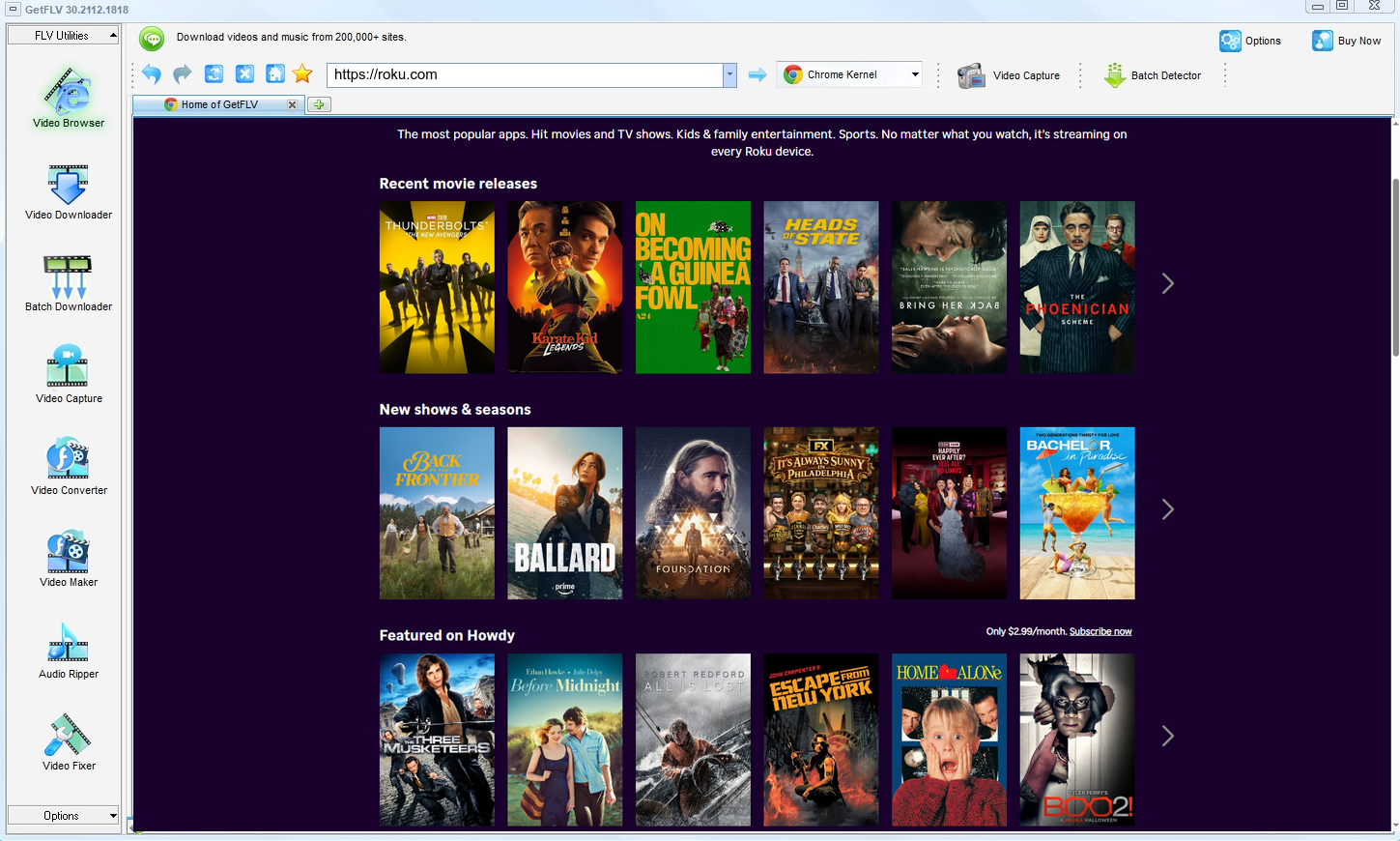
2. Open up GetFLV, head to the roku website, play the media, and capture its link

3. Capture and download roku videos

Treat the output like a backup, not like a master copy you are free to publish.
Method 2: A classic download manager such as IDM ★☆☆☆☆
A download manager that hooks into the browser and captures direct file links.
The procedure
- Set up IDM and add roku.com to its capture list.
- Start playback and wait for the floating download button.
- Choose a file if one is detected.
- Expect partial segments or no detection at all with tokenised streams.
Method 3: Older one-trick download programs ★☆☆☆☆
Once-popular programs that stopped being maintained: they fail after every roku update and never recover.
The procedure
- Find a legacy downloader and install it.
- Copy the roku.com URL into its address field.
- Start the analysis.
- Nothing usable comes back — the tool has not been updated in years.
Overall Comparison of the Ways to Download Roku Videos
| GetFLV: Roku Videos Downloader | A classic download manager such as IDM | Older one-trick download programs | |
|---|---|---|---|
| Resolution | Source quality, up to 4K | Medium quality | Medium quality |
| Speed (2 hour title) | 10–20 minutes | Usually no result | Fails before finishing |
| After a site update | Fixed with each release | Fails again | Unreliable |
| Audio and subtitles | Kept as delivered | Sometimes missing | Sometimes missing |
| Effort per title | Four steps, then automatic | Low effort, low yield | Seconds, usually wasted |
| Ads and pop-ups | No ads | Aggressive advertising | Aggressive advertising |
| Learning curve | Easy | One field | One field |
| After a platform update | Stays current | Unpredictable | Unpredictable |
| Playback on TV or car stereo | Standard MP4, plays anywhere | Rarely usable | Poor |
Interpretation: Update cadence is the quiet decider for anyone archiving a series rather than a single title.
Worth Remembering: Safety and Copyright Guidelines for Roku
The short checklist:
- Respecting the terms protects the creators you are paying, and keeps your own account in good standing.
- Account safety: never type your roku credentials into an extension, an online parser or any tool you would not trust with your email password.
- Adaptive streaming can silently drop you mid-session; check the resolution the tool detected rather than the one you assume you were watching.
- If the platform or the creator does not permit keeping a local copy, do not do it.
- Keep the files on devices you control; do not upload them to public clouds or group chats.
Is It Legal to Download Roku Videos?
The distinction that matters is between a private backup and distribution. Stay on the first side:
- Stay within valid access — an active subscription or a purchased title.
- Use the file for personal offline viewing only.
- Delete the copy when your access to the title ends.
- Do not use saved files commercially, in any form.
Apply those rules and the choice of method becomes mostly a technical one.
What Reddit Threads Reveal About Saving Roku Videos in 2026
What people report publicly matches what we measured privately. Threads across Reddit and independent forums describe short-lived workarounds and repeated failures, then settle on the same durable answer: desktop software maintained by a team that tracks roku changes.
Web-Based Downloader Limitations: Threads dating back months read like a timeline of decay. Each roku change removes a few more working services, and each round leaves users repeating the same conclusion: anything depending on a remote resolver will eventually break.
Why Recording Falls Short: Experienced users point out that the black screen is not something to troubleshoot. It signals that the content is protected, and attempting to work around it is both unreliable and, in many jurisdictions, the wrong thing to attempt.
What Actually Works Reliably: Members who archive at scale are very clear about requirements: original quality, no re-encoding, regular updates. Those criteria filter out every approach except desktop software, which is why the recommendation is repeated verbatim.
The GetFLV Answer: GetFLV Roku Downloader was built for people who decided to stop experimenting. It works across more than 600 websites, uses multi-threading to keep large files moving quickly, preserves true 1080p or 4K detail, and stays compatible through regular development updates.
FAQs About Roku Videos
QCan I legally keep a copy of roku videos?
APersonal use, no redistribution, and legitimate access — those three conditions cover most situations. Anything beyond them, such as sharing files or removing credits, is where users get into trouble.
QWhy do online downloaders and browser extensions fail on roku?
ATiming. By the time a remote service parses the page and requests the media, the signed addresses have expired. Working locally, with playback already running, removes that race entirely.
QWill I get the same resolution roku plays?
ASelectable. The detector lists every resolution the player negotiated, and you pick one before downloading — useful when you would rather have three hours of 720p than a few gigabytes of 4K.
QDo I need a roku account or subscription?
AThe rule is identical to normal viewing: if you would have to log in to watch it, you have to log in to download it. No workaround is involved.
QHow fast is it compared with screen recording?
AMeasured on our test machine, a two hour roku title took just under fifteen minutes to capture, versus two hours plus editing for the recording route.
QCan I keep the subtitle tracks as well?
ATitle, cover art and chapter information are written into the file when the source supplies them, which keeps a large library tidy.
QCan I trust the installer?
AYou can also run it in a virtual machine if you prefer to evaluate software in isolation — it needs no special drivers.
Update Log
The dates below reflect hands-on re-testing on the current roku.com player.
- September 2026 — Refreshed the FAQ with the questions readers ask most this quarter.
- August 2026 — Updated the comparison table with the latest quality and speed measurements.
- June 2026 — Re-measured capture speed after a network upgrade in our test lab.
Verified User Reviews for Roku Videos
Reviews below are grouped by the reason each person installed the program in the first place.
Member-only content on roku.com saved without any drama, at the quality my subscription actually entitles me to.
Signed in through the built-in browser, played the title, saved it. That is the whole process.
The developers clearly watch for site changes. I have never had to wait long for a fix.
Conclusion
After testing the three approaches on roku.com, the verdict is clear:
Three approaches, three very different outcomes. Titles worth keeping rarely survive the limitations of free online tools, and real-time recording is a poor way to store anything you value. GetFLV Roku Downloader closes that gap. Engineered to work with more than 600 websites, it splits each download across multiple threads for speed, and writes files out at the same 1080p or 4K quality the source delivered. Our developers monitor streaming changes closely and release updates as sites evolve, which is what separates maintained software from abandoned scripts. The trial costs nothing and takes about two minutes to install.
-
1 GetFLV Roku Downloader Our pick
Once it is installed it becomes a one-click job per title, and 90% of our queue finished without any intervention.
-
2 A classic download manager such as IDM
The promise is instant downloads; the reality is intermittent success and, now and then, a file that simply will not play.
-
3 Older one-trick download programs
Some days it handles everything short; other days it fails on titles it managed yesterday. That unpredictability is the real problem.
Keep it simple: one install, four steps, full-quality MP4 files that play anywhere.
Treat every file as temporary — that is the habit that keeps you on the safe side.
About the Author & How We Tested

Mandatory disclaimer: Save responsibly: lawful access in, private copy out, deletion when finished.