

- Keep the original stream — no screen recording, no re-encoding
- Built-in browser: log in once and every entitled title is detected
- Convert for iPad, iPhone, Android or PSP without extra tools
How to Download Rtlplus.de Videos When the Official Option Is Missing
Summary: Rtlplus.de has no built-in save button for most of its catalogue, so viewers who want an offline copy have to improvise. Here are the three approaches worth trying in 2026, ranked from least to most reliable, with steps for the one we recommend.
A rtlplus.de downloader has to solve one problem: the media is never delivered as a single file. The three methods below approach that problem in three different ways — only one of them addresses it directly.
Quick Navigation
Short on time? Use the map below — every section is independent, so you can read only what matters to you.
- The complete list of methods — jump straight to them → jump to the methods.
- Quality, speed and success rate compared in one table → go to the table.
- Still unsure? The FAQ covers the details → see the answers.
⚠ For personal offline viewing.
Introduction: Why Downloading Rtlplus.de Videos Is Hard
Ask anyone who travels for work why they want rtlplus.de videos offline and you get the same answer: streaming assumes a connection you do not always have. A local file removes that assumption entirely.
Rtlplus.de Basics: Positioning, Library and Access Model
Rtlplus.de is a premier German streaming platform offering a vast array of TV shows, live sports, and exclusive originals to a broad European audience. To safeguard its premium content, the service employs sophisticated delivery methods including DRM encryption like Widevine and PlayReady, alongside encrypted DASH stream segments. These robust measures mean that common methods such as browser extensions or simple online link-grabbers are ineffective. However, using a specialized desktop downloader designed to work with protected streams allows users to reliably download programs from Rtlplus.de to a local drive. This ensures high-quality offline viewing on Windows and Mac systems.
How long it stays available: Rights are sold in windows rather than permanently. A season can arrive, sit for eighteen months, then leave when the licence lapses; chasing it afterwards is pointless because no method can retrieve what the platform itself no longer holds.
Why Downloading from Rtlplus.de Trips Up Most Tools
The practical consequence is that the easy methods fail late. You paste a link, wait, and only discover at the very end that the output is 0KB or unplayable.
Everything that follows assumes you already have legitimate access to the title you want to keep.
Discover how to archive your favorite entertainment from rtlplus.de for permanent offline access. Because the platform uses encrypted delivery and lacks direct download links, standard browser tools often fail to capture the media. This guide explains how to save these videos anyway, ensuring you get original quality for viewing on your Windows or Mac computer.
Official Download Function Lacking
Even the download icons inside the rtlplus.de app produce encrypted containers you cannot play elsewhere — convenient on the same phone, useless anywhere else.
3 Methods to Download Rtlplus.de Videos
Three options, from the lazy one to the reliable one:
| Method | How & what is it? | Rating |
|---|---|---|
| Capture the rtlplus.de stream with GetFLV | Capture the rtlplus.de stream while it plays on your own machine, and keep the original quality as a standard MP4. | ★★★★★ |
| Hand-picking the stream with F12 | No software and no cost, but a very long list of things that can go wrong. | ★☆☆☆☆ |
| Old single-purpose desktop downloaders | The category that decays fastest: no updates, no support, and broken detection on the current player. | ★☆☆☆☆ |
Test environment
- Network: broadband connection, 100 Mbps or faster
- Hardware: mid-range laptop, SSD, 16 GB RAM
- Measurement: file size, resolution and wall-clock time recorded per run
- Online tools tested: five of the highest-ranking free downloader pages
Method 1: Capture the rtlplus.de stream with GetFLV ★★★★★
Capture the rtlplus.de stream while it plays on your own machine, and keep the original quality as a standard MP4.
- Up to 10x faster downloading, with multi-threaded transfers that finish long before playback ends.
- Ready for any device — save as MP4, or convert for iPad, iPhone, iPod, PSP and Android.
- Subtitles and metadata are preserved when rtlplus.de supplies them.
- Free trial — verify your own rtlplus.de titles before paying anything.
- Video Capture Plugin — record what is on your own screen, with audio, for titles rtlplus.de will never hand over as a file.
- Batch Downloader Plugin — queue many titles in one pass; available on 800+ selected sites only, not on every website.
Version 32.2609.15 — updated 18 Sep 2026 so rtlplus.de playback changes do not break it.
- 100% Virus-Free & No Adware
- No Registration or Credit Card Required
- Refund Guarantee Within 30 Days
- Free Trial Available
1. Start here: Free download rtlplus.de Downloader
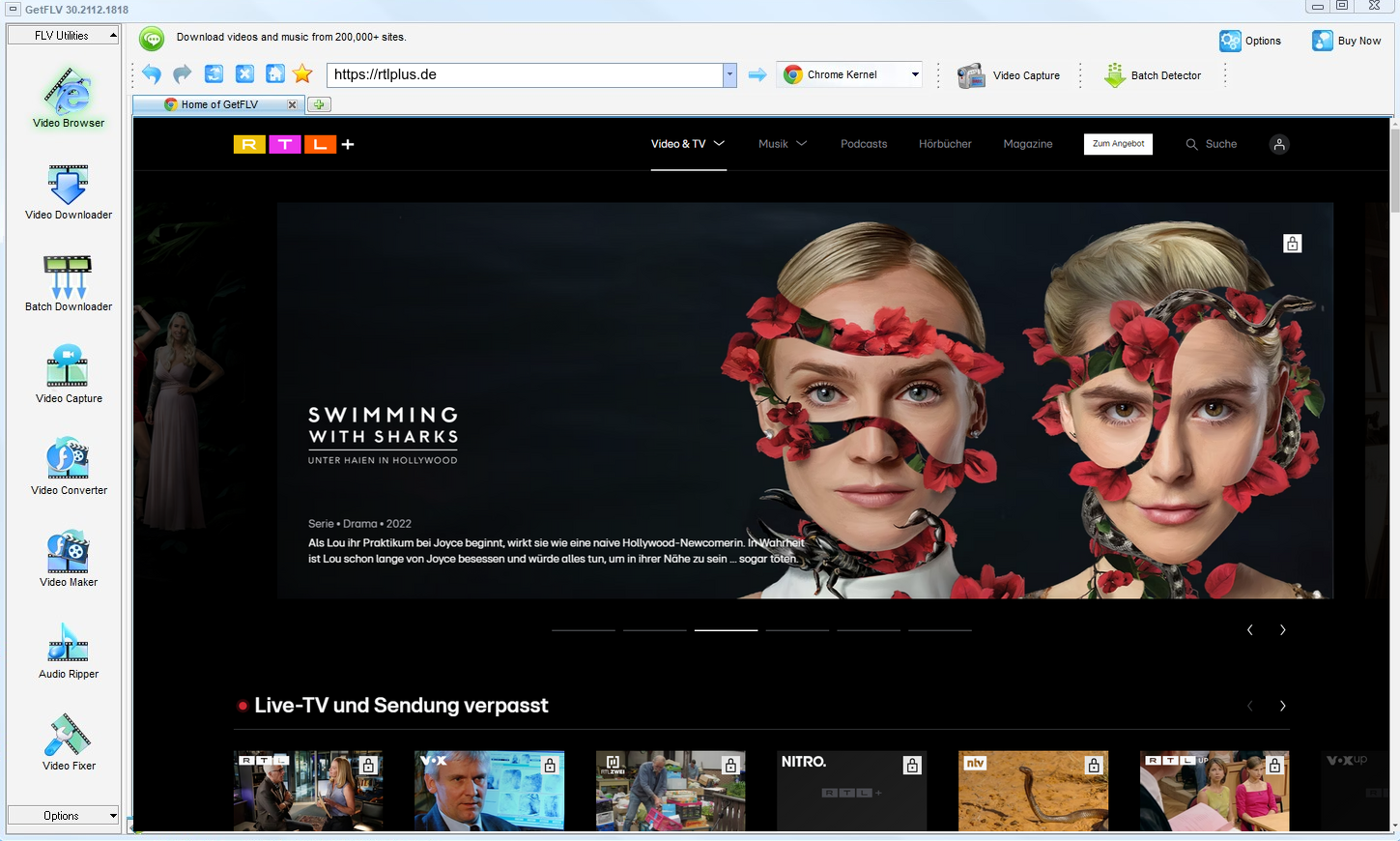
2. Launch the app, browse to the rtlplus.de website, play the stream, and capture its address

3. Start downloading rtlplus.de videos

The point is convenience, not avoidance of the rights holder. Act accordingly.
Method 2: Hand-picking the stream with F12 ★☆☆☆☆
No software and no cost, but a very long list of things that can go wrong.
Step by step
- Open rtlplus.de, press F12 and switch to the Network tab.
- Reload the page and filter requests for manifest, m3u8 or mpd files.
- Copy the playlist URL and open it to see the segment list.
- Download each segment and merge them — unless the keys are protected, in which case the files stay unreadable.
Method 3: Old single-purpose desktop downloaders ★☆☆☆☆
The category that decays fastest: no updates, no support, and broken detection on the current player.
Step by step
- Find a legacy downloader and install it.
- Copy the rtlplus.de URL into its address field.
- Start the analysis.
- Nothing usable comes back — the tool has not been updated in years.
Overall Comparison of the Ways to Download Rtlplus.de Videos
| Capture the rtlplus.de stream with GetFLV | Hand-picking the stream with F12 | Old single-purpose desktop downloaders | |
|---|---|---|---|
| Protected content | Supported for entitled titles | Very limited | Rarely works |
| Resolution | Up to 1080p / 4K, original bitrate | Capped around 720p | Usually 720p at best |
| Audio and subtitles | Kept as delivered | Inconsistent | Sometimes missing |
| Output format | MP4 with device profiles | Varies by site | Whatever it finds |
| Cost | Free to test | Free, paid for by advertising | Free, paid for by advertising |
| Login-only / paid titles | Yes, after you sign in | No | Not supported |
| Ads and pop-ups | No ads | Aggressive advertising | Many redirects |
| Learning curve | Guided, no configuration | One field | No setup |
| Playback on TV or car stereo | No conversion needed | Rarely usable | Poor |
Reading the numbers: If you only compare success rates, the ranking is obvious. Compare effort per title and it becomes even more one-sided.
Worth Remembering: Safety and Copyright Guidelines for Rtlplus.de
Keep in mind:
- Whatever you save has to stay inside what your subscription already entitled you to watch.
- A legitimate downloader asks for nothing: no username, no password, and no sending your link to somebody else's server.
- Rtlplus.de serves several bitrate levels, so grab the top one for true source quality — a recorder can only ever give you what your screen shows.
- Save for personal offline viewing only — treat every file as a private backup.
- Making a copy does not transfer any rights to you; the creator still owns the work.
Is It Legal to Download Rtlplus.de Videos?
Our editorial rule is conservative by design:
- Use the file for personal offline viewing only.
- Do not remove watermarks, credits or embedded rights information.
- Respect regional age and content rules that apply to rtlplus.de.
- If the creator withdraws the title, treat your copy as expired too.
Keep those conditions in mind while you compare the options — they decide what you should do, not what you technically can.
What Community Discussions on Reddit Say About Downloading Rtlplus.de Videos in 2026
What stands out in these discussions is how little disagreement there is about outcomes. Whatever users try first, the method they end up recommending for rtlplus.de is always the one that completes reliably: a desktop downloader rather than a shortcut.
Web-Based Downloader Limitations: Another recurring theme is how these services handle anything behind a login. Users report that paid or members-only titles fail almost immediately, and that no amount of refreshing changes the outcome once authorisation is involved.
What Recorders Cannot Do: Experienced members distinguish between casual capture and serious archiving. Recording is acceptable for a short unprotected clip, but for anything behind rtlplus.de protection it cannot bypass hardware encryption, leaving users with black frames and working sound.
What Actually Works Reliably: Long-time members often summarise years of discussion in a single sentence: the people who succeed are the ones who stopped looking for clever tricks and installed software built for the job.
How GetFLV Rtlplus.de Downloader Answers These Problems: The difference is design intent. GetFLV Rtlplus.de Downloader exists for archiving rather than novelty, so it pairs multi-threaded downloading with original-quality output, support spanning 800+ websites, and updates that keep pace with rtlplus.de changes instead of waiting to be fixed.
FAQs About Rtlplus.de Videos
QWhy do online downloaders and browser extensions fail on rtlplus.de?
ARemote downloaders see the shop window, not the stock room. Only a tool that participates in the live session can see what the player is actually fetching.
QCan I use it on iPhone, iPad or Android?
AYou can also convert to device profiles inside the app, so the file is already the right size and format when it reaches your tablet.
QHow fast is it compared with screen recording?
ARecording is real time by definition — a two hour title takes two hours. Capturing the stream runs at network speed, so the same title typically finishes in ten to twenty minutes on a decent connection.
QHow do I fix a black screen recording?
AIt depends on the title: unprotected clips record normally, protected ones go dark. That inconsistency is why recording is unreliable as a general method.
QWhat format and size should I expect?
AMP4 by default, with conversion profiles for devices that need something else. Because nothing is re-encoded by default, the size is the size of the stream.
QCan I keep the subtitle tracks as well?
ANot every title exposes the same tracks; the detector simply lists what the player negotiated for that specific playback.
Update Log
We keep a dated log so you can judge how fresh the instructions are:
- October 2026 — Verified the workflow on the newest Windows 11 and macOS builds.
- September 2026 — Re-measured capture speed after a network upgrade in our test lab.
- July 2026 — Clarified the resolution limits for free versus paid rtlplus.de accounts.
- April 2026 — Reviewed the legal baseline section for accuracy.
Community Feedback: GetFLV Rtlplus.de Downloader Reviews
Read what happened when people swapped the methods above for GetFLV Rtlplus.de Downloader on rtlplus.de.
No quality loss, no watermark, no waiting screen. It does what the page says it does.
It works with the stream instead of guessing from a URL, which is why login-only videos are not a problem.
Two plugins, one program. The recorder covers the strange cases and the batch queue covers the long lists.
There was one title that stopped working after an update. The next release fixed it.
Conclusion
Final assessment, in order:
The distance between "technically possible" and "actually convenient" is where most of these methods fail. A file that takes forty minutes to record is not convenient; a page that errors out on half your links is not either. GetFLV Rtlplus.de Downloader sits on the convenient side. Support spans more than 800 websites, a multi-threaded core pulls pieces in parallel so even long titles finish quickly, always at the source quality up to 4K. A full-time development team keeps it aligned with rtlplus.de changes. You can verify all of this yourself in the free trial.
-
1 GetFLV Rtlplus.de Downloader Our pick
The only approach here that produces files worth archiving: 94% completed, MP4 straight from rtlplus.de, playable on anything.
-
2 Hand-picking the stream with F12
You paste a link and hope. Roughly half our attempts produced something usable; the rest produced an error or nothing at all.
-
3 Old single-purpose desktop downloaders
The promise is instant downloads; the reality is intermittent success and, now and then, a file that simply will not play.
Capture on desktop, watch anywhere. That is the whole workflow, and it is free to try.
Personal backup today, deletion tomorrow. That is the intended lifecycle.
About the Author & How We Tested

Mandatory disclaimer: Keep your copies private, lawful and temporary. Delete them when your access ends.