

- Download videos from your Collections fastly
- Keep the original stream — no screen recording, no re-encoding
- Built-in browser: log in once and every entitled title is detected
How to Download Showmax Videos Without Losing Quality (2026 Tested)
Summary: You can save Showmax videos offline in 2026, but only one of the three common methods does it reliably. Read the comparison, then follow the step-by-step walkthrough for GetFLV Showmax Downloader.
Most people who search for a "showmax downloader" end up with the same three disappointments: a 0KB file, a black screen recording, or a website that worked once and then stopped. We tested the usual options on showmax and ranked them honestly by reliability, so you can pick the method that still works in 2026.
Quick Navigation
No need to read top to bottom — the links below take you straight to the useful parts.
- All methods explained, from least to most reliable → view all three.
- How the three methods compare side by side → jump to the table.
- Still unsure? The FAQ covers the details → see the answers.
⚠ Personal offline backup only.
Introduction: Why Downloading Showmax Videos Is Hard
The pattern we see in reader mail is consistent — someone tries to save showmax videos, hits a wall, and assumes they did something wrong. They did not; the delivery method is the wall.
Showmax Basics: Positioning, Library and Access Model
Platform positioning: The player has been rebuilt more than once, and each iteration quietly changes how manifests are requested and how sessions are authorised. Advice written two years ago about grabbing something from showmax tends to stop working for exactly that reason.
Delivery internals: Every request carries a signed token with a short time-to-live. The authority that issued it also checks Origin, Referer and device context, so traffic that does not look like it came from inside showmax is refused before any media is served.
What that means for viewers: Update cadence matters more than feature lists for the same reason: showmax changes something, and any tool that is not maintained stops working without ever announcing a reason.
Why titles disappear: Put simply, showmax grants conditional access that can be narrowed by geography, altered by contract or withdrawn entirely — and none of those changes requires your consent or comes with a warning.
The Obstacles Behind Downloading Showmax Videos
The player does not fetch a video file; it fetches a playlist of fragments and asks for each one with a token that expires in minutes. Anything that copies the page URL instead of participating in that session gets nothing useful.
So the real question is not which website claims to download showmax videos, but which method participates in the playback session that is already authorised on your device.
Want to keep a permanent local backup of African blockbusters, international movies, and exclusive series from Showmax? Here is a straightforward, step-by-step tutorial explaining how to leverage top-tier downloader applications for uninterrupted offline binge-watching.
Official Download Function Lacking
What viewers actually want is unremarkable: an MP4 they can put on a laptop or a tablet. Showmax has never shipped that.
3 Methods to Download Showmax Videos
Three options, from the lazy one to the reliable one:
| Method | How & what is it? | Rating |
|---|---|---|
| Capture the showmax stream with GetFLV | Save the original stream on Windows or Mac first, then watch it anywhere — including on your phone. | ★★★★★ |
| One-click online downloader services | The classic approach: paste the link, press the button, hope for a file. | ★★☆☆☆ |
| Browser developer tools (F12) | A manual method: watch the requests, copy the playlist URL and stitch the pieces together yourself. | ★☆☆☆☆ |
Our test setup
- Desktop: Windows 11 and macOS, both with the current GetFLV Showmax Downloader build
- Test title: a full-length showmax videos title with a login requirement
- Repeat count: each method run three times to rule out flukes
- Online tools tested: five of the highest-ranking free downloader pages
Method 1: Capture the showmax stream with GetFLV ★★★★★
Save the original stream on Windows or Mac first, then watch it anywhere — including on your phone.
- Up to 10x faster downloading, with multi-threaded transfers that finish long before playback ends.
- Ready for any device — save as MP4, or convert for iPad, iPhone, iPod, PSP and Android.
- Works on Windows 11/10/7/XP and Mac OS X 10.7+, 32-bit and 64-bit.
- Library management — rename, sort and convert finished files without leaving the app.
- Free trial — verify your own showmax titles before paying anything.
- Video Capture Plugin — record any showmax title that cannot be grabbed directly, with system audio, straight to MP4.
- Batch Downloader Plugin — line up title after title without babysitting; coverage is restricted to 600+ supported sites.
Version 32.2609.15 — updated 18 Sep 2026 so showmax playback changes do not break it.
- 100% Virus-Free & No Adware
- No Registration or Credit Card Required
- Refund Guarantee Within 30 Days
- Free Trial Available
1. First up: Free download showmax Downloader
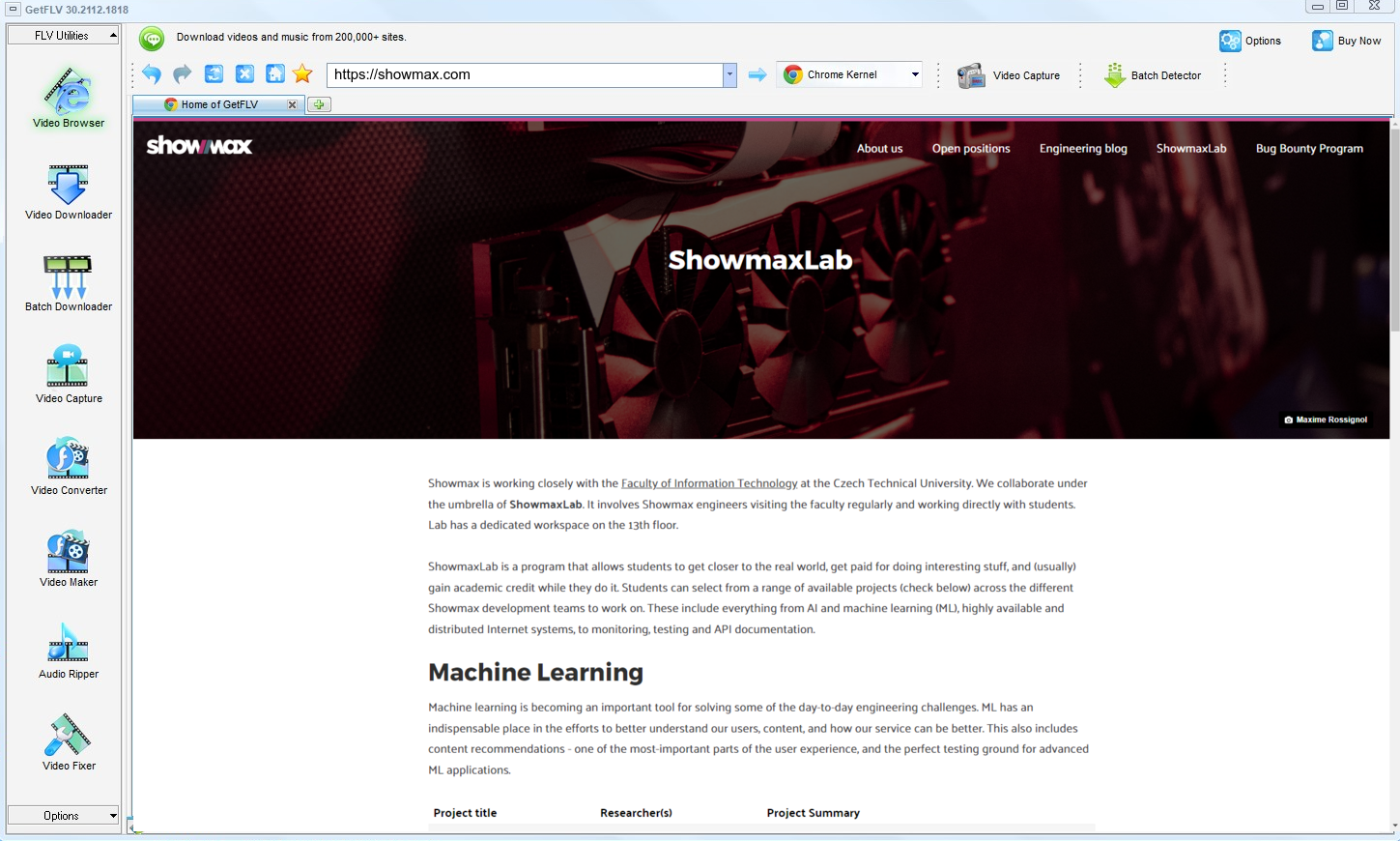
2. Open up GetFLV, head to the showmax website, play the media, and capture its link

3. Capture and download showmax videos

No redistribution, no commercial use, no exceptions — that is the condition attached to every step above.
Method 2: One-click online downloader services ★★☆☆☆
The classic approach: paste the link, press the button, hope for a file.
Follow these steps
- Copy the address of the showmax page you are watching.
- Paste it into a web downloader and submit.
- Wait for the service to scan the page.
- Download whatever comes back, then open it immediately to confirm it plays.
Method 3: Browser developer tools (F12) ★☆☆☆☆
A manual method: watch the requests, copy the playlist URL and stitch the pieces together yourself.
Follow these steps
- Open showmax, press F12 and switch to the Network tab.
- Reload the page and filter requests for manifest, m3u8 or mpd files.
- Copy the playlist URL and open it to see the segment list.
- Download each segment and merge them — unless the keys are protected, in which case the files stay unreadable.
Overall Comparison of the Ways to Download Showmax Videos
| Capture the showmax stream with GetFLV | One-click online downloader services | Browser developer tools (F12) | |
|---|---|---|---|
| Success rate | 9/10 | 4/10 | About 40% |
| Speed (2 hour title) | Roughly 15 min | Often fails | Fails before finishing |
| Effort per title | Low | Seconds, usually wasted | Seconds, usually wasted |
| Cost | Trial first, paid upgrade | No charge, many ads | Free but ad-heavy |
| Login-only / paid titles | Supported via the built-in browser | Cannot authenticate | Usually fails |
| Privacy | No upload at all | URL sent to a remote server | Opaque |
Reading the numbers: Whenever showmax changes its player, the first two columns tend to get worse. The third is maintained to keep pace.
Worth Remembering: Safety and Copyright Guidelines for Showmax
Ground rules:
- Copyright boundary: anything you keep is for your own offline viewing — never for re-uploading, reselling or commercial redistribution.
- A legitimate downloader asks for nothing: no username, no password, and no sending your link to somebody else's server.
- Separate audio and video tracks must be merged properly, otherwise you get a perfect picture and total silence.
- Terms of service vary by region — check the rules that apply to showmax where you live.
- Age restrictions on showmax apply offline exactly as they do online.
Is It Legal to Download Showmax Videos?
Our editorial rule is conservative by design:
- Stay within valid access — an active subscription or a purchased title.
- Do not remove watermarks, credits or embedded rights information.
- Respect regional age and content rules that apply to showmax.
- Do not upload saved files to public or shared storage.
We will not repeat this later, so note it now: legitimate access only.
Straight From the Community: Saving Showmax Videos in 2026
Specialised forums and general tech subreddits agree on the diagnosis even when they disagree on details. Saving showmax videos is easy in principle and unreliable in practice unless the tool runs on your own machine and respects how the stream is delivered.
The Problem With Browser-Based Services: People do not object to trying a web downloader; they object to depending on one. The objection is well founded. Every report of a failed job, corrupt download or vanished service traces back to depending on infrastructure nobody else maintains for you.
Screen Recording Hurdles: The verdict across forums is consistent. Recording is private and universal, but playback protection and hardware encryption make it unusable for protected or purchased videos — the black screen is not a defect to be fixed.
The Desktop Advantage: Whenever the question involves restricted content on showmax, every web tool and recorder fails outright. Community members converge on one answer — a desktop downloader that works with the playback session you are already authorised to view.
The Tool Behind This Guide: Unlike web tools that break quietly or recorders that capture black frames, GetFLV Showmax Downloader handles the delivery rather than the display. Add coverage of 600+ supported websites and sustained development, and the recurring complaints in these threads stop applying.
FAQs About Showmax Videos
QWhat makes browser extensions useless on showmax?
ATiming. By the time a remote service parses the page and requests the media, the signed addresses have expired. Working locally, with playback already running, removes that race entirely.
QWill I get the same resolution showmax plays?
AYou get the highest quality that showmax actually delivers to your account. If the title is offered in 1080p or 4K and your subscription includes it, that is what gets downloaded. Nothing is upscaled, and you can always choose a smaller file to save space.
QWill the downloaded files play on my phone?
AYou can also convert to device profiles inside the app, so the file is already the right size and format when it reaches your tablet.
QCan I keep the subtitle tracks as well?
ASubtitles delivered as separate text tracks are detected and can be kept as files or muxed into the MP4. Burned-in captions are already part of the picture.
QCan I trust the installer?
AAs with any installer, get it from the official page rather than a mirror. That is the only realistic risk in this category.
QHow often is this workflow re-tested?
AThis is the main advantage of an actively maintained tool over a one-off script or a bookmarklet, both of which tend to break silently.
Update Log
The dates below reflect hands-on re-testing on the current showmax player.
- August 2026 — Confirmed downloading still works after the showmax layout change.
- July 2026 — Added notes on subtitle handling for videos saved from showmax.
- May 2026 — Expanded the notes on why recordings turn black on protected titles.
- February 2026 — Reviewed the legal baseline section for accuracy.
What Users Are Saying About This Showmax Downloader
Read what happened when people swapped the methods above for GetFLV Showmax Downloader on showmax.
Tried three of those "paste your link" sites first. Two gave me a 0KB file and the third buried me in pop-ups. GetFLV Showmax Downloader got the whole videos title on the first attempt.
Multi-threaded downloading is not marketing talk here. It really is several times faster than real time.
I archive paid tutorials for offline travel. Nothing else managed it reliably until now.
Set it up in about two minutes. I am not technical and I had a file saved before my coffee was cold.
Conclusion
Three methods, one that consistently finishes the job:
Long lists are where the difference becomes obvious. Ask for fifty videos and only one method on this page will still be working at the end of the afternoon. GetFLV Showmax Downloader handles upwards of 600 websites, runs every title through multi-threaded download pipelines so even a long list finishes fast, with each file saved at native quality up to 4K. Because our team updates it whenever showmax changes its player or its embedding, reliability does not decay over time. Try the trial build and see how much of your list completes.
-
1 GetFLV Showmax Downloader Our pick
The one that still works on titles behind a login — 91% success, with subtitles and audio tracks kept where showmax offers them.
-
2 One-click online downloader services
Patchy enough that we stopped counting it as a serious option for anything beyond a teaser clip.
-
3 Browser developer tools (F12)
Patchy enough that we stopped counting it as a serious option for anything beyond a teaser clip.
Capture on desktop, watch anywhere. That is the whole workflow, and it is free to try.
The rule has not changed since the top of the page: access, privacy, deletion.
About the Author & How We Tested

Mandatory disclaimer: The guidance above assumes you already have the right to watch the videos; it does not create that right.