

- Download videos from Vhx.tv Search Result, Timeline, and Explore with ease
- Free trial, clean signed installer, no bundled adware
- Automatic retry and resume on unstable connections
How to Download Vhx.tv Videos in 2026: Online Tools vs Recorder vs GetFLV Vhx.tv Downloader
Summary: We tested every realistic way to download Videos from Vhx.tv in 2026 and ranked them by how often they produced a complete, playable file. Online downloader websites rarely survive the encrypted segments used by vhx.tv; screen recording always works but costs real time and often returns a black picture; GetFLV Vhx.tv Downloader captures the original stream and finishes a two hour title in minutes.
A vhx.tv downloader has to solve one problem: the media is never delivered as a single file. The three methods below approach that problem in three different ways — only one of them addresses it directly.
Quick Navigation
Whether you want the steps, the numbers or the legal background, start here:
- Every working method, with steps and screenshots → view all three.
- How they stack up: resolution, speed and reliability → view the numbers.
- FAQ: legality, quality, speed, accounts and devices → jump to the FAQ.
⚠ For personal offline viewing.
Introduction: Why Downloading Vhx.tv Videos Is Hard
The pattern we see in reader mail is consistent — someone tries to save vhx.tv videos, hits a wall, and assumes they did something wrong. They did not; the delivery method is the wall.
A Short Introduction to Vhx.tv and Its Content Library
VHX (Vimeo OTT) hosts professional independent videos and masterclass content. While their secure delivery system is designed for creator protection, our tool enables viewers to successfully capture and store these high-quality assets for offline learning and entertainment.
The basics: Discovery is algorithmic: homepages are personalised, rows are rearranged per viewer, and deep pages are reachable but not always linked. Practically speaking, half the catalogue has no stable public address — it exists only inside a browsing session.
The technical side: Geo-restriction is enforced at several layers at once — IP geolocation, account region, payment country and sometimes device locale. It affects what appears in the catalogue, what can play, and occasionally which resolution is offered.
Regional restrictions: Access is territorial. Licensing is negotiated country by country, so availability is decided by geo-location and often by the country attached to your payment method — which is why some titles simply do not exist in your region no matter how you reach vhx.tv.
Why Vhx.tv Playback Does Not Translate into Files
This is also why the same online downloader can work on one site and fail on another. It is not about popularity — it is about whether the media is served as a plain file or as a protected segment stream.
The methods below are ordered by how often they succeed, not by how easy they look on a search results page.
Learn how independent creators and enthusiastic viewers can download direct video content, master classes, and specialized media hosted on the VHX (Vimeo OTT) framework with maximum clarity and speed.
Official Download Function Lacking
For desktop users the situation is starker: vhx.tv simply assumes you are online, and offers nothing for the case where you are not.
3 Methods to Download Vhx.tv Videos
The ranking reflects success rate first, then quality, then the time you spend.
| Method | How & what is it? | Rating |
|---|---|---|
| GetFLV Vhx.tv Downloader | Capture the vhx.tv stream while it plays on your own machine, and keep the original quality as a standard MP4. | ★★★★★ |
| Internet Download Manager (IDM) | Built for speed on normal downloads; needs a lot of configuration and still misses protected streams. | ★★☆☆☆ |
| Old single-purpose desktop downloaders | Abandoned tools written for the old vhx.tv layout, never rewritten for the one running today. | ★★☆☆☆ |
How we tested
- Account: active access to vhx.tv where the title requires it
- Playback: standard browser playback, no modified clients
- Browser: current Chrome and Safari, default settings, no extensions
- Online tools tested: five of the highest-ranking free downloader pages
Method 1: GetFLV Vhx.tv Downloader ★★★★★
Capture the vhx.tv stream while it plays on your own machine, and keep the original quality as a standard MP4.
- Keeps the best available quality — HD, 1080p or 4K, exactly as delivered by vhx.tv.
- Ready for any device — save as MP4, or convert for iPad, iPhone, iPod, PSP and Android.
- Subtitles and metadata are preserved when vhx.tv supplies them.
- Resume and retry — interrupted downloads pick up instead of starting over.
- Library management — rename, sort and convert finished files without leaving the app.
- Video Capture Plugin — a fallback for anything vhx.tv protects: record it while it plays, picture and audio together.
- Batch Downloader Plugin — handle a long list automatically, limited to the 1200+ websites where batch grabbing is supported.
Latest build: 32.2609.15 · released 18 Sep 2026 · verified working on vhx.tv.
- 100% Virus-Free & No Adware
- No Registration or Credit Card Required
- Refund Guarantee Within 30 Days
- Free Trial Available
1. Jump right in: Free download vhx.tv Downloader
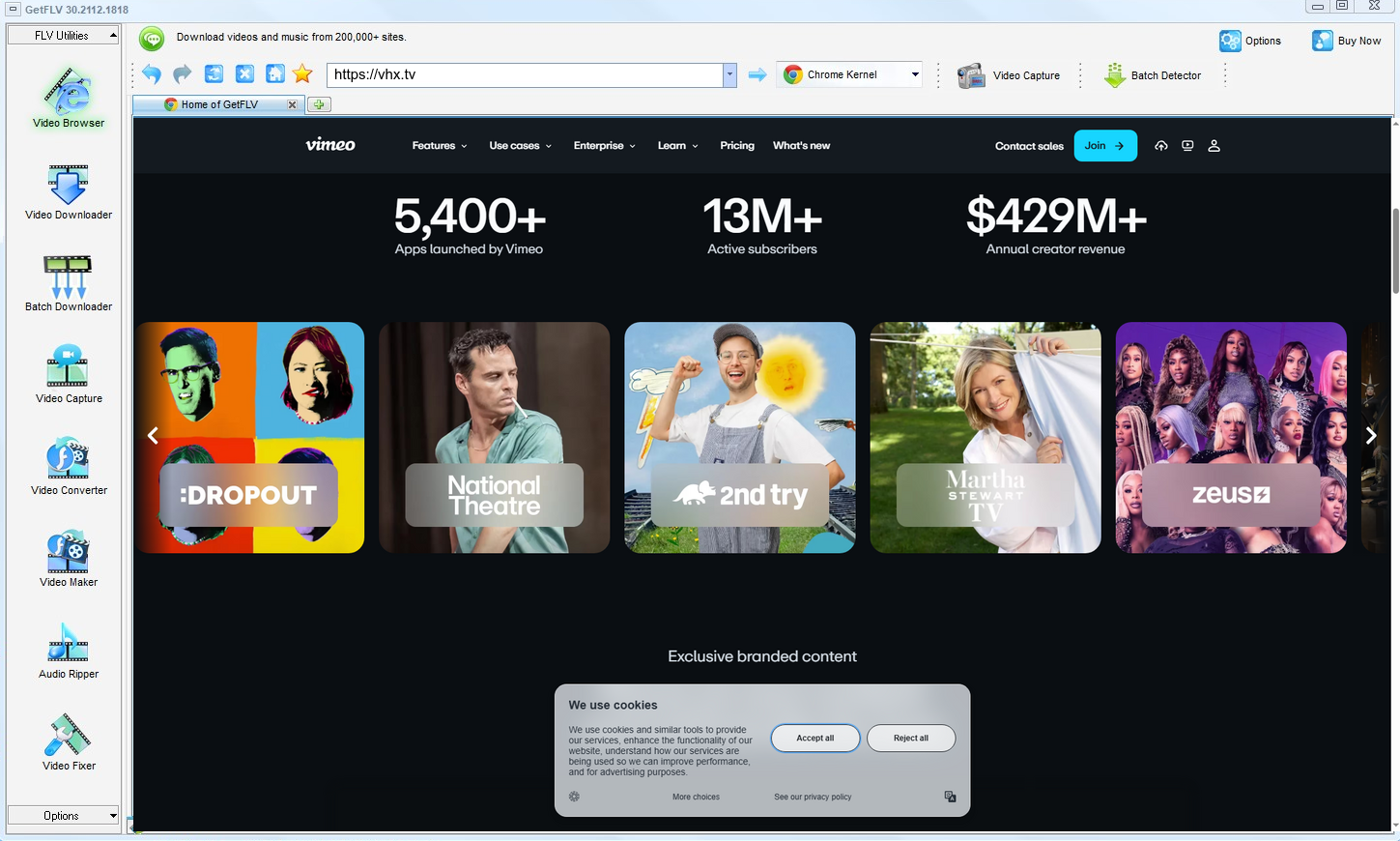
2. Open GetFLV, visit the vhx.tv website, start playing the video, and grab its address

3. Enjoy downloading vhx.tv videos

Important use boundary: have legitimate access, follow the creator and platform rules, keep the files private, and delete them when they are no longer needed. If saving a local copy is not permitted, do not attempt it — even if a tool appears to make it technically possible.
Method 2: Internet Download Manager (IDM) ★★☆☆☆
Built for speed on normal downloads; needs a lot of configuration and still misses protected streams.
Walkthrough
- Configure the browser module and its file-type filters.
- Open vhx.tv and play the videos.
- Look for the download prompt in the corner of the screen.
- Most protected titles never trigger it; those that do usually return a few seconds of video.
Method 3: Old single-purpose desktop downloaders ★★☆☆☆
Abandoned tools written for the old vhx.tv layout, never rewritten for the one running today.
Walkthrough
- Download one of the older freeware downloaders still listed in search results.
- Install it and paste the vhx.tv link.
- Press the download button and wait.
- It fails, because the detection rules were written for a player that no longer exists.
Overall Comparison of the Ways to Download Vhx.tv Videos
| GetFLV Vhx.tv Downloader | Internet Download Manager (IDM) | Old single-purpose desktop downloaders | |
|---|---|---|---|
| Resolution | Source quality, up to 4K | 720p, medium | Usually 720p at best |
| After a site update | Maintained actively | Often stops working | Breaks until patched |
| Audio and subtitles | All detected tracks | Inconsistent | Inconsistent |
| Effort per title | Set and forget | One minute, then hope | One minute, then hope |
| Login-only / paid titles | Yes | Usually fails | Cannot authenticate |
| Ads and pop-ups | No ads | Heavy | Heavy |
| Privacy | Everything stays on your machine | URL sent to a remote server | Unknown logging |
How to read the table: Update cadence is the quiet decider for anyone archiving a series rather than a single title.
Worth Remembering: Safety and Copyright Guidelines for Vhx.tv
Ground rules:
- Whatever you save has to stay inside what your subscription already entitled you to watch.
- Shady browser plugins have been caught harvesting cookies and session tokens — a far bigger loss than one video.
- Keep subtitles and chapters when the platform provides them, and check what the tool actually carries across.
- Keep the files on devices you control; do not upload them to public clouds or group chats.
- If saving is not permitted in your jurisdiction, close this page and use the official app instead.
Is It Legal to Download Vhx.tv Videos?
Our editorial rule is conservative by design:
- Follow the terms of vhx.tv and the law in your country.
- Respect regional age and content rules that apply to vhx.tv.
- Delete the copy when your access to the title ends.
- If the creator withdraws the title, treat your copy as expired too.
Bearing that in mind, here is the practical side of the problem.
How Users Really Save Vhx.tv Videos in 2026 — Community Findings
Reading dozens of vhx.tv threads produces a clear picture. Users are not short of options; they are short of dependable ones. The options that hold up under scrutiny are desktop applications that handle the stream directly and are updated when platforms change.
The Problem With Browser-Based Services: Users also flag the queue problem. A service that takes two minutes per link is unusable for a list, and most web tools impose exactly that limit, which rules them out immediately for anyone archiving more than a handful of videos.
Why Screen Capture Disappoints: Sceptical users have tested recorders extensively and posted their findings. Their summary: the technique is universal in theory and unreliable in practice for vhx.tv, particularly once the account session or paid tier introduces protection.
What Experienced Users Recommend: Threads asking how to save locked posts, member-only clips or direct messages mark the point where other approaches stop working. In those discussions the consensus is unambiguous: reliable high-definition capture without dropped frames requires a dedicated desktop application.
The Tool Behind This Guide: GetFLV Vhx.tv Downloader is engineered around precisely these obstacles. Instead of depending on remote resolvers or recording pixels, it reads the authorised stream directly, uses multi-threading for speed, saves files at their original up to 4K resolution, and receives frequent updates that follow every vhx.tv change.
FAQs About Vhx.tv Videos
QCan I legally keep a copy of vhx.tv videos?
APersonal use, no redistribution, and legitimate access — those three conditions cover most situations. Anything beyond them, such as sharing files or removing credits, is where users get into trouble.
QWhy does every free vhx.tv downloader site return nothing?
ABecause they only read the public page. The real media is delivered as encrypted segments with short-lived, signed addresses, so a remote service that never plays the videos has nothing valid to fetch. A local application that works with the stream while it plays avoids that limitation.
QWhat happens when vhx.tv updates its website?
Avhx.tv ships front-end changes regularly, and every one of them is a chance for fragile methods to break. This one is tracked by a full-time team, so compatibility is repaired rather than lost.
QHow big is a downloaded vhx.tv video file?
AMP4 by default, with conversion profiles for devices that need something else. Because nothing is re-encoded by default, the size is the size of the stream.
QAre captions downloaded together with the video?
ANot every title exposes the same tracks; the detector simply lists what the player negotiated for that specific playback.
QIs GetFLV Vhx.tv Downloader safe to install?
AWe install it on every test machine in the lab and have never seen a bundled offer or a background service that outlives the uninstall.
QDo you update the tool when vhx.tv breaks it?
AStreaming platforms change their players every few months. When they do, the detector is patched; the update log at the bottom records the date we last re-tested.
Update Log
Every entry below corresponds to a re-test on vhx.tv, not a cosmetic edit.
- August 2026 — Updated the comparison table with the latest quality and speed measurements.
- July 2026 — Confirmed downloading still works after the vhx.tv layout change.
- May 2026 — Verified the workflow on the newest Windows 11 and macOS builds.
- February 2026 — Expanded the notes on why recordings turn black on protected titles.
What Our Users Report After Trying GetFLV Vhx.tv Downloader
Short reviews from people who tried the methods on this page and ended up staying with GetFLV Vhx.tv Downloader.
What surprised me was how little fuss there was. The online tools needed five attempts; this needed one.
Download speed was the first thing I noticed — a two hour title finished in well under twenty minutes on my connection.
For anything the downloader cannot parse directly, the capture plugin is the fallback that actually delivers.
Set it up in about two minutes. I am not technical and I had a file saved before my coffee was cold.
I like that it is a real application rather than another browser tab that might vanish tomorrow.
Conclusion
Three methods, one that consistently finishes the job:
The honest summary is that only one option here scales beyond a handful of clips. GetFLV Vhx.tv Downloader was built for volume from the start: support for more than 1200 websites, multi-threaded downloads that keep even large files moving at speed while retaining every pixel of the original 1080p or 4K rendition. Add regular updates that track how vhx.tv delivers media, and it becomes the obvious default. If you are unsure, the free trial settles the question faster than any amount of reading.
-
1 GetFLV Vhx.tv Downloader Our pick
This is the one we would actually use ourselves — 88% success, offline playback afterwards, no ads and no waiting rooms.
-
2 Internet Download Manager (IDM)
Works occasionally, usually on the shortest downloads. Anything longer, or anything behind a login, is a coin flip.
-
3 Old single-purpose desktop downloaders
Acceptable for a single vhx.tv clip in a pinch, too fragile for regular use, and it hands your link to a server you do not control.
Once the first file lands on your disk at full resolution, the rest of the comparison stops being theoretical.
Rights stay with the creator in every case — a local copy never changes that.
About the Author & How We Tested

Mandatory disclaimer: Respect the creator, respect the platform terms, and keep the files to yourself.