

- Download videos from ViKi in up to 1080p and in AAC 2.0 audio track
- Keep the original stream — no screen recording, no re-encoding
- Works on Windows 11/10 and macOS, 32-bit and 64-bit
How to Download ViKi Videos on Windows and Mac (2026 Guide)
Summary: No theory, no filler: three methods tested against the current viki.com player, a comparison table with the numbers that matter, community feedback, and a FAQ covering the questions people actually ask about ViKi downloads.
Streaming is convenient until you need the file itself: a long flight, a flaky hotel connection, or a title that is about to leave the catalogue. Below are the three methods people try, with the honest results we measured on viki.com in 2026.
Quick Navigation
This page is long on purpose, so here is the quick route through it:
- All methods explained, from least to most reliable → start here.
- Compare them before you choose — table and analysis → compare them now.
- Questions and answers about ViKi downloads → see the answers.
⚠ Do not share anything you save.
Introduction: Why Downloading ViKi Videos Is Hard
There is a quiet difference between watching something and having it. viki.com is built around the first; this guide is written for people who need the second.
ViKi 101: Understanding the Platform First
Rakuten Viki specializes in Asian dramas with unique community-subtitled content. Their video player features tight access controls, but our platform’s download technology successfully decodes these streams, allowing you to archive subtitled series and films directly to your storage.
What it is: Delivery is adaptive by design. Every playback session negotiates a bitrate ladder suited to your connection at that moment, so the picture quality you see is a decision the player made in real time, not a property of the file. Highest available resolution consequently varies by title, by device and sometimes by region.
What the guardrails look like: Audio and video frequently travel as separate tracks and are muxed client-side. Grab only one and you get either a silent picture or a picture-less soundtrack — one of the more common complaints in user reports about half-broken ViKi downloads.
Rights and rotation: Taken together, availability here is always temporary: geographically filtered, contractually windowed and subject to rotation. Any reason for wanting a local archive has to be measured against that clock.
Why Downloading from ViKi Trips Up Most Tools
None of this is accidental. Segment delivery protects the stream from hotlinking and makes casual copying impractical, which is why a dedicated desktop tool is the realistic answer.
The good news is that the reliable path is also the least effortful one once it is set up.
Passionate about Korean, Chinese, and Japanese dramas? Learn how to grab, convert, and store full-length episodes and movie clips from Rakuten Viki for convenient offline viewing. This guide covers essential steps to secure your favorite subtitled entertainment files locally.
Official Download Function Lacking
Support pages will confirm it if you ask: offline files are tied to the app and cannot be transferred or converted by design.
3 Methods to Download ViKi Videos
Three options, from the lazy one to the reliable one:
| Method | How & what is it? | Rating |
|---|---|---|
| GetFLV: ViKi Videos Downloader | Save the original stream on Windows or Mac first, then watch it anywhere — including on your phone. | ★★★★★ |
| One-click online downloader services | A remote page attempts to fetch the videos for you, without ever playing it. | ★☆☆☆☆ |
| Browser developer tools (F12) | No software and no cost, but a very long list of things that can go wrong. | ★★☆☆☆ |
Test environment
- Network: broadband connection, 100 Mbps or faster
- Browser: current Chrome and Safari, default settings, no extensions
- Repeat count: each method run three times to rule out flukes
- Measurement: file size, resolution and wall-clock time recorded per run
Method 1: GetFLV: ViKi Videos Downloader ★★★★★
Save the original stream on Windows or Mac first, then watch it anywhere — including on your phone.
- Captures the original stream — no plug-ins, no screen recording, no quality loss from re-encoding.
- Up to 10x faster downloading, with multi-threaded transfers that finish long before playback ends.
- Keeps the best available quality — HD, 1080p or 4K, exactly as delivered by ViKi.
- Works on Windows 11/10/7/XP and Mac OS X 10.7+, 32-bit and 64-bit.
- Resume and retry — interrupted downloads pick up instead of starting over.
- Library management — rename, sort and convert finished files without leaving the app.
- Video Capture Plugin — record any ViKi title that cannot be grabbed directly, with system audio, straight to MP4.
- Batch Downloader Plugin — line up title after title without babysitting; coverage is restricted to 1000+ supported sites.
Version 32.2609.15 shipped 18 Sep 2026 with improved stream detection for ViKi.
- 100% Virus-Free & No Adware
- No Registration or Credit Card Required
- Refund Guarantee Within 30 Days
- Free Trial Available
1. Start here: Free download ViKi Downloader
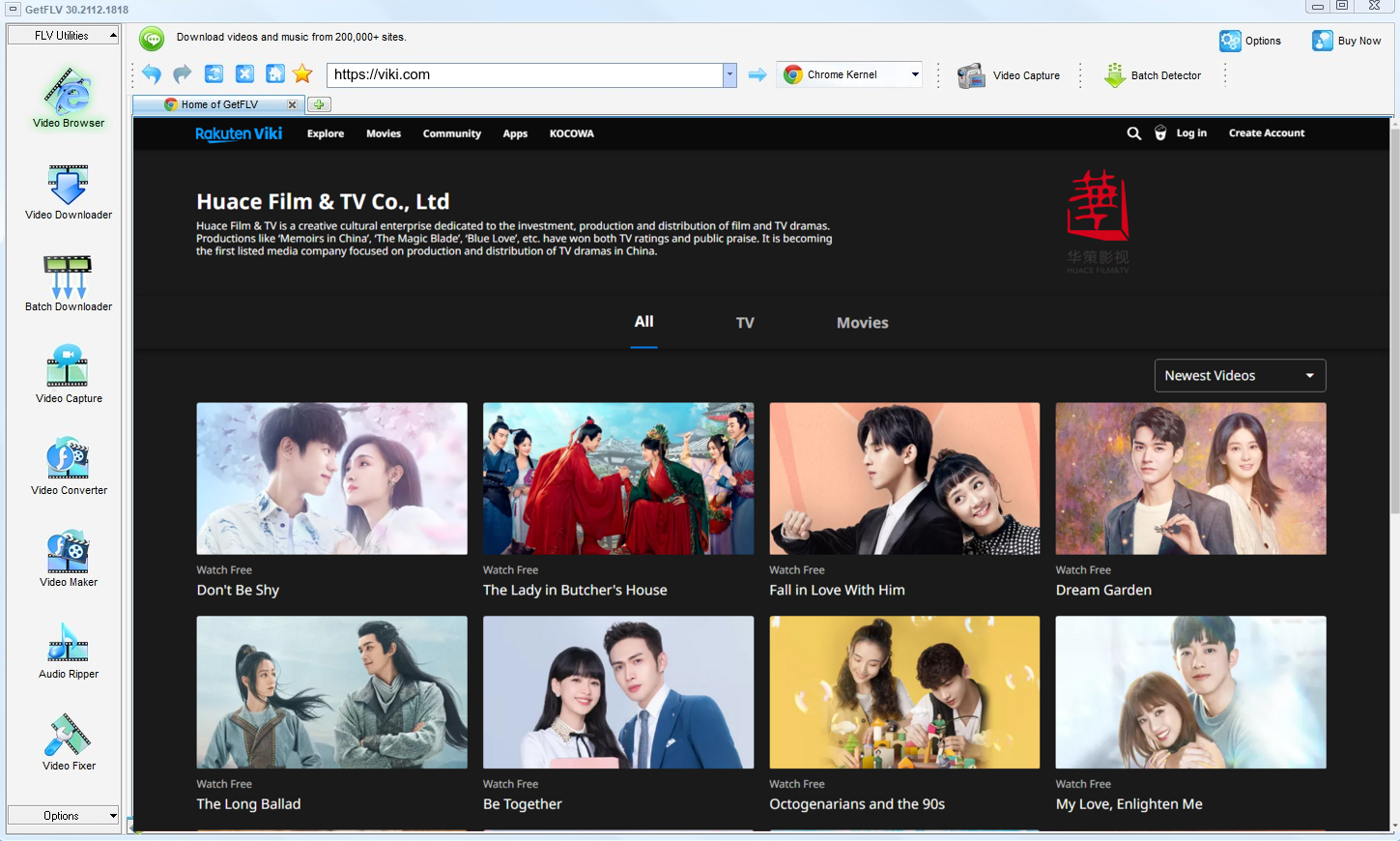
2. Launch the app, browse to the ViKi website, play the stream, and capture its address

3. Start downloading ViKi videos

The point is convenience, not avoidance of the rights holder. Act accordingly.
Method 2: One-click online downloader services ★☆☆☆☆
A remote page attempts to fetch the videos for you, without ever playing it.
The procedure
- Copy the address of the ViKi page you are watching.
- Paste it into a web downloader and submit.
- Wait for the service to scan the page.
- Download whatever comes back, then open it immediately to confirm it plays.
Method 3: Browser developer tools (F12) ★★☆☆☆
No software and no cost, but a very long list of things that can go wrong.
The procedure
- Open viki.com, press F12 and switch to the Network tab.
- Reload the page and filter requests for manifest, m3u8 or mpd files.
- Copy the playlist URL and open it to see the segment list.
- Download each segment and merge them — unless the keys are protected, in which case the files stay unreadable.
Overall Comparison of the Ways to Download ViKi Videos
| GetFLV: ViKi Videos Downloader | One-click online downloader services | Browser developer tools (F12) | |
|---|---|---|---|
| Protected content | Supported for entitled titles | Limited | Limited |
| Speed (2 hour title) | 10–20 minutes | Unpredictable | Usually no result |
| Output format | Clean MP4 | Unpredictable | Unpredictable |
| Login-only / paid titles | Works exactly as in your browser | No | No |
| Ads and pop-ups | Nothing bundled | Heavy | Aggressive advertising |
| Privacy | Private by design | URL sent to a remote server | URL sent to a remote server |
| After a platform update | Patched regularly | Breaks until the site catches up | Often stops working |
| Playback on TV or car stereo | No conversion needed | Unlikely to play at all | Unlikely to play at all |
How to read the table: Whenever ViKi changes its player, the first two columns tend to get worse. The third is maintained to keep pace.
Worth Remembering: Safety and Copyright Guidelines for ViKi
Four rules we follow ourselves:
- Passing a private copy to people who have not paid is the fastest way to lose your account.
- The safest setups run entirely on your computer, reusing the session your browser already established.
- ViKi serves several bitrate levels, so grab the top one for true source quality — a recorder can only ever give you what your screen shows.
- Use these methods only for videos you are legitimately allowed to access.
- If the platform or the creator does not permit keeping a local copy, do not do it.
Is It Legal to Download ViKi Videos?
The distinction that matters is between a private backup and distribution. Stay on the first side:
- Never share, repost or sell anything you save.
- Follow the terms of viki.com and the law in your country.
- Do not remove watermarks, credits or embedded rights information.
- Delete the copy when your access to the title ends.
Bearing that in mind, here is the practical side of the problem.
How Users Really Save ViKi Videos in 2026 — Community Findings
Threads about offline viewing of ViKi videos tend to be generous with hard-won detail: which failures are normal, which errors mean nothing, and which approach consistently produces watchable files. That consensus points to desktop software every time.
What Users Report About Online Downloaders: Even when a download completes, users report problems with what arrives: missing audio, shortened duration, or a file renamed into uselessness. None of these issues exist in a workflow that reads the stream directly.
The Recording Trade-Off: Screen recording is recommended in almost every thread and rejected in the replies that follow. Tech-savvy members point out the fatal flaw immediately: platform DRM and hardware-level encryption trigger the black screen problem, and no recorder can bypass protection on paid content.
Why Desktop Software Wins: Threads asking how to save locked posts, member-only clips or direct messages mark the point where other approaches stop working. In those discussions the consensus is unambiguous: reliable high-definition capture without dropped frames requires a dedicated desktop application.
Why Our Software is the Ultimate Solution: The three weaknesses users complain about — fragility, black screens and tedium — are precisely what GetFLV ViKi Downloader was designed to eliminate, through local stream handling, multi-threaded transfers and updates tracking ViKi changes.
FAQs About ViKi Videos
QIs downloading ViKi videos for offline viewing allowed?
AWe cannot give legal advice for your jurisdiction, but the conservative reading is consistent worldwide: keep the file, do not publish it, and delete it when your access ends.
QWhat quality can I expect — HD, 1080p or 4K?
AQuality follows your entitlement, not the tool. Free tiers often cap at 720p; paid plans usually unlock 1080p and sometimes 4K, and that is exactly what ends up on disk.
QDoes it still work after ViKi changes its player?
AThat is the main advantage over the other two methods. Web tools fail silently when ViKi changes and no update ever arrives; here the fix is published and the steps on this page stay valid.
QHow fast is it compared with screen recording?
AThe gap grows with length. A short clip is a matter of seconds either way; a full season is the difference between an afternoon and a coffee break.
QThe picture is black but the sound plays — why?
ASome users report success with hardware capture, but that adds cost and still costs real time. Capturing the stream avoids the problem entirely.
QWhat format and size should I expect?
AStandard MP4 with the original video and audio tracks, so file size follows the bitrate: roughly 1 to 3 GB per hour at 1080p, less if you pick a lower profile.
QCan I keep the subtitle tracks as well?
ANot every title exposes the same tracks; the detector simply lists what the player negotiated for that specific playback.
Update Log
Verification history for ViKi:
- August 2026 — Updated the comparison table with the latest quality and speed measurements.
- July 2026 — Added notes on subtitle handling for videos saved from ViKi.
- May 2026 — Removed a method that no longer returns a playable file.
- February 2026 — Checked the workflow against titles that require a login.
What People Say About Downloading ViKi Videos
These are typical reports from users saving ViKi videos — the good and the occasional rough edge.
Two of the free sites gave me a file with no sound at all. This kept both the picture and the audio at full resolution.
Fast downloads and the original resolution — the two things every other tool I tried got wrong.
There was one title that stopped working after an update. The next release fixed it.
Private by design — it captures what my machine is already entitled to play, nothing more.
Conclusion
Where each method ends up after testing:
Long lists are where the difference becomes obvious. Ask for fifty videos and only one method on this page will still be working at the end of the afternoon. GetFLV ViKi Downloader handles upwards of 1000 websites, runs every title through multi-threaded download pipelines so even a long list finishes fast, with each file saved at native quality up to 4K. Because our team updates it whenever ViKi changes its player or its embedding, reliability does not decay over time. Try the trial build and see how much of your list completes.
-
1 GetFLV ViKi Downloader Our pick
Highest reliability of the three at 88%, and the only method that preserves the original bitrate instead of recapturing it.
-
2 One-click online downloader services
Acceptable for a single ViKi clip in a pinch, too fragile for regular use, and it hands your link to a server you do not control.
-
3 Browser developer tools (F12)
No install, no cost, no account — and no guarantee either, especially once a video runs longer than a few minutes.
Everything described above is available in the trial — verify it on your own machine before deciding anything.
Save what you are entitled to, keep it to yourself, remove it when you are finished.
About the Author & How We Tested

Mandatory disclaimer: Keep your copies private, lawful and temporary. Delete them when your access ends.