

- Download videos from ViKi in up to 1080p and in AAC 2.0 audio track
- Download videos from ViKi Search Result, Timeline, and Explore with ease
- Keep the original stream — no screen recording, no re-encoding
How to Download ViKi Videos for Offline Viewing on Any Device
Summary: People search for a ViKi downloader after a 0KB file or a black screen recording. This page explains why that happens and shows the method that avoids both — capturing the original stream on desktop, then moving the MP4 to any device you watch on.
Every method here was run on the same machine, on the same connection, against the same viki.com title. That makes the differences in quality, speed and reliability easy to see.
Quick Navigation
This page is long on purpose, so here is the quick route through it:
- Three methods, tested on viki.com, ranked honestly → view all three.
- The head-to-head comparison of the three approaches → read the comparison.
- Questions and answers about ViKi downloads → read the FAQ.
⚠ For personal offline viewing.
Introduction: Why Downloading ViKi Videos Is Hard
People look for a ViKi downloader for very practical reasons: unstable hotel Wi-Fi, expensive mobile data, or the worry that a favourite title will be rotated out of the library next month. Whatever the reason, the goal is the same — a local copy you can open any time, without buffering.
ViKi Basics: Positioning, Library and Access Model
Rakuten Viki specializes in Asian dramas with unique community-subtitled content. Their video player features tight access controls, but our platform’s download technology successfully decodes these streams, allowing you to archive subtitled series and films directly to your storage.
Membership model: Discovery is algorithmic: homepages are personalised, rows are rearranged per viewer, and deep pages are reachable but not always linked. Practically speaking, half the catalogue has no stable public address — it exists only inside a browsing session.
How streams are protected: Even without full DRM, encryption is common at the segment level: AES-128 or SAMPLE-AES keys delivered over a separate request, rotated regularly, and valid only for a short window. Anyone replaying the request outside that window receives an error instead of video.
What you can actually reach: Resolution ceilings are another quiet restriction: browser playback is frequently capped below the native master, so the best available stream in a desktop session may still be lower than what the rights holder actually holds.
The Hard Part: Turning ViKi Playback into Local Files
Resolution switching complicates it further. The player renegotiates quality mid-playback, so any tool that captured one static URL is working from information that is already stale.
So the real question is not which website claims to download ViKi videos, but which method participates in the playback session that is already authorised on your device.
Passionate about Korean, Chinese, and Japanese dramas? Learn how to grab, convert, and store full-length episodes and movie clips from Rakuten Viki for convenient offline viewing. This guide covers essential steps to secure your favorite subtitled entertainment files locally.
Official Download Function Lacking
Support pages will confirm it if you ask: offline files are tied to the app and cannot be transferred or converted by design.
3 Methods to Download ViKi Videos
You will notice the methods differ in one fundamental way: whether they see the stream or only the page.
| Method | How & what is it? | Rating |
|---|---|---|
| GetFLV ViKi Downloader (Windows and Mac) | Save the original stream on Windows or Mac first, then watch it anywhere — including on your phone. | ★★★★★ |
| Capture the screen while it plays | Nothing needs to understand the stream — you simply capture the output. | ★★☆☆☆ |
| Developer tools and manual sniffing | A manual method: watch the requests, copy the playlist URL and stitch the pieces together yourself. | ★☆☆☆☆ |
What we measured on
- Network: broadband connection, 100 Mbps or faster
- Hardware: mid-range laptop, SSD, 16 GB RAM
- Measurement: file size, resolution and wall-clock time recorded per run
- Recorders tested: OBS Studio and two commercial screen capture tools
Method 1: GetFLV ViKi Downloader (Windows and Mac) ★★★★★
Save the original stream on Windows or Mac first, then watch it anywhere — including on your phone.
- Up to 10x faster downloading, with multi-threaded transfers that finish long before playback ends.
- Ready for any device — save as MP4, or convert for iPad, iPhone, iPod, PSP and Android.
- Works on Windows 11/10/7/XP and Mac OS X 10.7+, 32-bit and 64-bit.
- Private by design — everything runs on your machine; nothing is uploaded anywhere.
- Video Capture Plugin — capture playback from viki.com with sound when direct grabbing is blocked, and keep the original frame rate.
- Batch Downloader Plugin — queue many titles in one pass; available on 1200+ selected sites only, not on every website.
Current release 32.2609.15 — 18 Sep 2026, maintained for Windows 11 and the newest macOS.
- 100% Virus-Free & No Adware
- No Registration or Credit Card Required
- Refund Guarantee Within 30 Days
- Free Trial Available
1. Quick setup: Free download ViKi Downloader
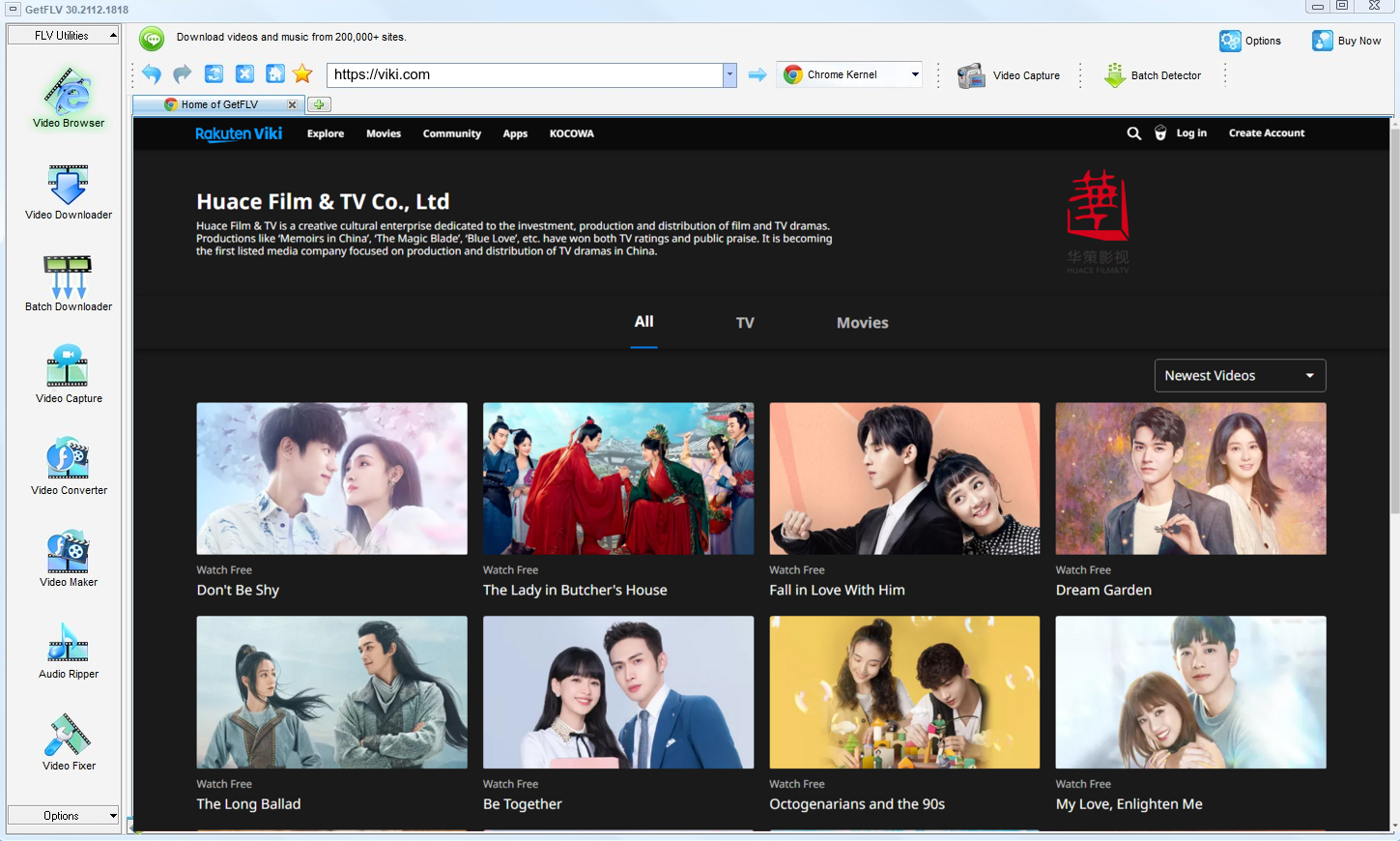
2. Start GetFLV, go to the ViKi website, play the video clip, and grab the link

3. Download ViKi videos with one click

Keep it private, keep it local, keep it temporary. That is the whole rule.
Method 2: Capture the screen while it plays ★★☆☆☆
Nothing needs to understand the stream — you simply capture the output.
Walkthrough
- Open OBS or your preferred recorder and create a window capture.
- Play the videos on ViKi in full screen.
- Record for the entire runtime; there is no shortcut.
- Stop, export and check for the black-screen problem.
Method 3: Developer tools and manual sniffing ★☆☆☆☆
A manual method: watch the requests, copy the playlist URL and stitch the pieces together yourself.
Walkthrough
- Press F12 before the ViKi player loads.
- Filter the network panel by media type and start the videos.
- Identify the manifest and any key requests.
- Manual reassembly only works when the content is unencrypted.
Overall Comparison of the Ways to Download ViKi Videos
| GetFLV ViKi Downloader (Windows and Mac) | Capture the screen while it plays | Developer tools and manual sniffing | |
|---|---|---|---|
| Success rate | 9 out of 10 attempts | 2/10 | Roughly 4/10 |
| Protected content | Higher for eligible content | Limited | Mostly fails |
| Resolution | Full source resolution | Screen resolution only | Capped around 720p |
| Speed (2 hour title) | 10–20 minutes | 2 hours (real time) | Often fails |
| Audio and subtitles | All detected tracks | Depends on mixer settings | Often audio only |
| Effort per title | Low | Full runtime plus editing | Quick to try |
| Cost | Paid, with a refund window | Free (OBS) | Free, paid for by advertising |
| After a platform update | Maintained and re-tested | Still runs, quality may drop | Unpredictable |
| Playback on TV or car stereo | Works out of the box | Needs re-encoding | Format roulette |
The takeaway: Whenever ViKi changes its player, the first two columns tend to get worse. The third is maintained to keep pace.
Worth Remembering: Safety and Copyright Guidelines for ViKi
Worth remembering:
- Leave watermarks, credits and embedded metadata exactly as they are.
- Prefer local parsing. Anything you can already play should never have to leave your own machine.
- Do not convert "just in case" — every re-encode costs quality and solves nothing.
- Save for personal offline viewing only — treat every file as a private backup.
- Never share, resell, re-upload or redistribute anything you save.
Is It Legal to Download ViKi Videos?
This is not legal advice, but it is the standard most cautious users follow:
- Use the file for personal offline viewing only.
- Delete the copy when your access to the title ends.
- Keep the copies on devices only you control.
- If the creator withdraws the title, treat your copy as expired too.
Keep those conditions in mind while you compare the options — they decide what you should do, not what you technically can.
What Actually Works for ViKi Viewers in 2026
Reading dozens of ViKi threads produces a clear picture. Users are not short of options; they are short of dependable ones. The options that hold up under scrutiny are desktop applications that handle the stream directly and are updated when platforms change.
Why Web Tools Fail: Another recurring theme is how these services handle anything behind a login. Users report that paid or members-only titles fail almost immediately, and that no amount of refreshing changes the outcome once authorisation is involved.
Limitations of Screen Capture: The verdict across forums is consistent. Recording is private and universal, but playback protection and hardware encryption make it unusable for protected or purchased videos — the black screen is not a defect to be fixed.
The Desktop Advantage: Community threads also highlight device portability: once a clean MP4 exists on disk, moving it anywhere is trivial. Users describe that as the practical argument for choosing desktop software over anything that runs in a tab.
What GetFLV ViKi Downloader Does Differently: The difference is design intent. GetFLV ViKi Downloader exists for archiving rather than novelty, so it pairs multi-threaded downloading with original-quality output, support spanning 1200+ websites, and updates that keep pace with ViKi changes instead of waiting to be fixed.
FAQs About ViKi Videos
QIs a paid ViKi plan required?
AOnly for content that is not public. Free titles are detected right away; anything behind a paywall or login simply requires you to sign in inside the built-in browser, exactly as you would in Chrome or Safari.
QWill this method keep working next month?
AThat is the main advantage over the other two methods. Web tools fail silently when ViKi changes and no update ever arrives; here the fix is published and the steps on this page stay valid.
QIs it really faster than just recording the screen?
AMeasured on our test machine, a two hour ViKi title took just under fifteen minutes to capture, versus two hours plus editing for the recording route.
QIs the output MP4 or something else?
AYou choose before downloading: keep the original bitrate for archiving, or convert to a smaller profile when disk space matters more than detail.
QCan I keep the subtitle tracks as well?
AWhere ViKi serves them as part of the stream, yes — available subtitle tracks are listed alongside the video formats and can be downloaded or embedded.
QWhat if ViKi changes its player and the method stops working?
AThis is the main advantage of an actively maintained tool over a one-off script or a bookmarklet, both of which tend to break silently.
Update Log
This page is maintained, not abandoned. Here is the record:
- August 2026 — Re-tested all three methods against the current viki.com player.
- July 2026 — Re-measured capture speed after a network upgrade in our test lab.
- May 2026 — Removed a method that no longer returns a playable file.
- February 2026 — Reviewed the legal baseline section for accuracy.
What Our Users Report After Trying GetFLV ViKi Downloader
A sample of the feedback we receive about GetFLV ViKi Downloader, grouped by the problem each person was trying to solve.
What surprised me was how little fuss there was. The online tools needed five attempts; this needed one.
Member-only content on viki.com saved without any drama, at the quality my subscription actually entitles me to.
Everything runs on my own machine. I am not pasting my links into some unknown server, which matters to me.
Conclusion
Three methods, one that consistently finishes the job:
Keeping ViKi videos offline should not mean re-recording your own screen every time. Above we tested three routes; all of them can produce a file, but only one does it consistently. GetFLV ViKi Downloader was built for exactly this job: support for over 1200 platforms and a multi-threaded engine that downloads several segments at once while preserving the source bitrate up to 4K. When a site rearranges its player or switches embedding technology, we publish an update rather than leaving you with an error. There is nothing to pay up front — the trial is free and needs no card.
-
1 GetFLV ViKi Downloader Our pick
Everything runs on your own machine, so no third party ever sees your link — and 89% of attempts produced the file we asked for.
-
2 Capture the screen while it plays
Zero compatibility issues, maximum effort: a full watch-through of the videos, plus a black-screen risk whenever copy protection engages.
-
3 Developer tools and manual sniffing
Convenient until it is not. No installation, but no consistency either, and several attempts stalled on a "processing" screen.
Two minutes of setup replaces hours of recording. That trade is worth making.
One last reminder: private copy, no sharing, delete when done.
About the Author & How We Tested

Mandatory disclaimer: A private copy for offline viewing is the intended use. Any other use is outside the scope of this guide.