

- Download videos from ZEE5 Search Result, Timeline, and Explore with ease
- Standard MP4 output that plays on any device, phone included
- Works on Windows 11/10 and macOS, 32-bit and 64-bit
How to Download ZEE5 Videos for Offline Viewing on Any Device
Summary: Everything below comes from hands-on testing on zee5.com: which ZEE5 downloader methods still return a file, which produce an empty one, and how to keep HD quality without recording your screen in real time.
Two hours of screen recording to keep one title is not a solution. Neither is a 0KB download. This comparison walks through the three real options for ZEE5 videos and explains, in plain language, why only one of them survives contact with the zee5.com player.
Quick Navigation
We keep this guide updated, so the map below is the fastest way back to what changed:
- Three methods, tested on zee5.com, ranked honestly → see all methods.
- The head-to-head comparison of the three approaches → see the comparison.
- Short answers to the most common doubts → view the FAQ.
⚠ Personal offline backup only.
Introduction: Why Downloading ZEE5 Videos Is Hard
People look for a ZEE5 downloader for very practical reasons: unstable hotel Wi-Fi, expensive mobile data, or the worry that a favourite title will be rotated out of the library next month. Whatever the reason, the goal is the same — a local copy you can open any time, without buffering.
ZEE5 Platform Profile: What You Are Actually Dealing With
ZEE5 is a leading provider of Indian regional entertainment, movies, and music videos. Although their platform relies on complex video encryption, our solution enables seamless extraction, allowing users to build a personal offline collection of diverse Indian content.
In one paragraph: ZEE5 runs its own playback stack from end to end: an HTML5 player fronting a CDN, backed by an entitlement service that decides whether this session may watch this title. What reaches your browser is therefore a controlled stream rather than a downloadable file. The library may be large, but every asset lives inside that pipeline and nothing in it is designed to leave.
Behind the player: Put plainly, ZEE5 is engineered so that watching is effortless and extracting is not. The technique that works is the one that reads the authorised stream the way the player does, rather than trying to reconstruct it afterwards.
Availability and geography: Access is territorial. Licensing is negotiated country by country, so availability is decided by geo-location and often by the country attached to your payment method — which is why some titles simply do not exist in your region no matter how you reach zee5.com.
So Why Does Downloading from ZEE5 Fail So Often?
The practical consequence is that the easy methods fail late. You paste a link, wait, and only discover at the very end that the output is 0KB or unplayable.
The rest of this guide is built around that constraint, because every recommendation follows from it.
Learn how to download regional movies, blockbuster web series, live TV channels, and music videos from ZEE5 for seamless, buffer-free offline access. This guide provides actionable insights into handling diverse digital rights-managed media files securely.
Official Download Function Lacking
Where an offline mode exists at all, it is usually limited: a mobile app, a fixed expiry, and files locked inside that app. You cannot move them, convert them or back them up, which is not the same thing as having the file.
3 Methods to Download ZEE5 Videos
Below is what we tested on zee5.com, ranked by how often each method returned a complete, playable file.
| Method | How & what is it? | Rating |
|---|---|---|
| GetFLV ZEE5 Downloader | Work with the stream instead of the page: install GetFLV ZEE5 Downloader, play the title, pick a resolution, save. | ★★★★★ |
| Downloader extensions for zee5.com | Extensions promise one-click saving from the page itself, but most cannot touch the encrypted segments ZEE5 serves. | ★★☆☆☆ |
| Internet Download Manager (IDM) | Built for speed on normal downloads; needs a lot of configuration and still misses protected streams. | ★☆☆☆☆ |
What we measured on
- Desktop: Windows 11 and macOS, both with the current GetFLV ZEE5 Downloader build
- Hardware: mid-range laptop, SSD, 16 GB RAM
- Measurement: file size, resolution and wall-clock time recorded per run
- Online tools tested: five of the highest-ranking free downloader pages
Method 1: GetFLV ZEE5 Downloader ★★★★★
Work with the stream instead of the page: install GetFLV ZEE5 Downloader, play the title, pick a resolution, save.
- Ready for any device — save as MP4, or convert for iPad, iPhone, iPod, PSP and Android.
- Works on Windows 11/10/7/XP and Mac OS X 10.7+, 32-bit and 64-bit.
- Subtitles and metadata are preserved when ZEE5 supplies them.
- Resume and retry — interrupted downloads pick up instead of starting over.
- Library management — rename, sort and convert finished files without leaving the app.
- Video Capture Plugin — record what is on your own screen, with audio, for titles ZEE5 will never hand over as a file.
- Batch Downloader Plugin — queue many titles in one pass; available on 800+ selected sites only, not on every website.
Software version 32.2609.15, updated 18 Sep 2026; this page was re-verified afterwards.
- 100% Virus-Free & No Adware
- No Registration or Credit Card Required
- Refund Guarantee Within 30 Days
- Free Trial Available
1. Before you start: Free download ZEE5 Downloader
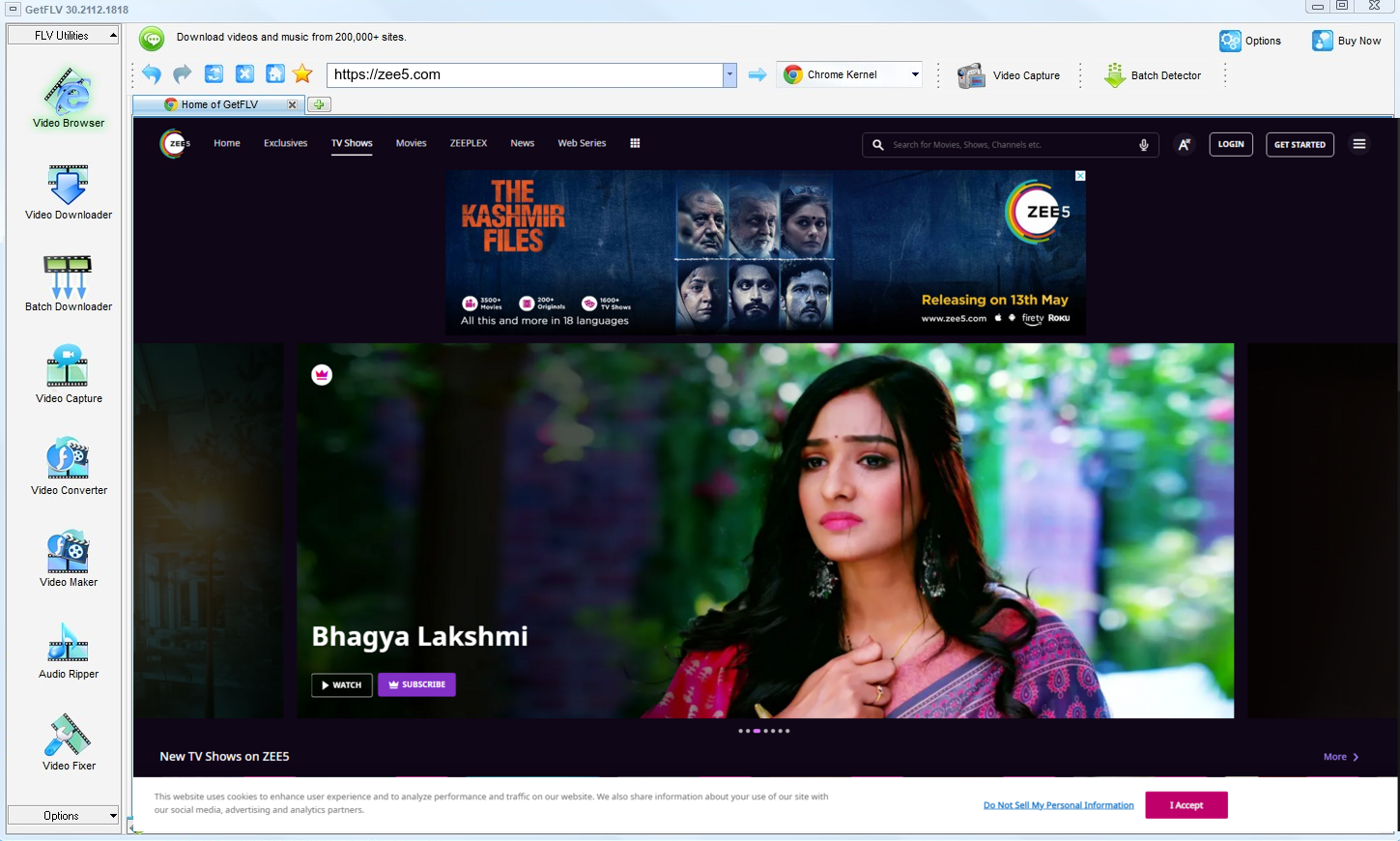
2. Fire up GetFLV, navigate to the ZEE5 website, start playing the video, and grab the URL

3. Grab your ZEE5 videos

A personal library on your own disk is one thing. Uploading it anywhere is another, and not one we endorse.
Method 2: Downloader extensions for zee5.com ★★☆☆☆
Extensions promise one-click saving from the page itself, but most cannot touch the encrypted segments ZEE5 serves.
Step by step
- Add a downloader extension from the official store.
- Restart the browser so the add-on can hook into page loads.
- Open ZEE5 and start playback.
- Check the extension panel; encrypted streams typically show nothing.
Method 3: Internet Download Manager (IDM) ★☆☆☆☆
Built for speed on normal downloads; needs a lot of configuration and still misses protected streams.
Step by step
- Set up IDM and add zee5.com to its capture list.
- Start playback and wait for the floating download button.
- Choose a file if one is detected.
- Expect partial segments or no detection at all with tokenised streams.
Overall Comparison of the Ways to Download ZEE5 Videos
| GetFLV ZEE5 Downloader | Downloader extensions for zee5.com | Internet Download Manager (IDM) | |
|---|---|---|---|
| Protected content | Handles entitled streams | Rarely works | Rarely works |
| Resolution | Up to 1080p / 4K, original bitrate | Usually 720p at best | Medium quality |
| After a site update | Maintained actively | Fails again | Unreliable |
| Audio and subtitles | All detected tracks | Inconsistent | Unreliable |
| Output format | Clean MP4 | Varies by site | Whatever it finds |
| Privacy | Local processing only | URL sent to a remote server | Your link goes to a third party |
| Playback on TV or car stereo | Standard MP4, plays anywhere | Poor | Unlikely to play at all |
Data interpretation: The pattern is consistent: browser-based tools read the public page, while the real media is delivered as encrypted segments with short-lived addresses. Capturing the stream locally avoids that whole problem — which is why the desktop workflow finishes a two hour title in minutes instead of two hours of recording.
Worth Remembering: Safety and Copyright Guidelines for ZEE5
Four rules we follow ourselves:
- Commercial distribution of ZEE5 material is off the table in every jurisdiction we know of.
- Prefer local parsing. Anything you can already play should never have to leave your own machine.
- Multi-threaded fetching is worth looking for: it routinely turns a long wait into a short one on any decent connection.
- Terms of service vary by region — check the rules that apply to zee5.com where you live.
- If saving is not permitted in your jurisdiction, close this page and use the official app instead.
Is It Legal to Download ZEE5 Videos?
This is not legal advice, but it is the standard most cautious users follow:
- Never share, repost or sell anything you save.
- Follow the terms of zee5.com and the law in your country.
- Do not upload saved files to public or shared storage.
- Keep the copies on devices only you control.
Apply those rules and the choice of method becomes mostly a technical one.
What Reddit Says After Years of ZEE5 Download Questions (2026)
Threads about offline viewing of ZEE5 videos tend to be generous with hard-won detail: which failures are normal, which errors mean nothing, and which approach consistently produces watchable files. That consensus points to desktop software every time.
Online Downloader Limitations: Threads are full of users comparing which downloader site still functions — a question that keeps needing to be re-asked. That instability is itself the answer: a method requiring constant re-discovery cannot be part of a dependable workflow.
Limitations of Screen Capture: Experienced users point out that the black screen is not something to troubleshoot. It signals that the content is protected, and attempting to work around it is both unreliable and, in many jurisdictions, the wrong thing to attempt.
The Local Workflow Consensus: Whenever somebody asks about frame drops, audio drift or desync, the replies all point the same way. Those artefacts belong to recording; the community recommends GetFLV ZEE5 Downloader instead, precisely because it avoids them.
The GetFLV Answer: Reliability at scale is the whole point. GetFLV ZEE5 Downloader processes large lists unattended across more than 800 websites, maintains the original 1080p or 4K rendition, and adapts quickly to changes at zee5.com through sustained development.
FAQs About ZEE5 Videos
QWhat makes browser extensions useless on ZEE5?
AThose tools cannot replay the negotiation that happens inside the player: tokens expire in minutes and the segments are protected. GetFLV ZEE5 Downloader handles the stream on your own machine, where the playback session is already authorised.
QWill I get the same resolution ZEE5 plays?
AWhatever the player would show you at its best setting. Because the method captures rather than recompresses, there is no generational loss between the stream and your file.
QCan I use it on iPhone, iPad or Android?
AThe downloader itself runs on Windows and Mac. Once the file is on your computer you can transfer it to a phone or tablet, or convert it with the built-in profiles for iPad, iPhone and Android.
QWill this method keep working next month?
AYes. GetFLV ZEE5 Downloader works with the stream rather than the page layout, and the development team ships an update whenever ZEE5 alters its player or embedding model.
QHow long does a two hour title actually take?
ASpeed also affects reliability: the longer a capture runs, the more chances something interrupts it. Shorter jobs fail less.
QWhy does my screen recording come out black?
ASome users report success with hardware capture, but that adds cost and still costs real time. Capturing the stream avoids the problem entirely.
Update Log
What we did and when we did it:
- August 2026 — Refreshed the FAQ with the questions readers ask most this quarter.
- July 2026 — Added notes on subtitle handling for videos saved from ZEE5.
- May 2026 — Clarified the resolution limits for free versus paid ZEE5 accounts.
- February 2026 — Expanded the notes on why recordings turn black on protected titles.
User Reviews: What People Say About GetFLV ZEE5 Downloader
A cross-section of user feedback: people who came from online tools, from recorders, and from abandoned shareware.
What surprised me was how little fuss there was. The online tools needed five attempts; this needed one.
Free tools are fine until ZEE5 changes something, then they are useless. I have been using this for months with the same result every time.
Two of the free sites gave me a file with no sound at all. This kept both the picture and the audio at full resolution.
Saved a full 4K title and the file matches the source bitrate. Nothing was compressed away.
Conclusion
After testing the three approaches on zee5.com, the verdict is clear:
There is a reason desktop software still wins this category. It sees the authorised stream directly instead of guessing from a URL, which is why results stay consistent. GetFLV ZEE5 Downloader extends that advantage further: support for upwards of 800 websites including zee5.com, multi-threaded pipelines that finish quickly, and output that stays untouched at native 1080p or 4K. A dedicated team keeps it current as ZEE5 evolves its front end and delivery methods. All of it is testable in the free trial, which requires no payment details.
-
1 GetFLV ZEE5 Downloader Our pick
This is the one we would actually use ourselves — 94% success, offline playback afterwards, no ads and no waiting rooms.
-
2 Downloader extensions for zee5.com
Acceptable for a single ZEE5 clip in a pinch, too fragile for regular use, and it hands your link to a server you do not control.
-
3 Internet Download Manager (IDM)
Worth trying first because it takes ten seconds. Not worth planning around, because it rarely survives a ZEE5 player update.
Keep it simple: one install, four steps, full-quality MP4 files that play anywhere.
Respect the rights holder and the platform, and the whole workflow stays uncontroversial.
About the Author & How We Tested

Mandatory disclaimer: Save responsibly: lawful access in, private copy out, deletion when finished.