

- Built-in browser: log in once and every entitled title is detected
- Works on Windows 11/10 and macOS, 32-bit and 64-bit
- Free trial, clean signed installer, no bundled adware
How to Download ZEE5 Videos — 3 Real Methods, Ranked by Success Rate
Summary: No theory, no filler: three methods tested against the current zee5.com player, a comparison table with the numbers that matter, community feedback, and a FAQ covering the questions people actually ask about ZEE5 downloads.
The internet is full of "ZEE5 video downloader" pages that simply re-run the same failing trick. We went through them, kept the three that are genuinely different, and ranked them by whether you end up with a file you can actually play.
Quick Navigation
No need to read top to bottom — the links below take you straight to the useful parts.
- All methods explained, from least to most reliable → view all three.
- Side-by-side comparison of every method above → go to the table.
- Read the FAQ before you decide anything → go to the FAQ.
⚠ Personal offline backup only.
Introduction: Why Downloading ZEE5 Videos Is Hard
There is a quiet difference between watching something and having it. zee5.com is built around the first; this guide is written for people who need the second.
Meet ZEE5: How the Platform Works and What It Offers
ZEE5 is a leading provider of Indian regional entertainment, movies, and music videos. Although their platform relies on complex video encryption, our solution enables seamless extraction, allowing users to build a personal offline collection of diverse Indian content.
The short version: The player has been rebuilt more than once, and each iteration quietly changes how manifests are requested and how sessions are authorised. Advice written two years ago about grabbing something from ZEE5 tends to stop working for exactly that reason.
Player mechanics: Audio and video frequently travel as separate tracks and are muxed client-side. Grab only one and you get either a silent picture or a picture-less soundtrack — one of the more common complaints in user reports about half-broken ZEE5 downloads.
What you can actually reach: Sports and live events bring their own limits — blackout rules, territory restrictions and a fixed availability window after the broadcast ends, after which the recording is usually replaced or removed.
Why ZEE5 Resists Ordinary Downloaders
Add playback protection and the picture darkens further: recorders are detected at the capture layer, which is why so many ZEE5 recordings contain audio and a black rectangle.
The methods below are ordered by how often they succeed, not by how easy they look on a search results page.
Learn how to download regional movies, blockbuster web series, live TV channels, and music videos from ZEE5 for seamless, buffer-free offline access. This guide provides actionable insights into handling diverse digital rights-managed media files securely.
Official Download Function Lacking
What viewers actually want is unremarkable: an MP4 they can put on a laptop or a tablet. ZEE5 has never shipped that.
3 Methods to Download ZEE5 Videos
Each method below was tested against the same ZEE5 title, on the same machine, on the same day.
| Method | How & what is it? | Rating |
|---|---|---|
| GetFLV ZEE5 Downloader | A desktop application listens to the playback session you have already authorised and saves the media directly. | ★★★★★ |
| A browser add-on for ZEE5 | Add an extension to Chrome or Firefox and let it grab the videos while the page is open. | ★☆☆☆☆ |
| Older one-trick download programs | Freeware from a few years ago that still promises ZEE5 downloads — and no longer delivers them. | ★☆☆☆☆ |
What we measured on
- Playback: standard browser playback, no modified clients
- Browser: current Chrome and Safari, default settings, no extensions
- Repeat count: each method run three times to rule out flukes
- No proxy, no VPN, no modified DNS during testing
Method 1: GetFLV ZEE5 Downloader ★★★★★
A desktop application listens to the playback session you have already authorised and saves the media directly.
- Captures the original stream — no plug-ins, no screen recording, no quality loss from re-encoding.
- Keeps the best available quality — HD, 1080p or 4K, exactly as delivered by ZEE5.
- Works on Windows 11/10/7/XP and Mac OS X 10.7+, 32-bit and 64-bit.
- Private by design — everything runs on your machine; nothing is uploaded anywhere.
- Resume and retry — interrupted downloads pick up instead of starting over.
- Clean installer — no bundled adware, signed and verified.
- Video Capture Plugin — record what is on your own screen, with audio, for titles ZEE5 will never hand over as a file.
- Batch Downloader Plugin — queue many titles in one pass; available on 800+ selected sites only, not on every website.
Version 32.2609.15 · 18 Sep 2026 update · still supports every method on this page.
- 100% Virus-Free & No Adware
- No Registration or Credit Card Required
- Refund Guarantee Within 30 Days
- Free Trial Available
1. Start here: Free download ZEE5 Downloader
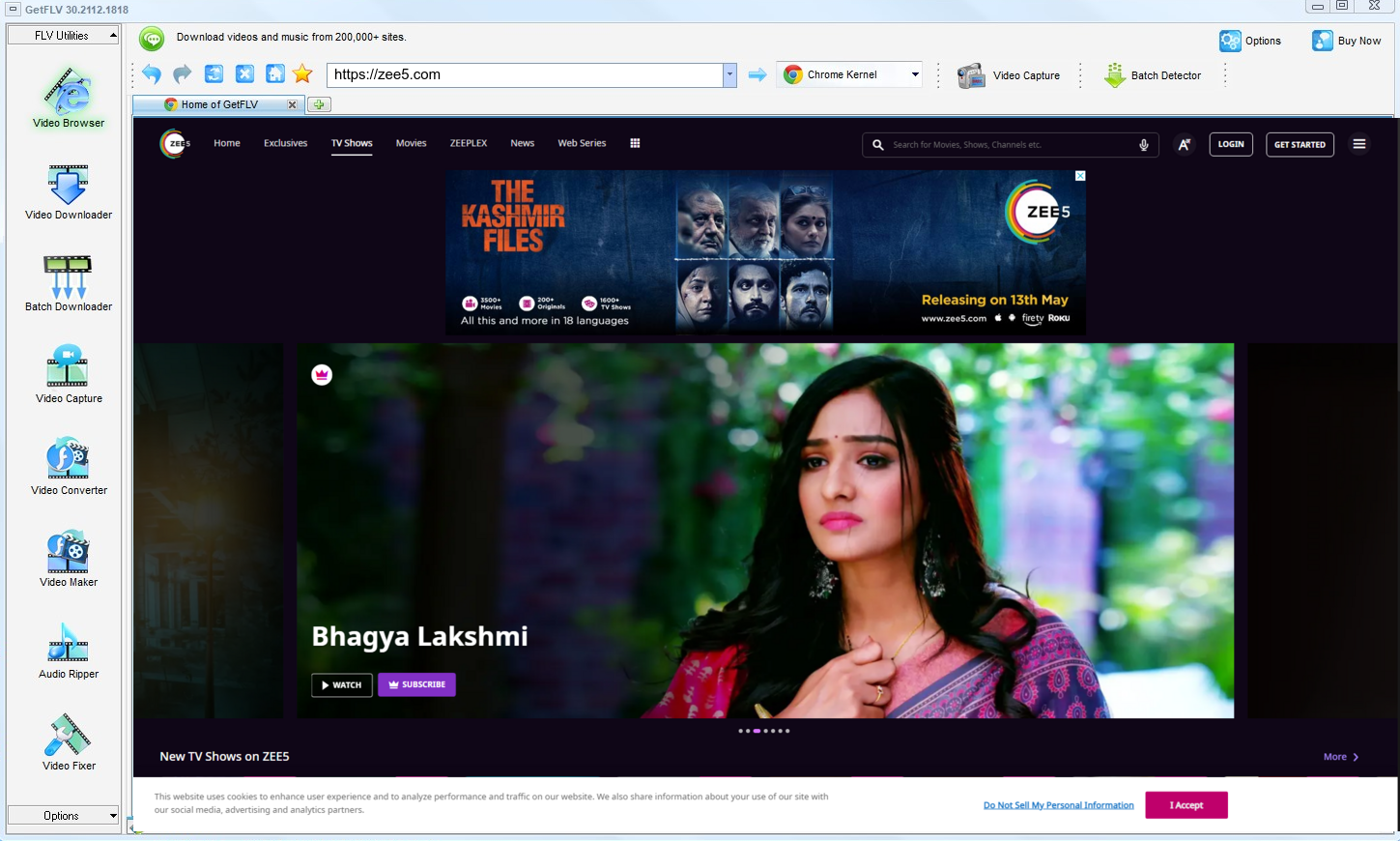
2. Launch the app, browse to the ZEE5 website, play the stream, and capture its address
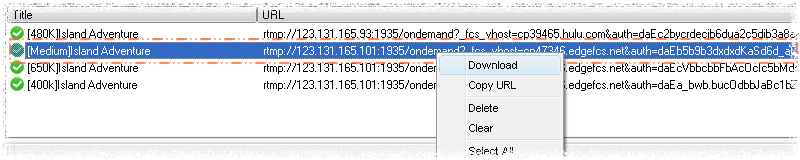
3. Start downloading ZEE5 videos
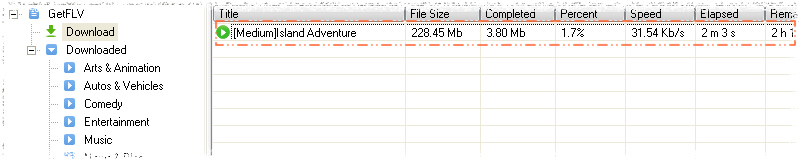
If your access to a title ends, so should your copy of it.
Method 2: A browser add-on for ZEE5 ★☆☆☆☆
Add an extension to Chrome or Firefox and let it grab the videos while the page is open.
How to do it
- Open the Chrome Web Store or the Firefox add-ons site and search for a video downloader extension.
- Install it and accept the permissions it asks for.
- Reload zee5.com and play the title you want.
- Click the extension icon — on protected pages the list is usually empty.
Method 3: Older one-trick download programs ★☆☆☆☆
Freeware from a few years ago that still promises ZEE5 downloads — and no longer delivers them.
How to do it
- Try one of the abandoned desktop tools still circulating online.
- Enter the videos URL and press start.
- Wait for the analysis to finish.
- Failure is the usual outcome: the program predates the current ZEE5 player.
Overall Comparison of the Ways to Download ZEE5 Videos
| GetFLV ZEE5 Downloader | A browser add-on for ZEE5 | Older one-trick download programs | |
|---|---|---|---|
| Protected content | Works where you have access | Mostly fails | Very limited |
| Speed (2 hour title) | Roughly 15 min | Fails before finishing | Fails before finishing |
| After a site update | Fixed with each release | Breaks until patched | Unreliable |
| Output format | Clean MP4 | Varies by site | Mixed formats |
| Privacy | Everything stays on your machine | URL sent to a remote server | URL sent to a remote server |
| Playback on TV or car stereo | Universal compatibility | Format roulette | Rarely usable |
The takeaway: The online column is genuinely convenient on the rare title it handles. The problem is that you cannot know in advance which those are.
Worth Remembering: Safety and Copyright Guidelines for ZEE5
The short checklist:
- Whatever you save has to stay inside what your subscription already entitled you to watch.
- Caching a login locally once is reasonable; transmitting it anywhere is not.
- MP4 plays everywhere and MKV carries more audio and subtitle options. Both beat a re-encoded file that has already lost detail.
- Save for personal offline viewing only — treat every file as a private backup.
- If the platform or the creator does not permit keeping a local copy, do not do it.
Is It Legal to Download ZEE5 Videos?
Keep it simple and you will almost always be fine:
- Use the file for personal offline viewing only.
- Respect regional age and content rules that apply to ZEE5.
- Do not use saved files commercially, in any form.
- If the creator withdraws the title, treat your copy as expired too.
If any of the above does not apply to your situation, stop here and use the official app instead.
What Reddit Says After Years of ZEE5 Download Questions (2026)
Users comparing notes on zee5.com generally agree on two things. Quick web services are fine for a throwaway clip, and anything worth keeping demands proper software installed locally, updated often, and consistent enough to reuse every time.
The Problem With Browser-Based Services: Users mention bandwidth and privacy alongside reliability: handing a link to an unknown third party, waiting in a queue, and receiving an unreliable result is a poor trade when compared with running the whole process locally.
Why Screen Capture Disappoints: Discussions often make the contrast explicit: recording duplicates whatever the display receives, including nothing; a downloader works with the authorised stream. That difference explains every black video reported in 2026.
The Local Workflow Consensus: Members who archive at scale are very clear about requirements: original quality, no re-encoding, regular updates. Those criteria filter out every approach except desktop software, which is why the recommendation is repeated verbatim.
Our Answer to Every Objection Above: Because playback changes constantly, maintenance matters more than features. GetFLV ZEE5 Downloader is updated whenever ZEE5 adjusts its player or embedding model, and combines that with multi-threaded speed and wide site coverage so even long titles stay practical.
FAQs About ZEE5 Videos
QIs downloading ZEE5 videos for offline viewing allowed?
AThe short answer: a private backup of something you can already watch is one thing; distribution is another. Stay on the private side and you are on solid ground.
QWhat quality can I expect — HD, 1080p or 4K?
AQuality follows your entitlement, not the tool. Free tiers often cap at 720p; paid plans usually unlock 1080p and sometimes 4K, and that is exactly what ends up on disk.
QWhat happens when ZEE5 updates its website?
APlayer redesigns break browser extensions and online pages first. Because this runs locally and reads the stream directly, changes are absorbed by a software update instead of leaving you with an error.
QIs it really faster than just recording the screen?
AMeasured on our test machine, a two hour ZEE5 title took just under fifteen minutes to capture, versus two hours plus editing for the recording route.
QIs the output MP4 or something else?
AStandard MP4 with the original video and audio tracks, so file size follows the bitrate: roughly 1 to 3 GB per hour at 1080p, less if you pick a lower profile.
QHow often is this workflow re-tested?
AIf you hit a failure, check the update log first. Most reader reports turn out to be a player change that was already addressed in a newer build.
Update Log
Changelog — newest first:
- August 2026 — Re-tested all three methods against the current zee5.com player.
- July 2026 — Re-measured capture speed after a network upgrade in our test lab.
- May 2026 — Removed a method that no longer returns a playable file.
- February 2026 — Clarified the resolution limits for free versus paid ZEE5 accounts.
User Reviews: Does GetFLV ZEE5 Downloader Actually Work?
Selected reviews from 2026, covering download speed, output quality and how the software holds up after site updates.
What surprised me was how little fuss there was. The online tools needed five attempts; this needed one.
Being able to record when a stream refuses to be grabbed directly has saved me more than once.
ZEE5 has redesigned twice since I installed this. Both times an update arrived and the workflow stayed the same.
There was one title that stopped working after an update. The next release fixed it.
No account needed to try it, and nothing is uploaded. That sold me before the download even finished.
Conclusion
Ranked by whether you end up with a file you can actually play:
Recording in real time is acceptable once. Doing it for an entire course, season or archive is not — and that is before you account for black frames and audio drift. GetFLV ZEE5 Downloader removes the waiting entirely. It handles upwards of 800 websites, splits each transfer across multiple threads to keep throughput high while writing out untouched 1080p or 4K files. Our developers follow changes at zee5.com closely and update accordingly, so today's steps still work tomorrow. Test it free before you commit to anything.
-
1 GetFLV ZEE5 Downloader Our pick
Original quality, no watermarks, no "please wait" queues, and a 94% hit rate on titles we were entitled to keep.
-
2 A browser add-on for ZEE5
Some days it handles everything short; other days it fails on titles it managed yesterday. That unpredictability is the real problem.
-
3 Older one-trick download programs
Some days it handles everything short; other days it fails on titles it managed yesterday. That unpredictability is the real problem.
Download the installer, run through the four steps in Method 1, and judge the result on your own screen.
Remember: respect creator rights, keep saved files private, and delete them when they are no longer needed.
About the Author & How We Tested

Mandatory disclaimer: Keep your copies private, lawful and temporary. Delete them when your access ends.