

- Download videos from Altbalaji in up to 1080p and in AAC 2.0 audio track
- Download videos from Altbalaji Search Result, Timeline, and Explore with ease
- Built-in browser: log in once and every entitled title is detected
How to Download Altbalaji Videos in 2026 (Step by Step Guide)
Summary: If you want Altbalaji videos on your laptop, tablet or phone without streaming them again, you have three options. We tried all three on altbalaji.com and documented the results, including the quality you actually get and how long a two hour title takes.
The internet is full of "altbalaji video downloader" pages that simply re-run the same failing trick. We went through them, kept the three that are genuinely different, and ranked them by whether you end up with a file you can actually play.
Quick Navigation
Want the short path? Start with the comparison, then read the method you picked.
- See all three ways to download altbalaji videos → read the methods.
- Compare them before you choose — table and analysis → go to the table.
- The FAQ section, including the legal baseline → read the FAQ.
⚠ Private backup only — no redistribution.
Introduction: Why Downloading Altbalaji Videos Is Hard
Bandwidth is not the only reason. Plenty of viewers want to archive a series before it is edited, dubbed or removed, and a local copy is the only way to be sure the version you saw stays available to you.
Altbalaji 101: Understanding the Platform First
AltBalaji provides unique, original Indian web series and dramatic content. Their streaming security is focused on platform-only delivery, but we provide the capability to extract these files, allowing you to enjoy your favorite thrillers and dramas offline.
In one paragraph: Altbalaji is built around an account hierarchy rather than a single open catalogue: some material is available to anyone, more of it requires registration, and the premium tiers add higher bitrates, earlier access and occasionally an offline viewing mode limited to the official app.
Rights management: Where premium titles are involved, the media itself is encrypted and protected by DRM. Depending on the platform the scheme is Widevine, PlayReady or FairPlay, negotiated through EME inside the browser; keys are exchanged in the background and never written into the page source.
The licensing picture: Resolution ceilings are another quiet restriction: browser playback is frequently capped below the native master, so the best available stream in a desktop session may still be lower than what the rights holder actually holds.
The Technical Reasons Downloading from Altbalaji Is Not Straightforward
This is also why the same online downloader can work on one site and fail on another. It is not about popularity — it is about whether the media is served as a plain file or as a protected segment stream.
The rest of this guide is built around that constraint, because every recommendation follows from it.
Explore advanced methods to download original web series, thrilling dramas, and exclusive entertainment videos from the AltBalaji platform. Ensure your mobile or desktop device has a steady stock of offline entertainment.
Official Download Function Lacking
The official apps treat offline access as a temporary cache, not as a file you own. Clear the app data or let the licence lapse and the cache goes with it.
3 Methods to Download Altbalaji Videos
Same test setup for all three — the only variable is the method itself:
| Method | How & what is it? | Rating |
|---|---|---|
| GetFLV Altbalaji Downloader | A desktop application listens to the playback session you have already authorised and saves the media directly. | ★★★★★ |
| Paste-a-link downloader sites | A remote page attempts to fetch the videos for you, without ever playing it. | ★☆☆☆☆ |
| Manual network capture in DevTools | No software and no cost, but a very long list of things that can go wrong. | ★★☆☆☆ |
How we tested
- Desktop: Windows 11 and macOS, both with the current GetFLV Altbalaji Downloader build
- Playback: standard browser playback, no modified clients
- Browser: current Chrome and Safari, default settings, no extensions
- Measurement: file size, resolution and wall-clock time recorded per run
Method 1: GetFLV Altbalaji Downloader ★★★★★
A desktop application listens to the playback session you have already authorised and saves the media directly.
- Up to 10x faster downloading, with multi-threaded transfers that finish long before playback ends.
- Keeps the best available quality — HD, 1080p or 4K, exactly as delivered by altbalaji.
- Ready for any device — save as MP4, or convert for iPad, iPhone, iPod, PSP and Android.
- Free trial — verify your own altbalaji titles before paying anything.
- Clean installer — no bundled adware, signed and verified.
- Video Capture Plugin — record what is on your own screen, with audio, for titles altbalaji will never hand over as a file.
- Batch Downloader Plugin — queue many titles in one pass; available on 600+ selected sites only, not on every website.
Last release: 32.2609.15 on September 18, 2026. Older builds are replaced automatically.
- 100% Virus-Free & No Adware
- No Registration or Credit Card Required
- Refund Guarantee Within 30 Days
- Free Trial Available
1. Quick setup: Free download altbalaji Downloader
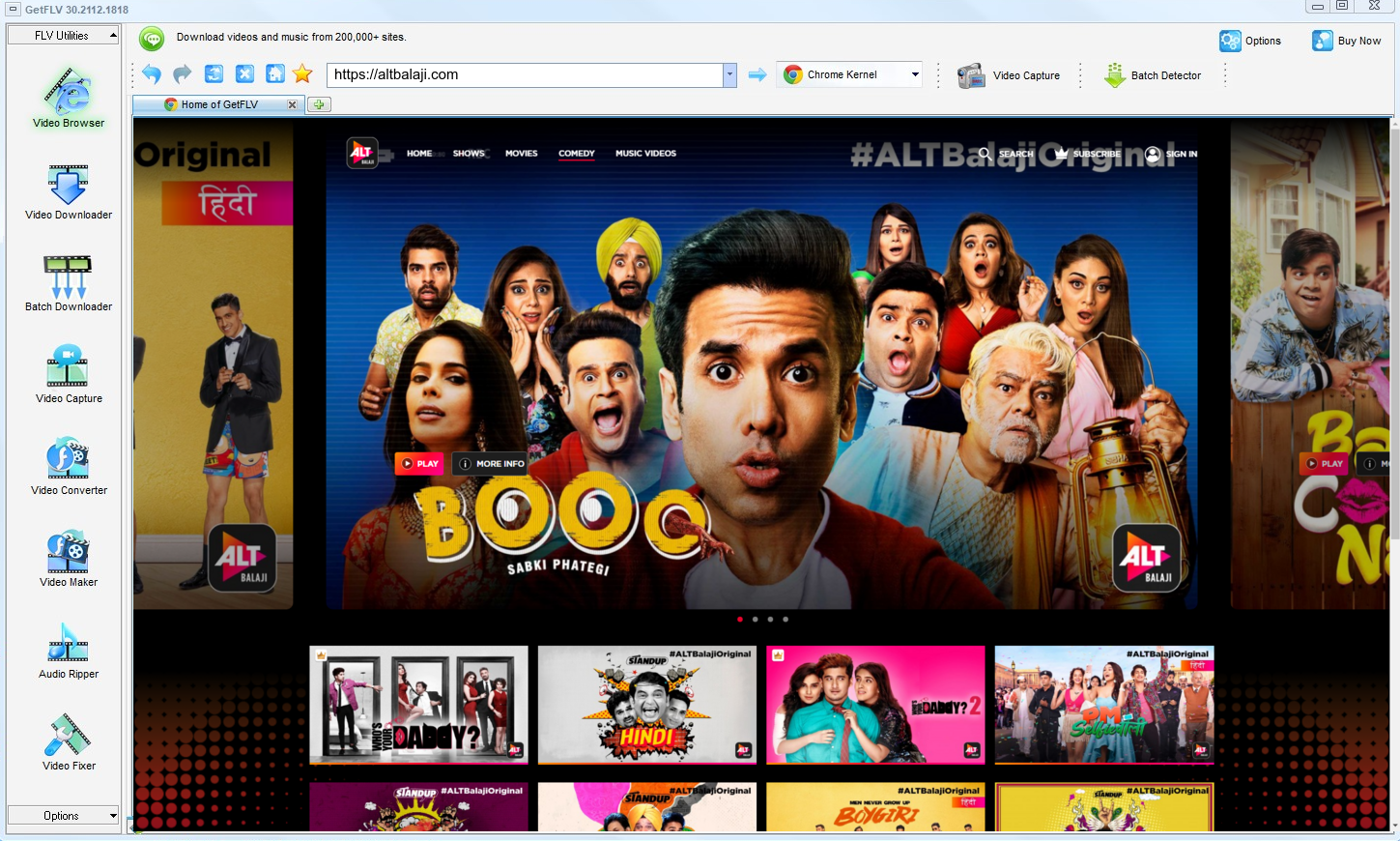
2. Start GetFLV, go to the altbalaji website, play the video clip, and grab the link
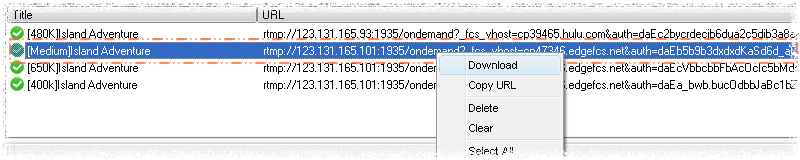
3. Download altbalaji videos with one click
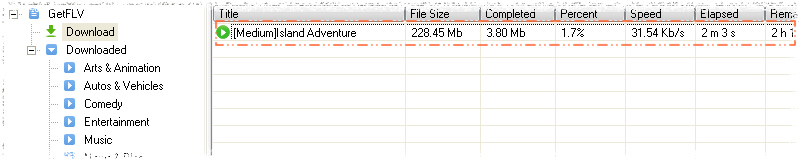
Treat the output like a backup, not like a master copy you are free to publish.
Method 2: Paste-a-link downloader sites ★☆☆☆☆
A remote page attempts to fetch the videos for you, without ever playing it.
Follow these steps
- Copy the altbalaji URL from your browser address bar.
- Open a free online downloader site and paste it in.
- Let the service attempt to fetch the media.
- Verify the output — on protected catalogues this step almost always produces nothing usable.
Method 3: Manual network capture in DevTools ★★☆☆☆
No software and no cost, but a very long list of things that can go wrong.
Follow these steps
- Press F12 before the altbalaji player loads.
- Filter the network panel by media type and start the videos.
- Identify the manifest and any key requests.
- Manual reassembly only works when the content is unencrypted.
Overall Comparison of the Ways to Download Altbalaji Videos
| GetFLV Altbalaji Downloader | Paste-a-link downloader sites | Manual network capture in DevTools | |
|---|---|---|---|
| Success rate | Around 90% | Roughly 4/10 | About 40% |
| Protected content | Supported for entitled titles | Limited | Very limited |
| Resolution | HD, 1080p or 4K as delivered | Capped around 720p | Usually 720p at best |
| After a site update | Updated promptly | Breaks until patched | Breaks until patched |
| Output format | MP4 with device profiles | Unpredictable | Mixed formats |
| Login-only / paid titles | Yes, after you sign in | Not supported | No |
| Ads and pop-ups | Clean installer, no adware | Intrusive | Aggressive advertising |
| Learning curve | Guided, no configuration | Paste a link and wait | No setup |
Data interpretation: These numbers come from repeated runs on altbalaji.com; your connection will shift the speed row, but not the ranking.
Worth Remembering: Safety and Copyright Guidelines for Altbalaji
Keep in mind:
- Personal offline viewing is the line. Anything past that goes beyond what this page supports.
- If a tool wants your password, it does not need your password — it wants your account.
- Altbalaji serves several bitrate levels, so grab the top one for true source quality — a recorder can only ever give you what your screen shows.
- Use these methods only for videos you are legitimately allowed to access.
- Never share, resell, re-upload or redistribute anything you save.
Is It Legal to Download Altbalaji Videos?
The distinction that matters is between a private backup and distribution. Stay on the first side:
- Never share, repost or sell anything you save.
- Delete the copy when your access to the title ends.
- Keep the copies on devices only you control.
- If the creator withdraws the title, treat your copy as expired too.
We will not repeat this later, so note it now: legitimate access only.
What the Community Actually Recommends for Saving Altbalaji Videos (2026)
What stands out in these discussions is how little disagreement there is about outcomes. Whatever users try first, the method they end up recommending for altbalaji is always the one that completes reliably: a desktop downloader rather than a shortcut.
The Problem With Browser-Based Services: Members often point out the maintenance asymmetry: altbalaji has engineers updating its player continuously, while a free downloader page usually has nobody. The result is predictable, and users have stopped being surprised by it.
Why Screen Capture Disappoints: Members advising newcomers usually rank recording last for dependability. It always starts, it often fails, and unlike a downloader it cannot tell you in advance which titles will succeed.
The Agreement Among Veterans: Threads comparing outcomes usually end with a simple instruction: stop improvising and install the desktop tool. Users report finishing every title at source quality, which no browser tab or recorder setting has reproduced.
Where GetFLV Altbalaji Downloader Fits In: GetFLV Altbalaji Downloader answers each objection raised in the community in turn: nothing remote to break, no reliance on screen pixels, multi-threaded transfers for speed, uncompromised 1080p or 4K output, and updates issued whenever altbalaji revises how its media is embedded.
FAQs About Altbalaji Videos
QWhat quality can I expect — HD, 1080p or 4K?
AGetFLV Altbalaji Downloader captures the original stream instead of re-encoding it, so the resolution matches the source — HD, Full HD or 4K where available.
QCan I use it on iPhone, iPad or Android?
ACapture happens on desktop (Windows or Mac), and the MP4 files can then be moved to any mobile device. An Android build is also available from the download page.
QDo I need a altbalaji account or subscription?
AOnly for content that is not public. Free titles are detected right away; anything behind a paywall or login simply requires you to sign in inside the built-in browser, exactly as you would in Chrome or Safari.
QHow fast is it compared with screen recording?
AThe gap grows with length. A short clip is a matter of seconds either way; a full season is the difference between an afternoon and a coffee break.
QThe picture is black but the sound plays — why?
AIf the audio continues and only the picture is missing, you are seeing protection at work. Treat it as a signal to change method, not to tweak settings.
QWhat if altbalaji changes its player and the method stops working?
AIf you hit a failure, check the update log first. Most reader reports turn out to be a player change that was already addressed in a newer build.
Update Log
Maintenance log:
- August 2026 — Updated the comparison table with the latest quality and speed measurements.
- July 2026 — Confirmed downloading still works after the altbalaji layout change.
- May 2026 — Clarified the resolution limits for free versus paid altbalaji accounts.
- February 2026 — Reviewed the legal baseline section for accuracy.
What Users Are Saying About This Altbalaji Downloader
Reviews below are grouped by the reason each person installed the program in the first place.
I wasted an evening on free web tools before finding this. The difference is night and day: one clean file, full length, no re-encoding.
The batch plugin is excellent on the sites it supports — I lined up a whole season and walked away.
There was one title that stopped working after an update. The next release fixed it.
Reliability over time is why I recommend it. Anything can work once; this keeps working.
Private by design — it captures what my machine is already entitled to play, nothing more.
Conclusion
Where each method ends up after testing:
Readers often ask which single tool we would keep if only one could stay installed. After everything above, the answer is GetFLV Altbalaji Downloader. It covers more than 600 websites including altbalaji.com, uses multiple threads per file to keep speeds high, and never degrades the source 1080p or 4K stream in the process. A dedicated development team keeps it aligned with the constant changes at altbalaji, which is what protects your workflow long term. The trial version is free and needs no payment details to begin.
-
1 GetFLV Altbalaji Downloader Our pick
Highest reliability of the three at 93%, and the only method that preserves the original bitrate instead of recapturing it.
-
2 Paste-a-link downloader sites
Acceptable for a single altbalaji clip in a pinch, too fragile for regular use, and it hands your link to a server you do not control.
-
3 Manual network capture in DevTools
Free and instant to test, which earns it a place on this list — but we would not build a workflow around it.
Once the first file lands on your disk at full resolution, the rest of the comparison stops being theoretical.
Keep it lawful, keep it private, and tidy up afterwards.
About the Author & How We Tested

Mandatory disclaimer: The guidance above assumes you already have the right to watch the videos; it does not create that right.